Best Mesh WiFi Australia 2026: Whole-Home Coverage for Your New House
By Anish Puri·6 April 2026·Last updated 6 September 2026·14 min read
The best mesh WiFi systems in Australia 2026: the TP-Link Deco M4 3 pack for entry NBN, the TP-Link Deco X55 for most households, the Google Nest WiFi Pro for WiFi 6E, and the NETGEAR Orbi 770 RBE773 WiFi 7 for NBN 1000+ Hyperfast. Ten researched picks across the NBN tier ladder.
Prices checked 5 October 2026 on Amazon AU and subject to change.
You've just moved into your first home and the WiFi doesn't reach the bedroom. Sound familiar? A mesh WiFi system can improve coverage across your home, depending on node placement, construction and the connection between nodes. Here's how to pick the right one without overspending.
We've researched the Australian mesh WiFi market for 2026, compared stated coverage and specifications, and put together 10 picks across three groups: WiFi 6 mesh for NBN, WiFi 7 for high speed NBN, and multi storey or thick wall homes. Whether you're in a two bedroom apartment or a multi storey house, there's a pick here for you.
Top pick
TP-Link
TP-Link Deco X55 (3-Pack)
4.4(280)
WiFi 6 whole home coverage from three units, for fast, reliable internet with fewer dead zones.
$373.35$499.00
Save 25%
Amazon.com.au price as of 11:01 pm AEDT, subject to change
As an Amazon Associate, NestPath earns from qualifying purchases.
Why Mesh WiFi Beats a Standard Router
A standard router has one broadcast point. Your internet signal travels from that single box, through walls, around corners and across your house. Every wall it passes through weakens the signal, and brick, concrete and double brick walls, common in Australian homes, weaken it more than plasterboard.
The result: your router is in the living room, you get 200Mbps there, but by the time the signal reaches the back bedroom it's down to 15Mbps. Video calls drop. Netflix buffers. Your smart home devices disconnect.
A mesh WiFi system solves this by using multiple nodes (small units) placed around your home. Each node talks to the others, creating a single network designed to reach more of the home. Your phone, laptop and smart devices connect to a node and can move between nodes as you move around.
Mesh is particularly valuable for:
Multi storey homes: Signal struggles to travel between floors through concrete slabs. A node on each level often helps.
Brick and concrete construction: Many Australian homes are brick veneer or double brick. These materials absorb WiFi signal far more than timber framed walls.
Larger homes: In bigger floor plans a single router often struggles to cover every room.
Smart home setups: If you have smart lights, cameras, speakers, and a streaming device, mesh handles dozens of simultaneous connections better than a single router. A 4K stream is the hungriest of those, so it is worth reading our streaming device guide alongside this one.
Our Top Picks for 2026
After comparing the major mesh systems available in Australia, these three stand out for coverage, reliability, and value. Each fills a different budget and use case.
Top pick
TP-Link
TP-Link Deco X55 (3-Pack)
4.4(280)
WiFi 6 whole home coverage from three units, for fast, reliable internet with fewer dead zones.
$373.35$499.00
Save 25%
Amazon.com.au price as of 11:01 pm AEDT, subject to change
As an Amazon Associate, NestPath earns from qualifying purchases.
Budget pick
TP-Link
TP-Link Deco M4 (3-Pack)
4.5(2,298)
Whole home mesh WiFi at the entry end of this guide, and a simple way to deal with dead zones. WiFi 5 is fast enough for streaming and working from home.
$175.00$217.46
Save 20%
Amazon.com.au price as of 05:01 pm AEDT, subject to change
As an Amazon Associate, NestPath earns from qualifying purchases.
Best Mesh WiFi for Australian NBN (Telstra / Optus / Aussie Broadband)
Most "best mesh WiFi Australia" guides recommend a router and stop there. The Australian details (bridge mode on ISP modems, NBN tech types that change how the mesh performs once it's plugged in, Australia's 6 GHz rules, and double brick walls that eat 5 GHz signal for breakfast) get ignored. This segment names a mesh that works on FTTP, HFC, FTTC, FTTN and FTTB services, plus compatible 5G Home Internet setups, and walks the modem setup per pick. NETGEAR puts "NBN Ready" in its Amazon AU product titles.
What to expect once the mesh arrives. On FTTP, FTTC, HFC or 5G Home Internet, the WAN port plugs straight into the NBN Connection Box (or 5G modem), then configure the connection using your provider's settings. Pick a 2.5 GbE WAN if you're on NBN Home Hyperfast, and gigabit if you're on NBN 100/250. On FTTN or FTTB (VDSL2), the mesh sits behind your ISP supplied modem router, usually with that modem in bridge mode. Telstra's support pages give bridge mode steps for Smart Modem Gen 2, 3 and 4 in the modem settings (follow the instructions for your modem generation). Australia's LIPD class licence allows WiFi 6E and WiFi 7 in 5925 to 6585 MHz, at up to 250 mW indoors or at up to 25 mW without an indoor restriction, which matters for the WiFi 7 segment below.
Best Overall Mesh WiFi for AU NBN: TP-Link Deco X55 (3-Pack)
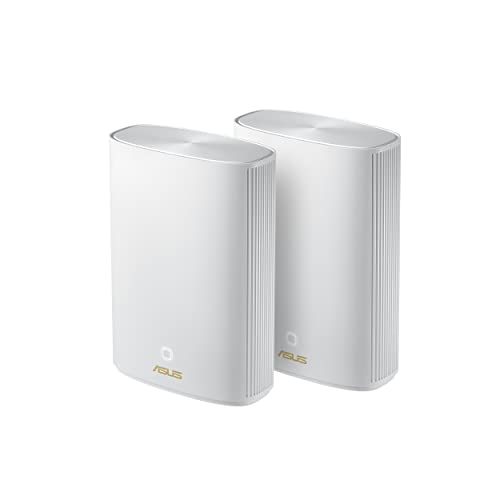
The TP-Link Deco X55 3 pack is the mesh you buy when you want a single box solution that works on every common AU NBN tech type. WiFi 6 (802.11ax), AX3000 dual band, 3 nodes, 1 GbE WAN and a free HomeShield baseline.
NBN compatibility: FTTP, HFC, FTTC and 5G Home Internet plug straight in. FTTN and FTTB need the X55 behind your ISP modem, because the X55 is not a VDSL modem. Telstra Smart Modem: put the Smart Modem in bridge mode and let the Deco route, or keep the Smart Modem routing and run the Deco in access point mode. If you have a Telstra home phone service, check with Telstra that it keeps working before you bridge the modem. 6 GHz: not applicable, the X55 is WiFi 6.
Compromises: the 1 GbE WAN caps at about 940 Mbps, so anyone on NBN 1000+ Hyperfast should step to the WiFi 7 segment. HomeShield Pro is a paid subscription. Dual band means wireless backhaul shares 5 GHz with your devices, which cuts the speed left for them.
WiFi 6 Alternative for NBN 100/250 Homes: Mercusys Halo H60X (3 Pack)
Mercusys is TP-Link's value brand: same parent company, same chipsets, same firmware lineage. The Halo H60X 3 pack is a WiFi 6 mesh kit with gigabit Ethernet ports. WiFi 6 (802.11ax), AX1500 dual band, 3 nodes, up to 350 m² of stated coverage, and gigabit Ethernet on every unit, with port counts and WAN support differing between the router and satellites.
NBN compatibility: the same as the Deco X55: every common AU tech type works, with a VDSL modem in front on FTTN and FTTB. Telstra Smart Modem: the same bridge mode choice as the Deco. 6 GHz: not applicable, WiFi 6 only.
Compromises: a lower AX1500 rating than the Deco X55's AX3000. No HomeShield, a simpler app and a plastic build.
Also great
MERCUSYS
Mercusys Halo H60X AX1500 WiFi 6 Mesh (3-Pack)
4.4(137)
A WiFi 6 mesh kit with gigabit Ethernet on every unit. It suits NBN 100 or 250 plans in an apartment of about 150 m². AX1500 is slower per device than AX3000 in busy wireless environments, and there is no HomeShield.
$241.30$299.00
Save 19%
Amazon.com.au price as of 11:01 am AEDT, subject to change
As an Amazon Associate, NestPath earns from qualifying purchases.
Free Security in Router Mode: ASUS ZenWiFi XD5 (2-Pack)
ASUS offers lifetime free network security in AiProtection Classic, powered by Trend Micro, with no subscription gate. AiProtection Classic is available in router mode. It is unavailable when the XD5 runs in AP mode behind the Telstra Smart Modem. WiFi 6 (802.11ax), AX3000 dual band, 2 nodes, up to 325 m² coverage, 1 GbE auto WAN/LAN per node, AiMesh and free AiProtection Classic.
NBN compatibility: on FTTP, HFC and FTTC, connect the router's WAN port to the NBN connection box via Ethernet; on FTTN and FTTB you need a VDSL modem in front. Telstra Smart Modem: bridge the Smart Modem and let the XD5 route, which keeps AiProtection working. AiProtection is not available when the XD5 runs in access point mode. 6 GHz: not applicable, WiFi 6 only.
Compromises: the 1 GbE WAN bottlenecks NBN 1000+ Hyperfast. The ASUS Router app is denser than Deco. Only 2 nodes in the kit.
Also great
ASUS
ASUS ZenWiFi XD5 AX3000 WiFi 6 Mesh (2-Pack)
4.7(10)
Lifetime free network security with AiProtection Classic and no subscription gate. AiProtection Classic needs router mode and is unavailable in AP mode. The 1 GbE WAN bottlenecks NBN 1000+.
$286.36$300.50
Save 5%
Amazon.com.au price as of 05:00 am AEDT, subject to change
As an Amazon Associate, NestPath earns from qualifying purchases.
Best WiFi 7 Mesh for High Speed NBN (1000/2000 Hyperfast)
NBN Home Hyperfast launched in September 2025 for eligible FTTP and HFC services, with maximum wholesale speeds of 2000/200 Mbps on FTTP and 2000/100 Mbps on HFC. A 1 GbE WAN port limits internet throughput to roughly 940 Mbps. To use a faster plan, choose a kit with 2.5 GbE or faster ports and consider the speed of the connection between mesh nodes.
Australia's 6 GHz rules differ from the US. The LIPD Class Licence 2025 allows WiFi 6E and WiFi 7 in 5925 to 6585 MHz, at up to 250 mW indoors or at up to 25 mW without an indoor restriction. The US allows 5925 to 7125 MHz, so US reviews that quote speeds on channels above 6585 MHz don't carry over. Which channels a router actually uses in Australia depends on its firmware.
Best Overall WiFi 7 Mesh for NBN: Netgear Orbi 770 RBE773 (3-Pack)
NETGEAR has put "NBN Ready" language in the Orbi 770 Amazon AU listing. The RBE773 is a tri band WiFi 7 mesh, BE11000 class, with NETGEAR Enhanced Backhaul and a 2.5 GbE WAN. WiFi 7 (802.11be), tri band, 3 nodes, up to 6,750 sq ft (about 627 m²) of coverage per the Amazon AU title, 2.5 GbE WAN, MLO, 320 MHz channels and up to 100 devices.
NBN compatibility: FTTP and HFC on NBN Home Hyperfast suit the 2.5 GbE WAN. FTTC, 5G Home, and FTTN or FTTB with a VDSL modem in front work too. Telstra Smart Modem: bridge the Smart Modem and let the Orbi route. 6 GHz: NETGEAR describes the 6 GHz band as limited to indoor range, and the channels it uses depend on its firmware.
Compromises: NETGEAR Armor is a paid subscription after the trial. Orbi's parental controls and anomaly detection are gated where ASUS provides equivalent features free. The Amazon AU review count is thin.
A tri band WiFi 7 mesh with a 2.5 GbE WAN and NETGEAR Enhanced Backhaul, with NBN Ready in its Amazon AU title. Available 6 GHz channels in Australia depend on ACMA rules and the device firmware. NETGEAR Armor security is a paid subscription.
$709.00$1,199.00
Save 41%
Amazon.com.au price as of 11:01 pm AEDT, subject to change
As an Amazon Associate, NestPath earns from qualifying purchases.
WiFi 7 Alternative: TP-Link Deco BE65 (3 Pack)
The Deco BE65 is a 3 pack tri band WiFi 7 mesh with wireless and wired backhaul, in the same BE11000 class as the Netgear Orbi 770. WiFi 7 (802.11be), BE11000, tri band, 3 nodes, four 2.5 GbE ports per node, MLO, 320 MHz channel width, 4K QAM and a free HomeShield baseline.
NBN compatibility: FTTP and HFC on NBN Home Hyperfast suit its 2.5 GbE ports. FTTC and 5G Home work, and FTTN or FTTB need a VDSL modem in front. Telstra Smart Modem: bridge the Smart Modem and let the Deco route, or run the Deco in access point mode behind it. 6 GHz: the channels it uses depend on its firmware.
Compromises: advanced HomeShield Pro features need a paid subscription.
A tri band WiFi 7 kit in the same BE11000 class as the Orbi 770, with the most Amazon AU reviews of the WiFi 7 picks in this guide. Available 6 GHz channels in Australia depend on ACMA rules and the device firmware. Advanced HomeShield features need a paid subscription.
$799.00$1,149.00
Save 30%
Amazon.com.au price as of 05:01 pm AEDT, subject to change
As an Amazon Associate, NestPath earns from qualifying purchases.
Best WiFi 7 Mesh with 10 GbE WAN: Amazon eero Max 7 (1-Pack)
A single node mesh router with 2 × 10 GbE Ethernet ports. For the small fraction of AU buyers running a NAS, a business grade symmetric 1 Gbps plan, or workstation class wired clients pushing 5 to 10 Gbps internally, the eero Max 7 has the right ports. WiFi 7 (802.11be), tri band per the eero spec sheet (the Amazon AU title does not say tri band, but the eero AU product page does). One router, expandable with eero add on nodes, up to 230 m² of coverage per node, 10 GbE WAN, 4 Ethernet ports per node, MLO, and a smart home hub for Thread and Matter devices.
NBN compatibility: FTTP and HFC on NBN Home Hyperfast, where the 10 GbE WAN is far more than today's NBN needs. FTTC, 5G Home, and FTTN or FTTB with a VDSL modem in front work too. Telstra Smart Modem: either bridge the Smart Modem and let eero route, or keep the Smart Modem routing and put eero in bridge mode (in the eero app: Settings, Advanced networking, DHCP and NAT, Bridge). Running both as routers creates double NAT, and in bridge mode some eero features, such as advanced security, ad blocking and content filters, do not work properly. 6 GHz: the channels it uses depend on its firmware.
Compromises: an eero Plus subscription gates DDNS, web content filtering and malware blocking.
Also great
eero
Amazon eero Max 7 WiFi 7 Mesh Router (1-Pack)
3.7(24)
A single node mesh router with two 10 GbE Ethernet ports. Tri band per the eero spec sheet, although the Amazon AU title does not say so. Available 6 GHz channels in Australia depend on ACMA rules and the device firmware. An eero Plus subscription is needed for DDNS and malware blocking.
$824.99$1,099.99
Save 25%
Amazon.com.au price as of 05:00 am AEDT, subject to change
As an Amazon Associate, NestPath earns from qualifying purchases.
Best Mesh WiFi for Multi Storey and Thick Wall Australian Homes
Australian homes can be tough on WiFi. Double brick and concrete walls absorb far more signal than plasterboard or timber, and higher frequencies generally penetrate walls less effectively, though the effect depends on the material. A tri band WiFi 7 mesh that's perfect in a single storey timber frame house can struggle to hold a 6 GHz connection through a double brick wall. The picks below are the two we'd back for AU brick and multi storey homes: one tri band WiFi 7 kit and one WiFi 6 Powerline hybrid that sends data through your home's electrical wiring instead of through the walls.
Three things matter for working through brick: node count, node placement and backhaul. In a 3 storey terrace, three nodes is a sensible starting point: one near the modem and one on each of the other floors, near doorways or stairwells rather than corner rooms. In a large double brick single storey home, spread the nodes through the house so each one has a clear path to the next. Wired Ethernet backhaul is the best option if you have it, and most picks here support it. If wired isn't feasible, Powerline backhaul over your mains wiring is another option, and one pick below offers it.
Best for Large Multi Storey Homes: ASUS ZenWiFi BT8 (2-Pack)
The ASUS ZenWiFi BT8 suits buyers who want WiFi 7 6 GHz capability without committing to NETGEAR Armor or eero Plus annual fees, because its AiProtection Pro security has no subscription. WiFi 7 (802.11be), BE14000 (14 Gbps aggregate), tri band, 2 nodes, up to 550 m² of coverage per the Amazon AU title, one 2.5 GbE WAN and one 2.5 GbE LAN port per node, supporting wired backhaul, MLO, AiMesh, free AiProtection Pro for life, and 4G/5G mobile tethering as WAN failover.
NBN compatibility: FTTP and HFC on NBN Home Hyperfast suit its 2.5 GbE WAN. FTTC, 5G Home, and FTTN or FTTB with a VDSL modem in front work too. Telstra Smart Modem: bridge the Smart Modem and let the BT8 route, which keeps AiProtection working; AiProtection is not available in access point mode. 6 GHz: the channels it uses depend on its firmware.
Compromises: only 2 nodes in the kit. Its Amazon AU review base is modest.
Also great
ASUS
ASUS ZenWiFi BT8 BE14000 Tri-Band WiFi 7 Mesh (2-Pack)
3.8(77)
A tri band WiFi 7 kit with 550 m² of stated coverage and lifetime free AiProtection Pro. Available 6 GHz channels in Australia depend on ACMA rules and the device firmware. Only 2 nodes per kit.
$639.70
Amazon.com.au price as of 11:01 am AEDT, subject to change
As an Amazon Associate, NestPath earns from qualifying purchases.
Best for Thick Walls: ASUS ZenWiFi XP4 Hybrid (2-Pack)
The unique pick in this guide: a mesh that uses Powerline (home electrical wiring) as a backhaul. For AU double brick homes where 5 GHz signal struggles through the wall and there's no realistic path to run wired Ethernet, the XP4 can bypass brick walls for the backhaul link, though performance depends on electrical wiring and interference. WiFi 6 (802.11ax), AX1800 dual band, Powerline AV1300 backhaul plus optional wireless or wired Ethernet backhaul, 2 nodes, up to 510 m² coverage per the Amazon AU title, 1 GbE WAN, free AiProtection Classic, AiMesh, and 4G/5G mobile tethering as WAN failover.
NBN compatibility: FTTP, HFC and FTTC plans up to what its 1 GbE WAN can carry, FTTN or FTTB with a VDSL modem in front, and 5G Home. Telstra Smart Modem: bridge the Smart Modem and let the XP4 route; AiProtection is not available in access point mode. The second XP4 node plugs into a power point on the far side of a thick wall and carries data over the home's electrical wiring, so you may not need to drill. 6 GHz: not applicable, the XP4 is WiFi 6.
Compromises: WiFi 6 only, with no 6 GHz, no MLO and no 4K QAM. For a single storey timber frame house with thin walls this is the wrong pick; the Deco X55 or Deco BE65 are better. Powerline speed depends heavily on your wiring and can cap what a fast NBN plan delivers. Performance can drop with old electrical wiring or LED dimmers that add noise to the mains.
A Powerline and mesh hybrid that can avoid drilling through double brick interior walls. WiFi 6 only (no 6 GHz). Powerline speed depends on your electrical wiring, and performance drops on poor wiring.
$381.90
Amazon.com.au price as of 11:01 pm AEDT, subject to change
As an Amazon Associate, NestPath earns from qualifying purchases.
How Many Mesh Nodes Do You Need?
The number of nodes you need depends on your home's size and construction. Here's a practical guide:
Small apartment: start with one router; add a second node if coverage is inadequate. Google rates a single Nest Wifi Pro for 1 to 2 bedroom homes.
3 to 4 bedroom house: 3 nodes, a typical starting point, which is why many mesh systems sell in 3 packs. Google says each Nest Wifi Pro router covers up to 2 bedrooms, and TP-Link rates the Deco M4 three pack for 3 to 5 bedroom houses. Place the base near your modem, one node halfway through the house, and one at the far end.
Large or multi storey homes: more nodes, often one per floor, plus extras for far flung rooms. Makers rate their kits differently, by bedrooms or by floor area, so check the rating for the kit you are buying; most brands sell individual expansion nodes.
Tip: Start from the guidance above, and if you find a dead zone later, add a single expansion node. TP-Link Deco, Google Nest and Netgear Orbi all sell nodes that join an existing network; check that the node is compatible with your kit before you buy.
Mesh WiFi vs WiFi Extender: What's the Difference?
WiFi extenders are cheaper, so people often try them first. Here's why they're a false economy for most homes:
WiFi extenders take your existing router's signal and rebroadcast it. The problems: they often create a separate network name (for example "HomeWiFi_EXT"), your devices may not switch between the router and extender automatically, and a single band extender can lose about half the speed it receives.
Mesh WiFi creates one unified network with a single name. Your devices can move between nodes as you walk around, though how smoothly depends on the device. Nodes talk to each other over a backhaul link, and wiring nodes together with Ethernet keeps that link from competing with your devices. The experience is usually much better.
Mesh costs more upfront than an extender, but if you're experiencing dead zones in your new home, a mesh system is the proper solution. An extender is a stopgap that creates new frustrations.
If you're setting up a home office, reliable WiFi is essential, and mesh helps keep video calls stable when someone starts streaming in the living room.
Frequently Asked Questions
What is the best mesh WiFi system in Australia?
The TP-Link Deco X55 3 pack is the best mesh WiFi system for most Australian homes in 2026. It offers WiFi 6 across 3 nodes and handles 150+ devices. For high speed NBN 1000+ Hyperfast buyers, the TP-Link Deco BE65 brings tri band WiFi 7 and 2.5 GbE ports. For smart home households, the Google Nest WiFi Pro adds WiFi 6E and works as a Google smart home hub.
Is mesh WiFi worth it for a small house?
It depends on your layout and construction. If you have a small open plan apartment with plasterboard walls and get good signal everywhere from your existing router, you probably don't need mesh. But if you have dead zones (especially common in brick or concrete homes, or apartments with long hallways), even a budget mesh system like the TP-Link Deco M4 can help.
How much does mesh WiFi cost in Australia?
Budget WiFi 5 kits are the cheapest place to start, WiFi 6 kits sit in the middle, and tri band WiFi 7 kits with 6 GHz support cost several times more. For most first home buyers on NBN 100/250, a WiFi 6 kit such as the TP-Link Deco X55 offers the best balance of coverage, speed and value. The live price on each card above is the current figure.
Does mesh WiFi slow down your internet?
It can. A mesh system shares your existing internet connection across your home, and in far rooms it often improves effective speeds because you're connecting to a nearby node with a strong signal instead of a distant router with a weak one. Speed can still be limited by the wireless link between nodes, signal conditions and the hardware itself, including with WiFi 6 and WiFi 7 kits.
Can I use a mesh WiFi system with my Telstra Smart Modem?
Yes. Telstra's support pages give bridge mode steps for Smart Modem Gen 2, 3 and 4 in the modem settings (follow the instructions for your modem generation), and the mesh then does the routing. If you'd rather keep the Smart Modem routing, put the mesh in access point or bridge mode behind it instead, and check which of its features still work in that mode: ASUS AiProtection, for example, is not available in access point mode. Not every kit supports this as a mesh: Google's help pages say bridge mode on Google Nest Wifi and Google Wifi only works with a single device. If you have a Telstra home phone service, check with Telstra that it keeps working before you bridge the modem.
What is ACMA's 6 GHz restriction and how does it affect WiFi 7 in Australia?
The Radiocommunications (Low Interference Potential Devices) Class Licence 2025 allows WiFi 6E and WiFi 7 in 5925 to 6585 MHz, at up to 250 mW indoors or at up to 25 mW without an indoor restriction. The US allows 5925 to 7125 MHz, so US reviews that quote speeds on the upper channels don't carry over directly. Which 6 GHz channels an Australian router uses depends on its firmware.
Do I need a WiFi 7 mesh on my NBN plan?
It depends on your internet plan, your devices and how the mesh nodes connect. For NBN 2000 on eligible FTTP or HFC services, choose a mesh with a 2.5 GbE or faster WAN port. WiFi 7 can add MLO and wider channels on supported devices, but those benefits depend on the particular device and setup. For NBN 100 or 250, a WiFi 6 kit such as the TP-Link Deco X55 or Mercusys Halo H60X can be enough.
What's the difference between FTTP and HFC for mesh WiFi setup?
Both use a small NBN supplied box in your home (the Network Termination Device or NTD), and the setup for mesh is the same: plug the mesh router's WAN port into the NTD via Ethernet, then configure the connection using your provider's settings. Eligible FTTP and HFC services can both take NBN Home Hyperfast, up to 2000/200 Mbps on FTTP and 2000/100 Mbps on HFC, so a mesh with a 2.5 GbE WAN port suits those plans, while a 1 GbE WAN is fine for NBN 100/250. The complication isn't FTTP versus HFC; it's FTTN and FTTB (Fibre to the Node and Building, both VDSL2 based), which need a separate ISP supplied modem router because the mesh isn't a VDSL modem. On FTTN or FTTB, the ISP modem stays connected to the wall port and the mesh sits behind it.
What does WiFi 7 wireless backhaul actually mean for AU buyers?
Backhaul is how the satellite mesh nodes talk to the main router. On the dual band WiFi 6 picks (Deco X55, Mercusys H60X, ZenWiFi XD5), wireless backhaul shares the 5 GHz band with your devices, which cuts the speed left for them; the ZenWiFi XP4 can use Powerline instead. The tri band WiFi 7 picks handle it in different ways: NETGEAR calls the Orbi 770's approach Enhanced Backhaul, and the Deco BE65 supports wireless and wired backhaul. Where you can, connect the nodes with Ethernet. Traffic carried over Ethernet does not use wireless airtime.
DETAILED REVIEWS
Top pick
TP-Link
TP-Link Deco X55 (3-Pack)
4.4(280)
WiFi 6 whole home coverage from three units, for fast, reliable internet with fewer dead zones.
$373.35$499.00
Save 25%
Amazon.com.au price as of 11:01 pm AEDT, subject to change
As an Amazon Associate, NestPath earns from qualifying purchases.
Budget pick
TP-Link
TP-Link Deco M4 (3-Pack)
4.5(2,298)
Whole home mesh WiFi at the entry end of this guide, and a simple way to deal with dead zones. WiFi 5 is fast enough for streaming and working from home.
$175.00$217.46
Save 20%
Amazon.com.au price as of 05:01 pm AEDT, subject to change
As an Amazon Associate, NestPath earns from qualifying purchases.
Also great
MERCUSYS
Mercusys Halo H60X AX1500 WiFi 6 Mesh (3-Pack)
4.4(137)
A WiFi 6 mesh kit with gigabit Ethernet on every unit. It suits NBN 100 or 250 plans in an apartment of about 150 m². AX1500 is slower per device than AX3000 in busy wireless environments, and there is no HomeShield.
$241.30$299.00
Save 19%
Amazon.com.au price as of 11:01 am AEDT, subject to change
As an Amazon Associate, NestPath earns from qualifying purchases.
Also great
ASUS
ASUS ZenWiFi XD5 AX3000 WiFi 6 Mesh (2-Pack)
4.7(10)
Lifetime free network security with AiProtection Classic and no subscription gate. AiProtection Classic needs router mode and is unavailable in AP mode. The 1 GbE WAN bottlenecks NBN 1000+.
$286.36$300.50
Save 5%
Amazon.com.au price as of 05:00 am AEDT, subject to change
A tri band WiFi 7 mesh with a 2.5 GbE WAN and NETGEAR Enhanced Backhaul, with NBN Ready in its Amazon AU title. Available 6 GHz channels in Australia depend on ACMA rules and the device firmware. NETGEAR Armor security is a paid subscription.
$709.00$1,199.00
Save 41%
Amazon.com.au price as of 11:01 pm AEDT, subject to change
A tri band WiFi 7 kit in the same BE11000 class as the Orbi 770, with the most Amazon AU reviews of the WiFi 7 picks in this guide. Available 6 GHz channels in Australia depend on ACMA rules and the device firmware. Advanced HomeShield features need a paid subscription.
$799.00$1,149.00
Save 30%
Amazon.com.au price as of 05:01 pm AEDT, subject to change
As an Amazon Associate, NestPath earns from qualifying purchases.
Also great
eero
Amazon eero Max 7 WiFi 7 Mesh Router (1-Pack)
3.7(24)
A single node mesh router with two 10 GbE Ethernet ports. Tri band per the eero spec sheet, although the Amazon AU title does not say so. Available 6 GHz channels in Australia depend on ACMA rules and the device firmware. An eero Plus subscription is needed for DDNS and malware blocking.
$824.99$1,099.99
Save 25%
Amazon.com.au price as of 05:00 am AEDT, subject to change
As an Amazon Associate, NestPath earns from qualifying purchases.
Also great
ASUS
ASUS ZenWiFi BT8 BE14000 Tri-Band WiFi 7 Mesh (2-Pack)
3.8(77)
A tri band WiFi 7 kit with 550 m² of stated coverage and lifetime free AiProtection Pro. Available 6 GHz channels in Australia depend on ACMA rules and the device firmware. Only 2 nodes per kit.
$639.70
Amazon.com.au price as of 11:01 am AEDT, subject to change
A Powerline and mesh hybrid that can avoid drilling through double brick interior walls. WiFi 6 only (no 6 GHz). Powerline speed depends on your electrical wiring, and performance drops on poor wiring.
$381.90
Amazon.com.au price as of 11:01 pm AEDT, subject to change
Affiliate Disclosure: As an Amazon Associate, NestPath earns from qualifying purchases. This means if you click a product link and buy something, we may receive a small commission at no extra cost to you. We only recommend products we genuinely believe will help new homeowners. This does not influence our recommendations.
CERTAIN CONTENT THAT APPEARS ON THIS SITE COMES FROM AMAZON. THIS CONTENT IS PROVIDED ‘AS IS’ AND IS SUBJECT TO CHANGE OR REMOVAL AT ANY TIME.