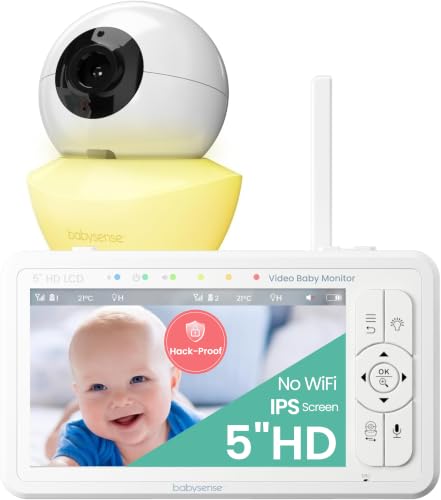
Best overall: Babysense 5in HD Video Baby Monitor
The Babysense 5in HD Video Baby Monitor is the one we put first, because its listing covers what parents compare most: a title that says No WiFi, a 5 inch 720 HD screen, remote pan and tilt, a built in sound and light machine and room for up to 4 cameras. Amazon AU shows 4.4 stars from 2,082 ratings, the highest of the five dedicated monitors in this guide, and the buy box seller is Babysense Australia.
Read the limits before you buy. The title says 4X Zoom while a bullet says double zoom. The bullets say you can connect up to 4 cameras, while the product table gives Number of Channels as 2. The title says Hack Proof and a bullet says the camera does not require Wi-Fi, which we repeat as the maker's words and have not tested. The table lists a corded electric power source and a camera battery, and the listing names no plug type or voltage, so check the adapter that arrives. A video monitor does not replace supervision.
How the six monitors compare
Every cell below uses the maker's words from the Amazon AU listing, and where the title and the product table disagree we show both. Ratings and counts are in the section on star ratings further down.
| Monitor | Connection in the listing | Screen | Battery or range in the listing | Sold by |
|---|
| Babysense 5in HD Video Baby Monitor | Title: No WiFi. Table: 2.4Ghz | 5 inch, 720 HD | 4000mAh battery in the title, 300m range in a bullet | Babysense Australia |
| VTech BM3350N Video Baby Monitor | Table: 2.4 GHZ FHSS protocol and Wi-Fi as the wireless technology | 2.8 inch full colour, 480p in the table | Up to 19 hours of active monitoring | Amazon AU |
| BOIFUN Non WiFi Video Baby Monitor, 3.2 inch | Title: Non WiFi. Table: Wi-Fi | 3.2 inch HD, 720p in the table | 260 meters in an outdoor test | BOIFUN SweetGuard AU |
| Tapo C200 Smart Home Security Camera | WiFi camera, viewed on Smartphone or Tablet | No parent unit in the box list | Night vision up to 30 ft | Amazon AU |
| HelloBaby HB50 Video Baby Monitor | Title: No WiFi. Table: Controller Type wifi | 5 inch, no resolution figure | 30 hour battery in the title, up to 1000 feet | AnCeKJ |
| bonoch 1440p 5.5in Baby Monitor, No WiFi | Title: No WiFi. Table: WiFi HaLow | 5.5 inch, 1440p | 15 hours regular, 35 hours VOX, 1600ft in the table | iVANKY, Bonoch AU |
WiFi or No WiFi: the choice that matters most
A No WiFi baby monitor pairs a camera with a handheld parent unit over a 2.4GHz radio link instead of your home internet. The HelloBaby bullets describe its link as enhanced 2.4GHz wireless technology between the baby camera and the parent unit. A WiFi security camera such as the Tapo C200 streams over your home network to a phone instead, and its product table lists Wi-Fi as the connectivity protocol and Smartphone and Tablet as compatible devices.
Four of the five dedicated monitors say No WiFi or Non WiFi in their titles: the Babysense, BOIFUN, HelloBaby and bonoch. The product tables are not consistent with that. The BOIFUN table lists Wi-Fi as its protocol, the HelloBaby table lists Controller Type wifi and the bonoch table lists WiFi HaLow. The VTech title and bullets do not say No WiFi, and its table lists 2.4 GHZ FHSS as the protocol but Wi-Fi as the wireless technology. We cannot settle that from a listing, so read each card and ask the seller if it matters to you.
Makers make their own privacy claims. The Babysense title says Hack Proof, the BOIFUN bullets say the encrypted link keeps your baby's privacy protected from potential hackers, and the bonoch bullets say it uses the WPA3 security protocol with no WiFi, Bluetooth or apps required. We repeat these as the makers' words and have not tested them. If you use a WiFi camera, set a strong, unique password.
How to choose a baby monitor
Start with the choice above: a parent unit with its own screen, or a camera you watch on a phone. The bonoch bullets say its monitor does not work with phones, and the Tapo C200 is the only card here whose title calls it a WiFi camera. Then compare the screen size and any resolution figure, the range figure and its units, the battery figure and the mode it applies to, and how many cameras the listing allows. Finally read the limits on each card, because several listings give two values for the same spec.
The other five monitors
Each card below uses the listing's own words, and each paragraph ends with who the listing suits. We have not tested any of them.
VTech BM3350N Video Baby Monitor
The VTech title gives a 2.8 inch full colour screen with night light, 2 way talk, soothing sounds and a room temperature monitor. The bullets add auto night vision, digital zoom, a temperature sensor with alerts and up to 19 hours of active monitoring on the parent unit battery, and the product table lists a 2 year manufacturer warranty and Video Capture Resolution of 480p. The listing does not say No WiFi, so we do not call it a No WiFi monitor. Amazon AU shows 4.3 stars from only 44 ratings. Suits a small nursery where a 2.8 inch parent unit is enough.
BOIFUN Non WiFi Video Baby Monitor, 3.2 inch
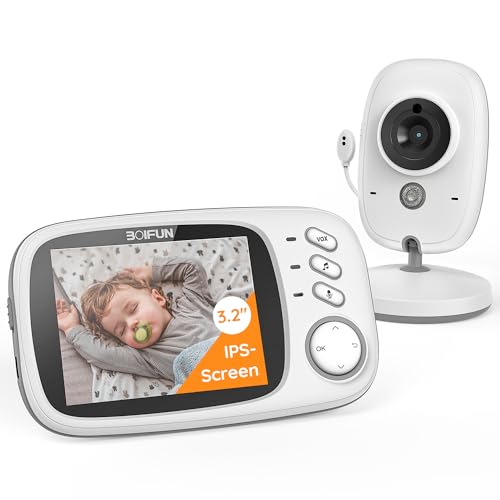
The BOIFUN is a low key parent unit with a 3.2 inch screen. The bullets cover VOX mode, where the screen sleeps to save power and wakes when sound is detected, two way talk with 8 lullabies, night vision with invisible infrared light and a 260 meter coverage figure from an outdoor test, and the title adds a feeding reminder and temperature monitoring. The title says Non WiFi, but the product table lists Wi-Fi as the protocol and Smartphone and Tablet as compatible devices, and it gives a video resolution of 720p where the bullets say HD. Amazon AU shows 4.3 stars from 6,275 ratings, with BOIFUN SweetGuard AU as the buy box seller. Suits a parent who wants VOX mode and lullabies on a 3.2 inch screen.
Tapo C200 Smart Home Security Camera
This is a home security camera, not a dedicated baby monitor. Its own listing title reads Tapo C200 Smart Home Security Wi-Fi Camera, Baby Monitor, so the maker also calls it a baby monitor. There is no parent unit: the box list is a mounting plate, mounting screw, power adapter, quick start guide and the camera, and the table lists Smartphone and Tablet as compatible devices. The bullets give 1080p video, free smart AI detection with AI tracking, night vision up to 30 ft and footage stored on a microSD card up to 512GB with no recurring monthly fees, while the table also lists Local and Cloud Storage. We make no claims about its app or security. Amazon AU shows 4.5 stars from 149,867 ratings, a count that sits on a security camera listing, so we do not set it against the monitors. Suits parents who want to watch on a phone rather than a parent unit.
HelloBaby HB50 Video Baby Monitor
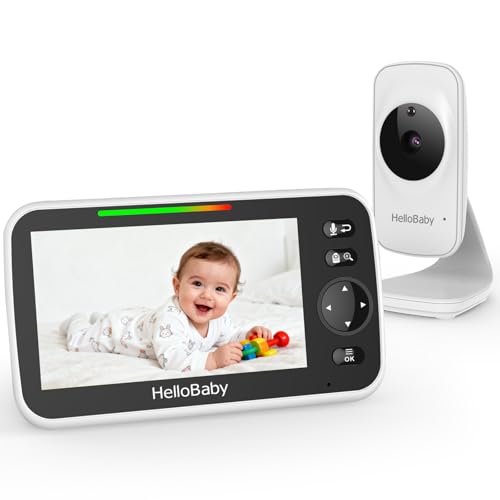
The HelloBaby title gives a 5 inch screen, a 30 hour battery figure with ECO Mode, remote pan, tilt and zoom, two way talk, 8 lullabies and temperature monitoring. The bullets add a transmission range up to 1000 feet and 2x digital zoom, expandable up to 4 cameras, while the product table gives Number of Channels as 2. The title says No WiFi, but the table lists Controller Type wifi. We found no resolution figure in its title, bullets, table, description or A+ content. Amazon AU shows 4.1 stars from 674 ratings, sold by AnCeKJ. Suits parents who want a 5 inch screen and a long battery figure.
bonoch 1440p 5.5in Baby Monitor, No WiFi
The bonoch lists a 5.5 inch screen with 1440p (2K) resolution, and its table gives Video Capture Resolution 1440p. The bullets add crying, sleep turnover and motion detection with three levels of sensitivity adjustment, a built in sound machine with white noise and lullabies, and a connection for up to 2 cameras. The battery is 7800mAh, with up to 240 hours in Deep Sleep Mode, 15 hours in regular mode and 35 hours in VOX mode. The title says No WiFi but the table lists WiFi HaLow, and the bullets say the monitor does not work with phones. We found no pan or tilt wording in its title, bullets, table, description or A+ content. Amazon AU shows 4.3 stars from 1,655 ratings, sold by iVANKY, Bonoch AU. Suits parents who want the highest resolution figure here and a parent unit rather than a phone.
Subscription and storage
The question to ask of any monitor is whether it needs a plan to work. We searched the title, bullets, product table, description and A+ content of the Babysense, VTech, BOIFUN, HelloBaby and bonoch listings and found no monthly fee wording. The HelloBaby bullets say Baby monitor no wifi, and none of the five listings carries subscription wording.
The one storage statement is on the Tapo C200 listing: its bullets say footage is stored locally on a microSD card up to 512GB with no recurring monthly fees, while its product table also lists Local and Cloud Storage. Check any WiFi camera listing for plan wording before you pay. The same question applies to security cameras that record without a subscription.
Screen, resolution and night vision
Screens here run from 2.8 inch on the VTech through 3.2 inch on the BOIFUN and 5 inch on the Babysense and HelloBaby to 5.5 inch on the bonoch. Resolution figures differ by listing. The bonoch title gives 1440p, the Tapo bullets say 1080p video, the Babysense table says 720p, the BOIFUN bullets say HD while its table says 720p and the VTech table says 480p. The HelloBaby listing gives no resolution figure. We have not compared pictures side by side.
Night vision words come from each listing. The VTech bullets say auto night vision, the BOIFUN bullets say invisible infrared light, the HelloBaby bullets say auto infrared night vision, the bonoch bullets say automatic night vision, the Babysense bullets say IR night vision with an adjustable night light, and the Tapo bullets say a visual distance of up to 30 ft. If you also want a night light for the room, see our guide to the best night light in Australia.
Range and battery
Range figures are the makers' own and they use different units. The Babysense bullets say a 300m range, the BOIFUN bullets say 260 meters in an outdoor test, the HelloBaby bullets say a transmission range up to 1000 feet and the bonoch table lists 1600ft under Long Range Connect. We have not measured any of them. Treat each as a maker figure and compare it with the rooms and distances in your own home before you buy.
Battery figures also differ and apply to different modes. The VTech title says up to 19 Hours Battery Life and its bullets say up to 19 hours of active monitoring time. The HelloBaby title says 30 Hours Battery Life. The bonoch bullets give a 7800mAh battery with up to 240 hours in Deep Sleep Mode, 15 hours in regular mode and 35 hours in VOX mode, and the Babysense title says 4000mAh Battery with a bullet about power saving mode. VOX mode means the parent unit screen sleeps and wakes when it hears sound, as the BOIFUN bullets describe it. Treat an up to figure as the most the maker claims.
Pan, tilt, zoom and multiple cameras
Remote pan, tilt and zoom lets you move the camera from the parent unit or a phone to follow a mobile baby around the room. The Babysense bullets give pan (350°), tilt (90°) and double zoom, while its title says 4X Zoom. The HelloBaby title says Remote Pan/Tilt/Zoom and its bullets add 2x Digital Zoom. The Tapo item highlights list 360° Pan/Tilt. The VTech bullets mention an adjustable camera angle and digital zoom, and the bonoch bullets mention 4X zoom with no pan or tilt wording.
For more than one room, the listings give two values. The Babysense bullets say connect up to 4 cameras with split screen when two or more cameras are used, while its table gives Number of Channels as 2. The HelloBaby bullets say expandable up to 4 cameras, while its table also gives Number of Channels as 2. The bonoch bullets say Connection up to 2 cameras. A bassinet beside the bed may put the camera closer to the bed than a cot in another room, so check how far the lead reaches. Setting up the nursery? Our guide to the best nappy bin in Australia is a good next read.
Placement and cords: a quick word
A baby monitor is a video aid and does not replace supervision. Follow the maker's placement instructions and keep cords out of reach of the cot. We make no safety or medical claims about any monitor in this guide.
How to read the star ratings
The Amazon AU listings show these ratings: Babysense 4.4 from 2,082 ratings, VTech 4.3 from 44, BOIFUN 4.3 from 6,275, Tapo C200 4.5 from 149,867, HelloBaby 4.1 from 674 and bonoch 4.3 from 1,655. A count of 44 tells you less than a count in the thousands. The Tapo count sits on a security camera listing, so we do not set it against the monitors.
Star ratings come from Amazon shoppers, we have not tested any monitor, and a rating does not tell you how a monitor performs in your home. Ratings and counts change, so read the live listing before you buy.
How we checked these baby monitors
We read two sources for every monitor: the Amazon AU listing and the maker's own wording on that listing, which means the bullet points, product information table, description and A+ content. Specs come from the maker's bullet points and the product information on each listing. Where the two disagree we say so and name both values. We do not test monitors. We cover video baby monitors and one WiFi camera; breathing sensor pads and wearable monitors are different products we do not cover, and we make no medical claims.
Last checked: 22 October 2026.
Frequently Asked Questions
What is the best baby monitor in Australia in 2026?
We put the Babysense 5in HD Video Baby Monitor first. Its listing title says No WiFi, and the bullets describe a 5 inch 720 HD screen, remote pan and tilt, a built in sound and light machine and connection for up to 4 cameras. The Amazon AU listing shows 4.4 stars from 2,082 ratings.
Which baby monitor is the best to buy?
Decide first whether you want a parent unit with its own screen or a camera you watch on a phone. For a parent unit we put the Babysense 5in HD Video Baby Monitor first. For phone viewing, the Tapo C200 is a WiFi security camera whose own title also calls it a baby monitor.
What are the top 5 baby monitors?
The five dedicated baby monitors in this guide are the Babysense 5in HD, VTech BM3350N, BOIFUN, HelloBaby HB50 and bonoch 1440p. The Babysense shows the highest rating of the five at 4.4 stars. BOIFUN, bonoch and VTech each show 4.3 and HelloBaby shows 4.1. The Tapo C200 is a security camera and sits outside that five.
What is the best long range baby monitor in Australia?
Range figures are the makers' own and use different units. The bonoch table lists 1600ft, the HelloBaby bullets say up to 1000 feet, the Babysense bullets say a 300m range and the BOIFUN bullets say 260 meters in an outdoor test. Treat all four as maker figures, and compare each listing before you buy.
What are some good baby monitors with an app?
Only the Tapo C200 is titled a WiFi camera. Its listing title calls it a security camera and a baby monitor, and its bullets cover 1080p video, free smart AI detection and microSD storage. The bonoch bullets say no WiFi, Bluetooth or apps are needed and that it does not work with phones. We have not tested any app.