Best Surge Protectors and Power Boards in Australia 2026
By Anish Puri·6 June 2026·Last updated 23 October 2026·14 min read
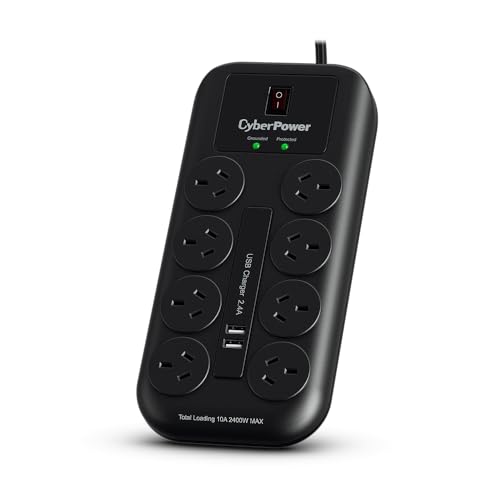
The best surge protector in Australia for most homes is the CyberPower 8 Outlet Power Board, rated 4.7 from 977 ratings on Amazon AU. Its listing gives eight surge protection outlets, two USB ports, an On/Off switch, and its maker section states 2,750 joules. We compared the other boards on stated joules, USB, spacing and warranty.
Prices checked 27 October 2026 on Amazon AU and subject to change.
The best surge protector in Australia for most homes is the CyberPower 8 Outlet Power Board, rated 4.7 from 977 ratings on Amazon AU. Its listing gives eight surge protection outlets, two USB charging ports (max 2.4A), an On/Off switch and an RCM approval line, and its maker section states 2,750 joules, the highest figure on the boards we compared. If you want a stated figure with more USB ports, the Addtam 900J Surge Protector Power Board states 900 joules and adds four USB ports including two USB C. For one television or modem, the HPM Adaptor Surge Protector is a double adaptor that makes one powerpoint into two, rather than a full board. A power strip, powerboard or power board is the same plain splitter until the listing states a surge rating.
The short joule ladder, because the number is what separates a surge protector from an extension lead. This is our rule of thumb, not a standard: under 500 joules is only worth having behind cheap, replaceable things, 500 to 900 joules is modest protection, and 1,000 joules or more is what we would want behind a television or a desktop computer. Where a listing states no figure at all, assume the protection is modest. Every joule figure on this page is the maker's own, because we did not test any board.
The one thing most people get wrong about surge protection
This guide turns on one point: a power board is not a surge protector unless its listing says so and gives a rating. A plain power board only splits one socket into several. Most power boards are not surge protectors, which is our wording, so read the title, bullets and product table for a stated surge claim before you rely on any board.
A joule rating is the surge energy a board is rated to absorb, so a higher figure means more. For valuable gear such as a TV, a computer, a games console or networking equipment, our rule of thumb is 1,000 joules or more. In this guide the CyberPower 8 Outlet Power Board states 2,750 joules in its maker section, and the Addtam 900J Surge Protector Power Board states 900 joules in its bullets. Watts are a different thing: watts are the load a board can supply, while joules are the surge energy it is rated to absorb.
We compared options on Amazon AU, from a double adaptor up to eight outlet boards, and judged them on stated protection, outlet spacing, USB charging, warranty and switching. For the lead that plugs into those USB ports, see our best USB C cable guide for phones and laptops.
How we checked these surge protectors
We do not run surges through power boards. We checked each listing on the figures that decide the buy: the stated joule rating, outlet count and spacing, USB output, the warranty line and any RCM approval line, and we say plainly where a listing states no joule figure at all. Our two sources are the Amazon AU listing (title, bullets and product information table) and the makers' own wording on that listing, including the maker section some listings carry. Specs come from the maker's bullet points and the product information on each listing. We did not check any register, and several product tables carry two differing Plug Type rows, so confirm the plug in the listing photos before you order.
Last checked: 23 October 2026.
Best overall: CyberPower 8 Outlet Power Board
Top pick
CyberPower
CyberPower 8 Outlet Power Board
4.7(977)
Eight surge protection outlets, two USB charging ports (max 2.4A), an On/Off switch and a 2 meter cable, per the bullets. The maker section states 2,750 joules and a 2.1 m cord. The bullets say Limited Lifetime Guarantee while the product table says 1 Year, so check the terms. The bullets include an RCM approval line; we have not checked any register.
$35.00$39.00
Save 10%
Amazon.com.au price as of 05:01 am AEDT, subject to change
As an Amazon Associate, NestPath earns from qualifying purchases.
The CyberPower 8 Outlet Power Board is the best overall pick here, rated 4.7 from 977 ratings on Amazon AU. The bullets give eight surge protection outlets, two USB charging ports (max 2.4A), a 2 meter cable and an On/Off switch, and the title adds EMI and RFI filtration and an LED indicator. The maker section states 2,750 joules of surge suppression, above the 900 joules stated by the Addtam and the Belkin 8 Outlet, and gives a power cord length of 2.1 m where the bullets say 2 meter. The bullets say Limited Lifetime Guarantee, while the product table says 1 Year and the maker section title says 1 Year Advanced Replacement Warranty, so check the terms before you rely on either. The bullets include an RCM approval line; we have not checked any register.
Look for a real Joule rating, and know what the number means
If you remember one spec from this guide, make it the joule rating. It is the surge energy a board is rated to absorb, and a higher figure means more. The figures stated on the listings we hold run from 175 joules on the HPM 4 Outlet to 2,750 joules on the CyberPower, and the HPM Adaptor manufacturer section also states 175 joules. Each is the maker's own figure and we did not test any board. The CyberPower title also names EMI and RFI filtration, which is a filter feature rather than a joule figure.
As a rough guide, and this is our rule of thumb, not a standard: under about 500J suits cheap, replaceable items, and we would want 1000J or higher behind a TV, a desktop PC or a home theatre stack. The Addtam 900J Surge Protector Power Board states 900 joules in its bullets, just under that mark. Where a listing states no figure, assume the protection is modest and plan accordingly. A listing can also give two figures: the Belkin Connect title says 650 joules while its bullets say 900, so we do not rank on either.
Addtam 900J Surge Protector Power Board
Also great
Addtam
Addtam 900J Surge Protector Power Board
4.7(547)
Eight widely spaced outlets, four USB ports (two USB A, two USB C), a double switch on each side that controls the power separately and a 1.8M cord. The bullets state a 900 Joule energy rating and a SURGE PROTECTED indicator light, and the product table states a 6 months warranty. The description says not to exceed total loading of 10A and 2400W. The buy box showed Ships from Amazon and Sold by AddtamDirect AU.
$33.99$42.99
Save 21%
Amazon.com.au price as of 11:00 am AEDT, subject to change
As an Amazon Associate, NestPath earns from qualifying purchases.
The Addtam is rated 4.7 from 547 ratings on Amazon AU. Its bullets give a 900 Joule energy rating with a SURGE PROTECTED indicator light, eight widely spaced outlets, four USB ports (two USB A and two USB C) and a double switch on each side that controls the power separately. The extension cord is 1.8M per the bullets, and the product table states a 6 months warranty. Its description says not to exceed total loading of 10A and 2400W.
Wide outlet spacing so big plugpacks do not block neighbours
A frustration with cheap boards is that one chunky plugpack, such as a laptop charger or a smart home hub, can cover the socket next to it, so an eight outlet board may fit fewer devices than it has sockets. Look for boards that advertise wide spacing or a tower layout where outlets stack upward instead of sitting shoulder to shoulder. The Addtam bullets call it a Widely Spaced Power Board, and the TESSAN A+ text gives the space between each outlet as 4.5 cm.
TESSAN USB-C Tower Power Board
Also great
TESSAN
TESSAN USB-C Tower Power Board
4.6(68)
Eight AC outlets and three USB ports in a vertical tower: one USB C port at 5V/4A max and two USB A ports at 5V/3.6A max, with a 10A overload switch that cuts off power when usage exceeds 2400W and a 2M extension lead. The title and bullets do not say surge protected; the product table states 525 Joules and an 18 months warranty. The buy box showed Sold by TESSAN US Store.
$34.99
Amazon.com.au price as of 05:00 am AEDT, subject to change
As an Amazon Associate, NestPath earns from qualifying purchases.
The TESSAN USB-C Tower Power Board is rated 4.6 from 68 ratings on Amazon AU. Its title says 8AC outlets, 3USB and USB C PD 20W, and its bullets describe a vertical tower with one USB C port at 5V/4A max and two USB A ports at 5V/3.6A max, a 10A overload switch that cuts off power when usage exceeds 2400W, a 2M extension lead and a slim flat plug with a 45° angled design. The title and bullets do not say surge protected; the product table gives a Surge Protection Rating of 525 Joules and an 18 months warranty, and the A+ text says up to 525 Joules.
USB A and USB C ports on the board save a wall plug
Most boards here include USB charging, which saves an AC outlet for something other than a wall brick. Read the output on each listing: the CyberPower bullets say 2 USB charging ports (Max 2.4A), the Belkin 8 Outlet bullets say Includes 2.4A USB charging, the TESSAN title says USB C PD 20W with two USB A ports at 5V/3.6A max, the Addtam bullets say each USB A port has 2.4A Max output and the USB C charging port 3A MAX, and the Belkin Connect bullets say two Power Delivery ports provide up to 30W.
If you want USB C charging at the desk, compare the stated figures above rather than the port count. The HPM Adaptor and HPM 4 Outlet titles and bullets mention no USB ports. Away from the desk, a power bank is the other half of the same kit.
Warranty lines differ between these listings
Warranty wording differs from one listing to the next, and some listings give two figures. The CyberPower bullets say Limited Lifetime Guarantee while its product table says 1 Year. The Addtam product table states 6 months, the TESSAN product table states 18 months, the Belkin 8 Outlet and Belkin Connect product tables state a 2 year manufacturer warranty, and the HPM 4 Outlet product table states 1 year. We found no warranty line on the HPM Adaptor listing. Read the terms on the listing before you rely on any of them.
Belkin 6 Outlet Surge Power Board
Belkin
Belkin 6 Outlet Surge Power Board
4.6(126)
Could not be bought on 23 October 2026: the Amazon AU listing showed no featured offer. When listed it states six outlets with 650 Joule surge protection, two USB A ports at 2.4A combined and a 2 metre cord, with an RCM safety certified line.
As an Amazon Associate, NestPath earns from qualifying purchases.
Could not be bought on 23 October 2026: the Amazon AU listing showed no featured offer. When listed, the Belkin 6 Outlet Surge Power Board states six AC outlets with 650 Joule surge protection, two USB A ports that deliver 2.4A combined, a 2 metre cord, an RCM safety certified line and LED status indicators, per its bullets. It is rated 4.6 from 126 ratings.
Belkin 8 Outlet Surge Protector Powerboard
Also great
Belkin
Belkin 8 Outlet Surge Protector Powerboard
4.7(720)
Eight outlets with 900J surge protection in the bullets and 900 Joules in the product table, built in 2.4A USB charging (2 USB ports in the table), a 2M extension lead and a 2 year manufacturer warranty in the product table. The description names TVs, stereo systems, cable boxes and monitors. Amazon AU is the seller.
$43.75$69.95
Save 37%
Amazon.com.au price as of 11:00 am AEDT, subject to change
As an Amazon Associate, NestPath earns from qualifying purchases.
The Belkin 8 Outlet Surge Protector Powerboard is rated 4.7 from 720 ratings on Amazon AU. Its bullets give eight outlets, 900J surge protection, built in 2.4A USB charging and a 2M extension lead, and the product table states 900 Joules, 2 USB ports and a 2 year manufacturer warranty. Its description names TVs, stereo systems, cable boxes and monitors. Choosing the soundbar for that board? See our best soundbars in Australia guide.
On/Off switches and switched sections on these boards
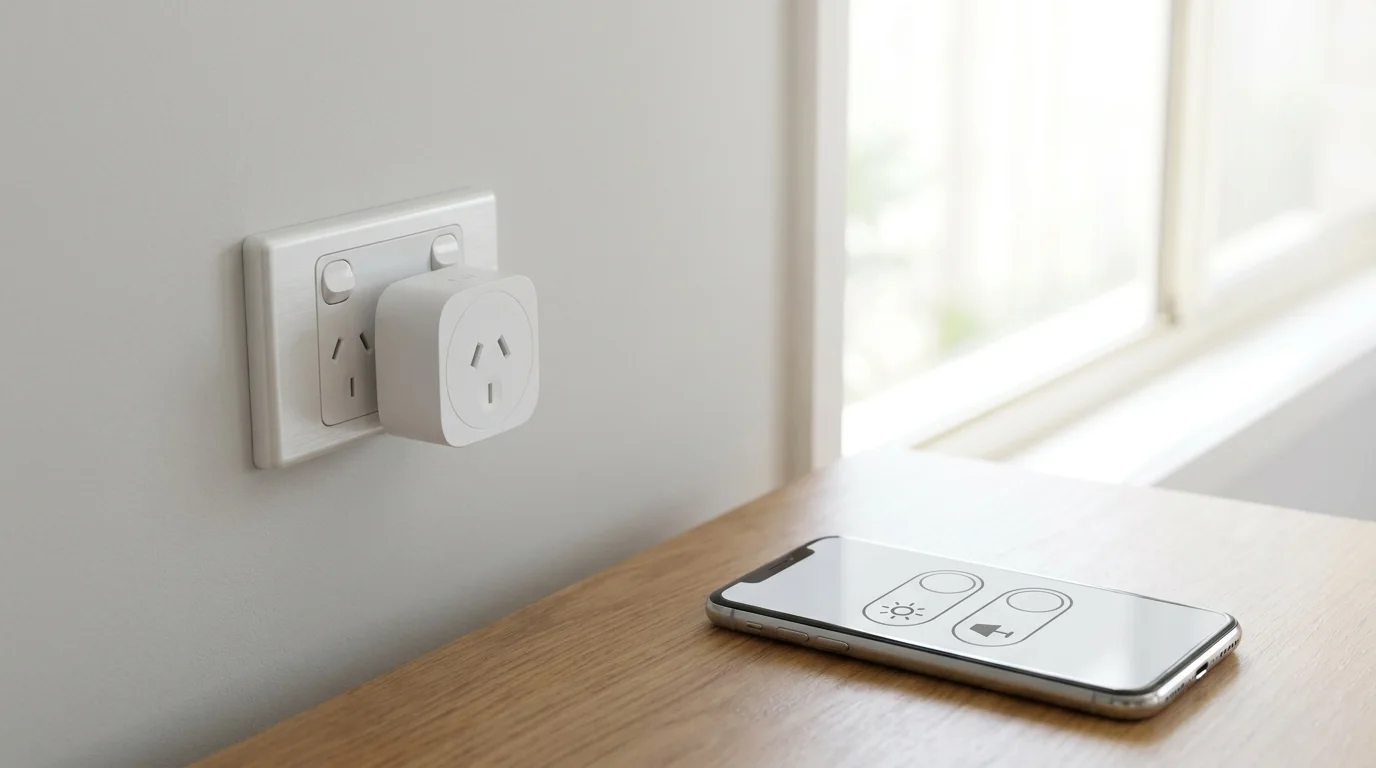
A board with an On/Off switch lets you turn the whole board off with one flick when you leave the room or head to bed, and a board with switched sections lets you keep a modem on while turning other gear off. A smart plug does the same job for one appliance and can schedule it.
The CyberPower 8 Outlet Power Board lists an On/Off switch in its title and bullets, and the Addtam 900J Surge Protector Power Board lists a double switch on each side that controls the power separately. The TESSAN bullets describe a 10A overload switch that cuts off power when usage exceeds 2400W, which is a protection switch rather than an On/Off switch.
Surge protectors wear out, so replace old ones
Surge protection is not permanent. The Belkin Connect bullets describe built in MOVs that absorb excess energy from spikes and surges, and a part that absorbs energy can be used up, so an old board can keep passing power with little protection left. No listing here states a lifespan, so we cannot give a number of years.
Replace any board that has taken a serious surge. The Addtam bullets describe a SURGE PROTECTED soft indicator light that is on to show your devices are protected, and the Belkin Connect bullets describe an active protection indicator; if a protection light goes dark, treat it as a prompt to replace the board. The CyberPower title names an LED indicator but does not say what it shows.
When a double adaptor is all you need
You do not always need a full board. If you are protecting one valuable device, such as a single TV, a modem or a console in a spot with nothing else nearby, a plug in double adaptor does the job and keeps the floor clear of cables. The HPM listing bullets say Make one powerpoint into two, so it gives you two sockets from one wall socket. A cordless phone base also plugs into the wall, so see our cordless phone base stations and handsets compared.
HPM Adaptor Surge Protector
Also great
HPM
HPM Adaptor Surge Protector
4.5(94)
Makes one powerpoint into two, with PVC coating and a right projection the listing says allows for greatest space efficiency. The manufacturer section states 175J surge protection, and its title and bullets mention no USB ports. Its product table lists Legrand Australia Pty Ltd as manufacturer, 240 Volts and 2400 watts.
$11.05
Amazon.com.au price as of 05:00 pm AEDT, subject to change
As an Amazon Associate, NestPath earns from qualifying purchases.
The HPM Adaptor Surge Protector is rated 4.5 from 94 ratings on Amazon AU. Its bullets say Make one powerpoint into two and Offers protection against surge and spikes, with PVC coating and a right projection that allows for greatest space efficiency. The manufacturer section states 175J surge protection and adds that if the red neon light is off, there is no surge protection and it needs to be replaced. Its title and bullets mention no USB ports, so treat it as simple spike protection for one spot rather than a board for your whole setup. Its product table lists Legrand Australia Pty Ltd as manufacturer, 240 Volts and 2400 watts.
Three more boards from the listings
These three boards sit outside the topic sections above, so each gets its own card here.
Belkin Connect 8 Outlet Surge Protector with Dual USB C 30W
Belkin
Belkin Connect 8 Outlet Surge Protector with Dual USB C 30W
4.7(31)
Eight AC outlets with two USB C ports at up to 30W and a durable 2m cord with built in wall mounting holes. The title says 650 Joules while the bullets say 900, so we do not rank on either. The bullets state RCM certification and an active protection indicator, and the product table states a 2 year manufacturer warranty.
$87.76$99.95
Save 12%
Amazon.com.au price as of 11:00 am AEDT, subject to change
As an Amazon Associate, NestPath earns from qualifying purchases.
The Belkin Connect is rated 4.7 from 31 ratings on Amazon AU. Its bullets give eight AC outlets, dual USB C ports with Power Delivery up to 30W, 900 joule protection with built in MOVs, RCM certification, an active protection indicator, and a durable 2m cord with built in wall mounting holes. The title says 650 Joules while the bullets say 900, so we do not rank on either figure, and the product table states a 2 year manufacturer warranty.
Belkin Four Outlet Surge Protection Strip
Belkin
Belkin Four Outlet Surge Protection Strip
4.7(120)
Could not be bought on 23 October 2026: our stock data showed it as out of stock. When listed it states four protected outlets, a 525 joule rating, three line protection and a 2M heavy duty cord.
$29.00$34.95
Save 17%
Amazon.com.au price as of 11:00 am AEDT, subject to change
Available to order at Amazon AU, ships after a lead time, last verified on 27 October
As an Amazon Associate, NestPath earns from qualifying purchases.
Could not be bought on 23 October 2026: our stock data showed it as out of stock. When listed, the Belkin Four Outlet Surge Protection Strip states four protected outlets, a 525 joule rating, three line protection between hot, neutral and ground lines, a 2M heavy duty cord and a not grounded indicator, per its bullets. It is rated 4.7 from 120 ratings.
HPM 4 Outlet Surge Protected Powerboard
HPM
HPM 4 Outlet Surge Protected Powerboard
4.7(206)
Four outlets with 175J surge protection, a safety cutout that restarts with a push after an overload, keyhole mounting slots and a fully moulded slimline plug with side entry. The product table states a 1 year warranty and lists a heater and a hair dryer among compatible devices, so keep heavy loads off it.
$11.90
Amazon.com.au price as of 11:00 am AEDT, subject to change
As an Amazon Associate, NestPath earns from qualifying purchases.
The HPM 4 Outlet is rated 4.7 from 206 ratings on Amazon AU. Its bullets give 175J surge protection, a safety cutout that restarts with a push after an overload, keyhole mounting slots and a fully moulded slimline plug with side entry. Its product table states a 1 year warranty and lists a heater and a hair dryer among compatible devices, so keep heavy loads off it.
How to choose the right one for you
Start with what you are protecting, then check five things on the listing: a stated joule figure, a protection indicator, the total load, the cord length and the warranty line. The HPM Adaptor Surge Protector is a double adaptor that makes one powerpoint into two, suited to one or two valuable devices. The CyberPower 8 Outlet Power Board suits a typical desk or media unit and states the highest joule figure here. The Addtam 900J Surge Protector Power Board states 900 joules and has the most USB ports here, four, while the TESSAN USB-C Tower Power Board suits a crowded desk with three USB ports in a tower. The Belkin Connect is the one here with two USB C ports at up to 30W.
On total load, the Addtam description says not to exceed total loading of 10A and 2400W, and the TESSAN overload switch cuts power above 2400W. Cord lengths on the listings run from 0.9m in the HPM 4 Outlet A+ comparison table and 1.8M on the Addtam to 2m or 2M on the others. The CyberPower bullets say 2 meter cable while its maker section says 2.1 m, so check which you need. Other brands make power boards too; the same joule and listing checks apply, and we write nothing about brands we hold no listing for.
If the board is protecting a television, our TV buying guide compares sizes, panel types and smart features.
Surge protector or power board: the difference
In this guide a surge protector is a power board whose listing states a surge rating, usually in joules. A power strip, powerboard or power board is the same plain splitter until the listing states one, and the words are used interchangeably. The CyberPower, Addtam, Belkin 8 Outlet, Belkin Connect, HPM 4 Outlet and HPM Adaptor listings state a rating, and the HPM Adaptor figure is in its manufacturer section. TESSAN states 525 Joules in its product table but not in its title or bullets.
RCM stands for Regulatory Compliance Mark. The CyberPower bullets include an RCM approval line and the Belkin Connect bullets say RCM certification. We have not checked any register, so look for the marking on the product you receive.
What a board cannot do
No joule figure in this guide is a promise that gear survives. The Addtam bullets list lightning strikes among what it protects against, but we did not test any board, so unplug valuable gear in a serious storm and replace any board that has taken a serious surge. A board is also the wrong place for heavy loads: check the total load before you plug in anything that heats or has a motor, and do not daisy chain one power board into another. The TESSAN, Addtam and HPM 4 Outlet product tables list items such as a heater and a hair dryer among compatible devices; we still keep heavy loads off a board, and you should follow the maker's manual.
When a plug in board is worth it
A plug in board suits a television, a desktop computer, a games console or a modem, while a lamp or a phone charger does not need surge protection. For protection across the whole home, such as a long rural line or solar and battery gear, ask a licensed electrician about a whole house device; we hold no saved listing for one and recommend none here. None of the boards in this guide is a battery backup unit.
Frequently asked questions
Which power board is the best?
The best power board here is the CyberPower 8 Outlet Power Board, rated 4.7 from 977 ratings on Amazon AU. Its listing gives eight surge protection outlets, two USB charging ports with a 2.4A maximum, an On/Off switch and an RCM approval line, and its maker section states 2,750 joules. It suits a typical desk or media unit.
What is the best power board to buy?
It depends on what you plug in. For a desk full of chargers, the Addtam has eight widely spaced outlets and four USB ports. For one television or modem, the HPM Adaptor turns one powerpoint into two. For a media unit, the Belkin 8 Outlet states 900 joules, and the CyberPower states 2,750. We tested none.
What is a good joule rating for a surge protector?
A joule rating is how much surge energy a board is rated to absorb, so higher means more. Our rule of thumb, not a standard, is 1,000 joules or more behind a television or desktop computer. Only the CyberPower states more here, at 2,750 joules in its maker section; the Addtam and Belkin 8 Outlet state 900.
How many watts is a good surge protector?
Watts and joules measure different things. Watts are the load a board can supply; joules are the surge energy it is rated to absorb. The Addtam listing says not to exceed total loading of 10A and 2400W, and the TESSAN overload switch cuts power above 2400W. Choose by joules, then check your total load.
Which brand is the best surge protector?
No brand wins outright on the listings we read. CyberPower states the highest figure here, 2,750 joules in its maker section. Belkin states 900 joules and a 2 year warranty line on its 8 Outlet board. HPM lists Legrand Australia as the manufacturer of its adaptor. Compare the stated joules and warranty on each listing, not the badge.
Are all surge protectors the same?
No. A plain power board only splits one socket into several, while a surge protector also states a surge rating, usually in joules. The figures stated here run from 175 joules on the HPM 4 Outlet to 2,750 on the CyberPower, and the HPM Adaptor manufacturer section states 175 joules.
Check that the listing gives a figure and an indicator light.
How long do surge protectors last?
No listing here states a lifespan, so we cannot give a number of years. The Belkin Connect bullets describe built in MOVs that absorb excess energy, and a part that absorbs energy can be used up. The Addtam listing describes a SURGE PROTECTED indicator light; if a board's protection light goes dark, replace the board.
What should never be plugged into a surge protector?
Check the total load before plugging in anything that heats or has a motor. The Addtam listing says not to exceed total loading of 10A and 2400W, and a heater, kettle or hair dryer can use much of that. Plug those straight into the wall, and never plug one power board into another.
Disclosure: the TESSAN, Addtam and HPM 4 Outlet product tables list items such as a heater and a hair dryer among compatible devices. We still keep heavy loads off a board, and you should follow the maker's manual.
Is it a good idea to put a surge protector on a refrigerator?
The Addtam product table lists a refrigerator among compatible devices, and its listing says total load must not exceed 10A and 2400W. A fridge has a motor, so check the manuals for the board and the fridge, and ask a licensed electrician if you are unsure. We did not test any board.
When not to use a surge protector?
Skip a power board for heavy loads such as heaters, kettles and air conditioners, and never plug one board into another. A lamp or phone charger does not need surge protection. Replace any board that has taken a serious surge. The Addtam listing sets a limit of 10A and 2400W in total.
Disclosure: the Addtam and TESSAN product tables list an air conditioner among compatible devices.
What are the downsides of using surge protectors?
Protection can be used up, so an old board can keep passing power with little protection left. A board is the wrong place for heavy loads, and we did not test any lightning claim. A low stated joule figure, such as the HPM Adaptor's 175 joules, means less energy absorbed, and every joule figure here is the maker's own.
DETAILED REVIEWS
Top pick
CyberPower
CyberPower 8 Outlet Power Board
4.7(977)
Eight surge protection outlets, two USB charging ports (max 2.4A), an On/Off switch and a 2 meter cable, per the bullets. The maker section states 2,750 joules and a 2.1 m cord. The bullets say Limited Lifetime Guarantee while the product table says 1 Year, so check the terms. The bullets include an RCM approval line; we have not checked any register.
$35.00$39.00
Save 10%
Amazon.com.au price as of 05:01 am AEDT, subject to change
As an Amazon Associate, NestPath earns from qualifying purchases.
Also great
HPM
HPM Adaptor Surge Protector
4.5(94)
Makes one powerpoint into two, with PVC coating and a right projection the listing says allows for greatest space efficiency. The manufacturer section states 175J surge protection, and its title and bullets mention no USB ports. Its product table lists Legrand Australia Pty Ltd as manufacturer, 240 Volts and 2400 watts.
$11.05
Amazon.com.au price as of 05:00 pm AEDT, subject to change
As an Amazon Associate, NestPath earns from qualifying purchases.
Also great
TESSAN
TESSAN USB-C Tower Power Board
4.6(68)
Eight AC outlets and three USB ports in a vertical tower: one USB C port at 5V/4A max and two USB A ports at 5V/3.6A max, with a 10A overload switch that cuts off power when usage exceeds 2400W and a 2M extension lead. The title and bullets do not say surge protected; the product table states 525 Joules and an 18 months warranty. The buy box showed Sold by TESSAN US Store.
$34.99
Amazon.com.au price as of 05:00 am AEDT, subject to change
As an Amazon Associate, NestPath earns from qualifying purchases.
Also great
Addtam
Addtam 900J Surge Protector Power Board
4.7(547)
Eight widely spaced outlets, four USB ports (two USB A, two USB C), a double switch on each side that controls the power separately and a 1.8M cord. The bullets state a 900 Joule energy rating and a SURGE PROTECTED indicator light, and the product table states a 6 months warranty. The description says not to exceed total loading of 10A and 2400W. The buy box showed Ships from Amazon and Sold by AddtamDirect AU.
$33.99$42.99
Save 21%
Amazon.com.au price as of 11:00 am AEDT, subject to change
As an Amazon Associate, NestPath earns from qualifying purchases.
Belkin
Belkin 6 Outlet Surge Power Board
4.6(126)
Could not be bought on 23 October 2026: the Amazon AU listing showed no featured offer. When listed it states six outlets with 650 Joule surge protection, two USB A ports at 2.4A combined and a 2 metre cord, with an RCM safety certified line.
As an Amazon Associate, NestPath earns from qualifying purchases.
Also great
Belkin
Belkin 8 Outlet Surge Protector Powerboard
4.7(720)
Eight outlets with 900J surge protection in the bullets and 900 Joules in the product table, built in 2.4A USB charging (2 USB ports in the table), a 2M extension lead and a 2 year manufacturer warranty in the product table. The description names TVs, stereo systems, cable boxes and monitors. Amazon AU is the seller.
$43.75$69.95
Save 37%
Amazon.com.au price as of 11:00 am AEDT, subject to change
As an Amazon Associate, NestPath earns from qualifying purchases.
Belkin
Belkin Connect 8 Outlet Surge Protector with Dual USB C 30W
4.7(31)
Eight AC outlets with two USB C ports at up to 30W and a durable 2m cord with built in wall mounting holes. The title says 650 Joules while the bullets say 900, so we do not rank on either. The bullets state RCM certification and an active protection indicator, and the product table states a 2 year manufacturer warranty.
$87.76$99.95
Save 12%
Amazon.com.au price as of 11:00 am AEDT, subject to change
As an Amazon Associate, NestPath earns from qualifying purchases.
Belkin
Belkin Four Outlet Surge Protection Strip
4.7(120)
Could not be bought on 23 October 2026: our stock data showed it as out of stock. When listed it states four protected outlets, a 525 joule rating, three line protection and a 2M heavy duty cord.
$29.00$34.95
Save 17%
Amazon.com.au price as of 11:00 am AEDT, subject to change
Available to order at Amazon AU, ships after a lead time, last verified on 27 October
As an Amazon Associate, NestPath earns from qualifying purchases.
HPM
HPM 4 Outlet Surge Protected Powerboard
4.7(206)
Four outlets with 175J surge protection, a safety cutout that restarts with a push after an overload, keyhole mounting slots and a fully moulded slimline plug with side entry. The product table states a 1 year warranty and lists a heater and a hair dryer among compatible devices, so keep heavy loads off it.
$11.90
Amazon.com.au price as of 11:00 am AEDT, subject to change
Affiliate Disclosure: As an Amazon Associate, NestPath earns from qualifying purchases. This means if you click a product link and buy something, we may receive a small commission at no extra cost to you. We only recommend products we genuinely believe will help new homeowners. This does not influence our recommendations.
CERTAIN CONTENT THAT APPEARS ON THIS SITE COMES FROM AMAZON. THIS CONTENT IS PROVIDED ‘AS IS’ AND IS SUBJECT TO CHANGE OR REMOVAL AT ANY TIME.