Best Document Scanner Australia 2026: Researched Picks
By Anish Puri·6 June 2026·Last updated 24 October 2026·14 min read
The best document scanner in Australia for most home offices is the Brother ADS-3100. Its Amazon Australia listing states scanning speeds of up to 40ppm for single and dual sided pages and a capacity of up to 60 pages, and Amazon AU is the seller. We read six listings for duplex, OCR, connection and seller.
Prices checked 27 October 2026 on Amazon AU and subject to change.
Why a document scanner is the heart of a paperless home office
The dream of a paperless home office is not really about owning a scanner. It is about being able to find any document in seconds, back it up so it never burns or floods away, and stop drowning in filing. A good document scanner is the on-ramp to all of that: it turns the stack on your desk into searchable, organised PDFs. Paperless never quite means zero paper, so if the same desk still has to produce the odd contract or school form, our home printer picks cover the multifunction machines that scan as well as print. The catch is that scanners look almost identical on a shelf but behave very differently in practice, and the spec that matters most for you depends entirely on what you scan. This guide is built around the decisions that actually change your day, from how the paper goes in to whether the bundled software is any good.
This guide reads six scanners on Amazon Australia: the Brother ADS-3100, DS-640 and DS-740D, the Canon CanoScan LiDE400, the ScanSnap iX1300 and the Epson ES-400 II. Four of the six cards have a dated note about where they ship from. The sections below say what each listing states, not how a scanner performed in our hands, and where a listing gives one fact two ways we show both values or leave the figure out.
Best overall: Brother ADS-3100 High Speed Desktop Scanner
The Brother ADS-3100 is the scanner we would buy for a home office going paperless. Its listing states scanning speeds of up to 40ppm for single and dual sided pages and a capacity of up to 60 pages, and it shows 4.5 stars from 218 ratings, with Amazon AU as the seller.
Its bullets add scanning directly to your computer or to USB with USB 3.0 connectivity, and 7 applications to optimise, enhance and customise documents and workflows. The product table lists a standard sheet capacity of 60, a resolution of 600 x 600, USB as the connection type, item dimensions of 29.7D x 21.6W x 19.1H centimetres and an item weight of 6.1 pounds. The title and the description both call it a desktop scanner, and the bullets say it suits small office, home office and work from home users.
Know the limits before you buy. The product table gives USB as the connection type, and the title, bullets, product table and description name no Wi-Fi, so it suits a desk beside a computer rather than scanning to a phone. The listing names no plug type or voltage. Its product table gives Windows 7 as the minimum system requirement and names no macOS version. The 7 applications are not named in the listing text, so check what comes with it before you plan your filing around one program.
The bullets also list triple layer security and say it helps safeguard sensitive documents and securely connect to devices and networks, without naming a connection type. The listing text gives no further detail on it and we have not tested it. The product table gives the warranty as 1 Year, Brother Standard Back to Base Warranty.
Top pick
Brother
Brother ADS-3100 High Speed Desktop Scanner
4.5(218)
The Brother ADS-3100 is our choice for most home offices. Its listing states scanning speeds of up to 40ppm for single and dual sided pages, a capacity of up to 60 pages, USB 3.0 connectivity and 7 applications, and the bullets say it suits small office, home office and work from home users. It shows 4.5 stars from 218 ratings, and Amazon AU is the seller. The listing names USB and no Wi-Fi, and no plug type or voltage.
$449.00$499.00
Save 10%
Amazon.com.au price as of 05:00 pm AEDT, subject to change
As an Amazon Associate, NestPath earns from qualifying purchases.
How the six scanners compare
This table copies what each Amazon Australia listing states, in the order the cards appear. A cell that says no pages per minute figure means the listing gives none.
Scanner
Type words in the listing
Connection (product table)
Speed in the listing
Capacity
Brother ADS-3100
High Speed Desktop Scanner (title)
USB
Up to 40ppm, single and dual sided
Up to 60 pages (bullets); 60 (product table)
Brother DS-640
Mobile Scanner (product table)
USB
Up to 16 ppm
1 (product table)
Canon CanoScan LiDE400
Book, Document, Photo (product table)
USB
No pages per minute figure; the description says 8 seconds of high speed scan
Product table row says 100; not used here because the bullets describe a lid for books
Brother DS-740D
Portable Document Scanner (product table)
USB
Up to 15 pages per minute
1 sheets (product table)
ScanSnap iX1300
Auto Document Feeder and Manual Feeder (title)
USB, Wi-Fi
Up to 30ppm duplex
20 (product table)
Epson ES-400 II
Desktop Document Scanner (title)
USB
Up to 35 ppm/70 ipm
50 sheet Auto Document Feeder (bullets); 50 (product table)
How we checked these scanners
We checked each scanner on its Amazon Australia listing and read the maker's own wording on that listing: the title, the bullet points, the product information table and the description. Specs come from the maker's bullet points and the product information on each listing. We did not read a separate manual or maker page for these six, so every spec on this page comes from that listing wording.
Where a listing gives one fact in two places and the values differ, we show both or leave the figure out. The DS-640 size and weight below are an example. We do not test scanners, and the ratings and rating counts on this page are the ones each listing shows.
Our choice starts from the listings that show a seller and no imports notice, then takes the highest rating. Two of the six meet that test, the Brother ADS-3100 at 4.5 stars and the Canon CanoScan LiDE400 at 4.1 stars, which leaves the ADS-3100 ahead. The other four cards each have a dated note about where they ship from.
Last checked: 24 October 2026.
The big fork: sheet fed versus flatbed scanners
This is the first choice, and almost everything else follows from it. A sheet fed scanner pulls paper through past a stationary sensor, like a tiny printer in reverse, and a feeder holds a stack so the scan runs unattended. A flatbed scanner, which this guide also calls a lid scanner, has a lid and a scanning surface: you lay one page or one book down at a time, like an old photocopier.
The six listings use different words. The Brother DS-640 and DS-740D product tables give a standard sheet capacity of 1 (the DS-740D table reads 1 sheets). The ADS-3100 states a capacity of up to 60 pages, the ScanSnap iX1300 names an Auto Document Feeder and Manual Feeder in its title, and the Epson ES-400 II names an Auto Document Feeder in its title and a 50 sheet Auto Document Feeder in its bullets. The Canon CanoScan LiDE400 is the lid scanner: its bullets say the Advanced Z Lid accepts books and other thick media for scanning.
In short, this guide sorts the six into three types. Desktop scanners with a stated page or feeder capacity are the ADS-3100, iX1300 and ES-400 II. Portable scanners with a standard sheet capacity of 1 are the DS-640 and DS-740D. The Canon is the third type. A desktop scanner is simply one built to stay on a desk; the ADS-3100 and ES-400 II both say Desktop in their titles. A lid scanner takes longer over a big stack, because you place one page or one book at a time.
Brother DS-640 Compact Mobile Document Scanner
The DS-640 is a mobile scanner built to run from your laptop. Its bullets say powering it through the included micro USB 3.0 cable to a laptop or PC enables scanning from virtually anywhere, that it scans colour and black and white documents at up to 16 ppm, and that scans go to File, Image, OCR, Email and cloud destinations when it is connected to a PC with the applicable software. The bullets add that drivers and bundled software are available by download and that an internet connection is required. The listing shows 4.3 stars from 6,255 ratings.
It takes invoices and receipts up to 72 inches long on paper up to 72 lb. bond weight, plus business cards and plastic ID cards. Its size and weight are given two ways: the bullets say it measures less than 11.8 inches in length and weighs about 1.5 pounds, the product table gives dimensions of 5.1D x 30.2W x 3.7H centimetres and an item weight of 467 Grams, and the title lists 11.9 inches. We give no single figure.
The title, bullets and product table do not mention two sided scanning, and the product table gives a standard sheet capacity of 1. If you scan double sided pages, see the DS-740D below. The bullets pitch the DS-640 at mobile professionals.
On 24 October 2026 this listing showed Amazon US as shipper and seller, with the notice "US imports may differ from local products. Additional terms apply."
Budget pick
Brother
Brother DS-640 Compact Mobile Document Scanner
4.3(6,255)
A mobile scanner powered through its micro USB 3.0 cable from a laptop or PC. It shows 4.3 stars from 6,255 ratings. The bullets state scans of up to 16 ppm and scan to File, Image, OCR, Email and cloud destinations with the applicable software. Its title, bullets and product table do not mention two sided scanning, and its size and weight are given two ways (bullets 11.8 inches and 1.5 pounds, product table 30.2 cm and 467 grams, title 11.9 inches). Its section has a dated note about the seller.
$214.79
Amazon.com.au price as of 11:01 pm AEDT, subject to change
As an Amazon Associate, NestPath earns from qualifying purchases.
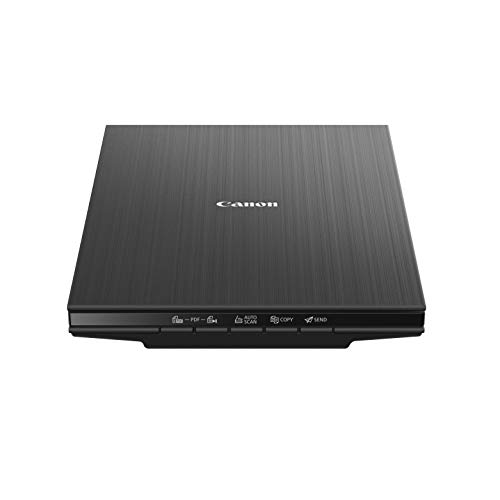
Canon CanoScan LiDE400 Document Scanner
The listing title calls the LiDE400 a Document Scanner, and its product table lists the scanner type as Book, Document, Photo. We file it as the flatbed in this guide because of its lid: the bullets say the Advanced Z Lid accepts books and other thick media for scanning. The listing itself does not use the word flatbed. It shows 4.1 stars from 891 ratings, and the seller shown is NES Printer Supplies & Services.
The bullets add that the entire unit runs off USB power and that documents can be immediately uploaded to cloud services like OneDrive or Dropbox. The description calls it a full colour image scanner made for scanning photos and documents in high resolution, with 8 seconds of high speed scan, 5 built in EZ buttons and 4800 x 4800 dpi resolution. The product table lists Windows 7, Windows 10, Windows 8.1 and macOS 10.10, 10.11, 10.12 and 10.13 as minimum system requirements, and the bullets also name Linux with ScanGear MP driver installed, so check your operating system first.
The title, bullets, product table and description name no document feeder. The product table gives a standard sheet capacity of 100, a figure we do not use because the bullets describe a lid for books and thick media.
Also great
Canon
Canon CanoScan LiDE400 Document Scanner
4.1(891)
The listing title calls this a Document Scanner and its product table lists Book, Document, Photo. It shows 4.1 stars from 891 ratings. The bullets say the Advanced Z Lid accepts books and other thick media and that the entire unit runs off USB power. The product table lists Windows 7, Windows 10, Windows 8.1 and macOS 10.10 to 10.13. The title, bullets, product table and description name no document feeder. Sold by NES Printer Supplies & Services.
$195.00
Amazon.com.au price as of 11:00 am AEDT, subject to change
As an Amazon Associate, NestPath earns from qualifying purchases.
Duplex: scan both sides in one pass
Duplex simply means the scanner captures the front and back of a page in a single pass. It sounds minor until you are facing a hundred double sided pages. A single sided scanner forces you to run the stack through, flip it, and run it again, then untangle the page order afterwards. A duplex scanner does it once, automatically, in the right order.
The listings word it differently. The ADS-3100 bullets state single and dual sided scanning speeds of up to 40ppm. The ES-400 II bullets say Single Step Technology captures both sides in one pass, and its title says Duplex. The iX1300 bullets state up to 30ppm duplex scanning, and its title says Double Sided. The DS-740D title says 2 Sided Scanning. That is four of the six listings. The DS-640 title, bullets and product table do not mention two sided scanning, and neither do the Canon title, bullets, product table or description. If you scan any volume of double sided paperwork, we would treat duplex as a feature worth choosing for.
The DS-740D was our previous pick for this guide. Its title says 2 Sided Scanning, 15PPM and Includes Micro USB Cable, and its bullets call it a lightweight 2 sided mobile scanner that takes 2 sided A4 documents, receipts and ID cards, with a U path paper feed for when space is limited. The description says it can be powered by USB3.0 connected to a laptop and has a built in, dedicated roller system. The listing shows 4.4 stars from 1,089 ratings.
The product table gives a standard sheet capacity of 1 sheets, an item weight of 1 Kilograms and a warranty of 1 Year Manufacturer, and also lists EU Spare Part Availability Duration 2 Years; none of those lines says whether Australia is covered. The table lists Business Card, ID Card, Paper, Photo and Receipt as media types.
On 24 October 2026 this listing showed Amazon Germany as shipper and seller, with the notice "Imports from Germany may differ from local products. Additional terms apply."
Also great
Brother
Brother DS-740D Portable Duplex Scanner
4.4(1,089)
This was our previous pick for this guide. It shows 4.4 stars from 1,089 ratings. Its title says 2 Sided Scanning and 15PPM, and its bullets say it takes 2 sided A4 documents, receipts and ID cards with a U path paper feed. The description says it can be powered by USB3.0 connected to a laptop. Its product table gives a standard sheet capacity of 1 sheets. Its section has a dated note about the seller.
$232.71
Amazon.com.au price as of 11:01 pm AEDT, subject to change
As an Amazon Associate, NestPath earns from qualifying purchases.
Pages per minute: speed for the big jobs
Pages per minute, or ppm, only matters once you scan in bulk. The listings give up to 16 ppm for the DS-640, up to 15 pages per minute for the DS-740D, up to 30ppm duplex for the iX1300, up to 35 ppm/70 ipm for the ES-400 II and up to 40ppm for the ADS-3100. The ADS-3100 states the highest figure of the five listings that give one, and the Canon listing gives no pages per minute figure, only 8 seconds of high speed scan in its description. The Epson lists 70 ipm beside its 35 ppm, double the first figure.
Be a little sceptical of headline figures. The DS-640 bullets say its speed is for letter size paper at 300 dpi, and the ES-400 II description says its figure is based on letter sized scans at 300 dpi in Black and White, Grayscale or Color Mode. Treat the numbers as a way to compare listings, not a promise for your pile.
OCR and searchable PDFs: the software is half the value
Here is the part buyers most often overlook. A scanner that produces a flat image of a page has done half the job. OCR, or optical character recognition, reads the text in the scan and makes it searchable, so you can find one invoice by a supplier name instead of opening folders one by one. The ES-400 II bullets describe creating searchable PDFs with included Optical Character Recognition (OCR), and converting scanned documents to editable Word and Excel files.
Five of the six listings describe software in their bullets. The DS-640 bullets say its software suite provides document management and OCR software that turns hardcopy documents into editable Microsoft Word files. The DS-740D bullets say it includes a package of scanning software to help you manage and distribute information. The ADS-3100 bullets say it includes 7 applications, without naming them. The iX1300 bullets name ScanSnap Home, which manages data from documents, receipts, business cards and photos. The ES-400 II bullets name Epson ScanSmart with automatic file naming. The Canon bullets mention the ScanGear MP driver and cloud upload, and no other software. Compare the software as hard as the hardware, because you will live in it every day.
Epson WorkForce ES-400 II Duplex Scanner
The ES-400 II bullets state scanning up to 35 ppm/70 ipm, Single Step Technology that captures both sides in one pass, and a 50 sheet Auto Document Feeder. They add Epson ScanSmart software with automatic file naming, an included TWAIN driver, and OCR that creates searchable PDFs and converts scanned documents to editable Word and Excel files. The product table gives USB as the connection type and a standard sheet capacity of 50. The listing shows 4.5 stars from 1,210 ratings.
The description footnote says the software needs an internet connection and the connected Windows PC or Mac, so this is a computer connected scanner, not a stand alone one. The product table lists an item weight of 3.7 Kilograms, and its warranty line reads a one year limited warranty in the U.S. and Canada, which does not mention Australia.
On 24 October 2026 this listing showed Amazon US as shipper and seller, with the notice "US imports may differ from local products. Additional terms apply."
Also great
Epson
Epson WorkForce ES-400 II Duplex Scanner
4.5(1,210)
It shows 4.5 stars from 1,210 ratings. The bullets state up to 35 ppm/70 ipm, Single Step Technology that captures both sides in one pass, a 50 sheet Auto Document Feeder and Epson ScanSmart software with OCR. The product table gives USB as the connection and a one year limited warranty in the U.S. and Canada. Its section has a dated note about the seller.
$600.06
Amazon.com.au price as of 05:01 am AEDT, subject to change
As an Amazon Associate, NestPath earns from qualifying purchases.
Wireless and USB: how each scanner connects
How a scanner connects shapes where it can live and how you use it. The product tables for the ADS-3100, DS-640, Canon CanoScan LiDE400, DS-740D and ES-400 II give USB as the only connection type. Three of those are powered through USB: the DS-640 bullets say so, the DS-740D description says it can be powered by USB3.0 connected to a laptop, and the Canon bullets say the entire unit runs off USB power. The ADS-3100 bullets add that it can scan directly to your computer or to USB, and its security bullet mentions connecting to devices and networks without naming a connection type. The ES-400 II software runs on a connected PC or Mac. None of the six titles or bullets mentions Ethernet.
The ScanSnap iX1300 is the wireless option. Its product table lists USB and Wi-Fi, and its bullets say it connects with USB or Wi-Fi, sends to Mac, PC, mobile devices and cloud services, scans to a Chromebook using the mobile app, and can be used without a computer. If you want to drop a receipt in and have it land on your phone, wireless is useful. If the scanner lives beside your PC, USB is one less thing to set up.
Fujitsu ScanSnap iX1300 Wireless Scanner
The iX1300 listing title reads Compact Wireless or USB Double Sided Color Document, Photo and Receipt Scanner with Auto Document Feeder and Manual Feeder for Mac or PC. The bullets state up to 30ppm duplex scanning with automatic skew correction, colour optimisation and blank page removal, and no driver setup. The product table gives a standard sheet capacity of 20, against 60 for the ADS-3100 and 50 for the ES-400 II in their product tables. The listing shows 4.2 stars from 1,769 ratings.
ScanSnap Home is the software on offer. The bullets say it brings together all your favorite functions and lets you manage, edit and use scanned data from documents, receipts, business cards, photos and more. We have not tested it, so judge it from the listing.
Check the electrical details before you buy: the description says "The product voltage arrange is 100V" and the listing names no Australian plug, so confirm the power supply before you order.
On 24 October 2026 this listing showed Amazon US as shipper and seller, with the notice "US imports may differ from local products. Additional terms apply."
Also great
ScanSnap
Fujitsu ScanSnap iX1300 Wireless Scanner
4.2(1,769)
It shows 4.2 stars from 1,769 ratings. The bullets state up to 30ppm duplex scanning, USB or Wi-Fi connection, use without a computer, and ScanSnap Home software. The product table gives a standard sheet capacity of 20. The description says the product voltage is 100V and the listing names no Australian plug, so confirm the power supply before you buy. Its section has a dated note about the seller.
$460.77
Amazon.com.au price as of 05:01 am AEDT, subject to change
As an Amazon Associate, NestPath earns from qualifying purchases.
Receipt and photo modes
A paperless office is not only A4 contracts. It is shoeboxes of receipts for tax time, business cards, ID cards and old family photos. The DS-740D bullets say it takes 2 sided A4 documents, receipts and ID cards, and the DS-640 bullets add invoices, business cards and plastic ID cards. The ADS-3100 product table lists media types including Business Card, Embossed Card, Glossy Paper, Plastic Card, Postcard, Receipt and Thick Paper. The iX1300 bullets say it handles thick items and plastic cards.
Photos are where listings cut against simple advice. The iX1300 bullets say SCAN DOCUMENTS, PHOTOS, CARDS, AND MORE, and its title says Photo and Receipt Scanner. The Canon description calls it a full colour image scanner made for scanning photos and documents, and the DS-740D product table lists Photo among its media types. Our view is that a print you could not replace is better placed on a lid scanner than fed through rollers, but these listings say photos are in scope, so the choice is yours. If digitising the family album is on your list, factor that in.
Computer compatibility
Check your computer before you check the speed. The ADS-3100 product table lists Windows 7 as the minimum system requirement. The iX1300 table lists Microsoft Windows 7 (32 bit/64 bit) or higher and macOS V10.13 or later. The DS-640 table says it supports Windows, Mac and Linux environments, and the DS-740D table names Windows and macOS. The Epson table says PC and Mac compatible. The Canon table lists Windows 7, Windows 10, Windows 8.1 and macOS 10.10 to 10.13.
Each of these is the listing's wording, so confirm against the maker's support pages before you buy. The ES-400 II description adds that its software needs an internet connection and the connected Windows PC or Mac, and the DS-640 bullets say drivers and bundled software are available by download with an internet connection required.
How to choose: a quick decision guide
Match the machine to the job and the choice gets easy. If you scan a handful of pages now and then, or work on the move, the Brother DS-640 is the portable to look at, and the DS-740D is the step up if those pages are double sided. If you are going properly paperless with daily stacks, a desktop scanner with a stated page capacity is the better fit, and the Brother ADS-3100 is our choice at up to 40ppm with a capacity of up to 60 pages. Want Wi-Fi scan to phone and ScanSnap Home? The ScanSnap iX1300. Want OCR software that produces searchable PDFs and a 50 sheet feeder? The Epson ES-400 II. And if books, thick media or photos are part of the picture, add the Canon LiDE400 alongside whatever you choose. Four of the six cards, the DS-640, DS-740D, iX1300 and ES-400 II, have a dated note about where they ship from, so read it before you decide.
After you scan
Once a document is scanned and backed up, the paper copy is a decision. See our paper shredder picks for what to destroy, our filing cabinet picks for what to keep in order, and our home safe picks for the originals you cannot replace.
Frequently Asked Questions
What is the best document scanner for home use?
The Brother ADS-3100 is our choice for home use. Its listing states scanning speeds of up to 40ppm for single and dual sided pages, a capacity of up to 60 pages and USB 3.0 connectivity, and it shows 4.5 stars from 218 ratings. It is a desk machine, because the listing names USB and no Wi-Fi.
What are desktop scanners?
A desktop scanner is a scanner built to stay on a desk, usually connected to a computer by USB. In this guide the Brother ADS-3100 and the Epson ES-400 II say Desktop in their titles and list USB as the connection. Portable models such as the Brother DS-640 are built to travel instead.
What are the three types of scanners?
This guide sorts its six listings into three types. Desktop scanners with a stated feeder or page capacity are the ADS-3100, ScanSnap iX1300 and Epson ES-400 II. Portable scanners with a standard sheet capacity of 1 are the DS-640 and DS-740D. The Canon CanoScan LiDE400 is the third type, with a lid for books.
What is a good desktop scanner?
For a home office we would start with the Brother ADS-3100. Its listing states up to 40ppm for single and dual sided scanning, a capacity of up to 60 pages and 7 applications. The Epson ES-400 II, listed as a desktop scanner, states 35 ppm/70 ipm and a 50 sheet Auto Document Feeder.
Which brand scanner is best?
Brother holds our choice, the ADS-3100, which shows 4.5 stars from 218 ratings. The Epson ES-400 II also shows 4.5 stars, from 1,210 ratings. We do not rank brands as a whole, so compare the type, speed, capacity and seller on each listing from Brother, Canon, ScanSnap and Epson before you choose.
What are the top 5 document scanners?
This guide compares six scanners, so there is no top five. The Brother ADS-3100 is our choice, with the DS-640, DS-740D, Canon CanoScan LiDE400, ScanSnap iX1300 and Epson ES-400 II alongside it. Each is read from its Amazon Australia listing, so compare type, speed, capacity and seller before you decide which suits your desk.
What is the best way to scan old documents?
Loose, flat pages suit a scanner with a feeder, such as the Brother ADS-3100, which states a capacity of up to 60 pages. Books and other thick media suit the Canon CanoScan LiDE400, whose bullets say its Advanced Z Lid accepts them. In our view, a fragile page suits a lid scanner better than a feeder.
What is the best scan software for PC?
Five of the six listings describe software in their bullets. The ADS-3100 includes 7 applications, the Epson ES-400 II includes Epson ScanSmart with auto file naming, searchable PDFs and Word and Excel conversion, and the ScanSnap iX1300 includes ScanSnap Home. We have not tested any of them, so read each listing before you choose.
DETAILED REVIEWS
Top pick
Brother
Brother ADS-3100 High Speed Desktop Scanner
4.5(218)
The Brother ADS-3100 is our choice for most home offices. Its listing states scanning speeds of up to 40ppm for single and dual sided pages, a capacity of up to 60 pages, USB 3.0 connectivity and 7 applications, and the bullets say it suits small office, home office and work from home users. It shows 4.5 stars from 218 ratings, and Amazon AU is the seller. The listing names USB and no Wi-Fi, and no plug type or voltage.
$449.00$499.00
Save 10%
Amazon.com.au price as of 05:00 pm AEDT, subject to change
As an Amazon Associate, NestPath earns from qualifying purchases.
Budget pick
Brother
Brother DS-640 Compact Mobile Document Scanner
4.3(6,255)
A mobile scanner powered through its micro USB 3.0 cable from a laptop or PC. It shows 4.3 stars from 6,255 ratings. The bullets state scans of up to 16 ppm and scan to File, Image, OCR, Email and cloud destinations with the applicable software. Its title, bullets and product table do not mention two sided scanning, and its size and weight are given two ways (bullets 11.8 inches and 1.5 pounds, product table 30.2 cm and 467 grams, title 11.9 inches). Its section has a dated note about the seller.
$214.79
Amazon.com.au price as of 11:01 pm AEDT, subject to change
As an Amazon Associate, NestPath earns from qualifying purchases.
Also great
Canon
Canon CanoScan LiDE400 Document Scanner
4.1(891)
The listing title calls this a Document Scanner and its product table lists Book, Document, Photo. It shows 4.1 stars from 891 ratings. The bullets say the Advanced Z Lid accepts books and other thick media and that the entire unit runs off USB power. The product table lists Windows 7, Windows 10, Windows 8.1 and macOS 10.10 to 10.13. The title, bullets, product table and description name no document feeder. Sold by NES Printer Supplies & Services.
$195.00
Amazon.com.au price as of 11:00 am AEDT, subject to change
As an Amazon Associate, NestPath earns from qualifying purchases.
Also great
Brother
Brother DS-740D Portable Duplex Scanner
4.4(1,089)
This was our previous pick for this guide. It shows 4.4 stars from 1,089 ratings. Its title says 2 Sided Scanning and 15PPM, and its bullets say it takes 2 sided A4 documents, receipts and ID cards with a U path paper feed. The description says it can be powered by USB3.0 connected to a laptop. Its product table gives a standard sheet capacity of 1 sheets. Its section has a dated note about the seller.
$232.71
Amazon.com.au price as of 11:01 pm AEDT, subject to change
As an Amazon Associate, NestPath earns from qualifying purchases.
Also great
ScanSnap
Fujitsu ScanSnap iX1300 Wireless Scanner
4.2(1,769)
It shows 4.2 stars from 1,769 ratings. The bullets state up to 30ppm duplex scanning, USB or Wi-Fi connection, use without a computer, and ScanSnap Home software. The product table gives a standard sheet capacity of 20. The description says the product voltage is 100V and the listing names no Australian plug, so confirm the power supply before you buy. Its section has a dated note about the seller.
$460.77
Amazon.com.au price as of 05:01 am AEDT, subject to change
As an Amazon Associate, NestPath earns from qualifying purchases.
Also great
Epson
Epson WorkForce ES-400 II Duplex Scanner
4.5(1,210)
It shows 4.5 stars from 1,210 ratings. The bullets state up to 35 ppm/70 ipm, Single Step Technology that captures both sides in one pass, a 50 sheet Auto Document Feeder and Epson ScanSmart software with OCR. The product table gives USB as the connection and a one year limited warranty in the U.S. and Canada. Its section has a dated note about the seller.
$600.06
Amazon.com.au price as of 05:01 am AEDT, subject to change
Affiliate Disclosure: As an Amazon Associate, NestPath earns from qualifying purchases. This means if you click a product link and buy something, we may receive a small commission at no extra cost to you. We only recommend products we genuinely believe will help new homeowners. This does not influence our recommendations.
CERTAIN CONTENT THAT APPEARS ON THIS SITE COMES FROM AMAZON. THIS CONTENT IS PROVIDED ‘AS IS’ AND IS SUBJECT TO CHANGE OR REMOVAL AT ANY TIME.