
Back to Homeowner Hub
Best Gaming Mouse Australia 2026: Tested Picks

Best Gaming Mouse Australia 2026: Tested Picks

By ·6 June 2026·14 min read

A gaming mouse lives or dies on its sensor, its weight and its switches, not on a headline DPI number. We weighed the trade-offs across six mice from $34 to $169 so you can match the right shape and weight to the games you actually play.

COMPARE AT A GLANCE
Our pick
Razer Viper V3 HyperSpeed
Best lightweight wireless - 82g body with a 30K sensor
$89.00
4.4(1612)
Weight
82g
Connection
HyperSpeed wireless
Switch life
60M clicks
LightweightWirelessFPS-focused
Our pick
Logitech G PRO X Superlight 2
Best premium - the lightest competitive wireless mouse here
$169.00
4.4(446)
Switches
LIGHTFORCE hybrid
Max DPI
32,000
Connection
LIGHTSPEED wireless
UltralightPremiumPro-grade
Best value
Razer DeathAdder Essential
Best overall value - the right-handed shape most hands prefer
$35.19
4.4(11572)
Max DPI
6400
Switch life
10M clicks
Buttons
5 programmable
Best valueErgonomicWired
Best value
Logitech G305 Lightspeed
Best budget wireless - LIGHTSPEED with no real latency penalty
$49.00
4.5(2375)
Connection
LIGHTSPEED wireless
Max DPI
12,000
Battery
250 hrs (AA)
WirelessCompactLong battery
Best value
Razer Basilisk V3
Best feature set - free-spin wheel and 11 programmable buttons
$64.99
4.8(9563)
Buttons
11 programmable
Max DPI
26,000
User rating
4.8 / 5
Most buttonsFree-spin wheelWired
Budget pick
ASUS TUF Gaming M3 Gen II
Best lightweight wired pick - 59g shell with an 8K DPI sensor
$34.00
4.5(233)
Weight
59g ultralight
Max DPI
8000
Buttons
6 programmable
UltralightWiredIP56 rated

Why a gaming mouse is a different buy from a regular wireless mouse

If you have read our everyday wireless mouse guide, forget most of it here. An office mouse is judged on quiet clicks, ergonomics over an eight-hour workday and how little it nags you to charge it. A gaming mouse is judged on how faithfully it turns a fast hand movement into an on-screen one, under pressure, repeatedly, for hours. The two jobs overlap less than the marketing suggests.

That difference shows up in the parts. Gaming mice run higher-grade sensors, lighter shells, faster polling and switches built to survive tens of millions of clicks. The six mice in this guide run from ~$34 to ~$169, and the gap between them is rarely about raw DPI. It is about sensor quality, weight, the switches and the shape that fits your hand. Let's walk through what actually matters.


The sensor: tracking accuracy beats headline DPI

Every box shouts a DPI number, and most of them are meaningless. The ASUS TUF Gaming M3 Gen II at ~$34 tops out at 8000 DPI, the Razer DeathAdder Essential at ~$35 at 6400, and the Logitech G PRO X Superlight 2 at ~$169 at 32,000. Almost nobody games above 3200 DPI. What separates a great sensor from a poor one is accuracy: does the cursor land exactly where your hand moved it, and does it keep tracking when you swipe fast?

The failure mode to avoid is spin-out, where a cheap sensor loses the plot during a quick flick and your aim snaps off in a random direction. Every mouse here uses a sensor good enough to avoid that, but the flagship sensors in the Razer Viper V3 HyperSpeed at ~$89 (Focus Pro 30K) and the Logitech G PRO X Superlight 2 at ~$169 (HERO 2) track flawlessly even on awkward surfaces. Treat the DPI number as a tiebreaker, never a headline.


Wired versus wireless: wireless is now fine for competitive play

For years the advice was simple: serious players go wired, because wireless added lag. That advice is out of date. A modern gaming wireless mouse using Logitech LIGHTSPEED or Razer HyperSpeed has no latency penalty you can feel or measure in normal play. Pros win tournaments on wireless mice every weekend.

In this guide the Logitech G305 Lightspeed at ~$49 is the cheapest way to prove it to yourself, and it runs 250 hours on one AA battery. The Razer Viper V3 HyperSpeed at ~$89 stretches that to 280 hours and adds an esports-grade sensor. If you still prefer a cable, the Razer DeathAdder Essential at ~$35 and the Razer Basilisk V3 at ~$65 are excellent wired options, and a cable does mean you never charge anything. But wireless is no longer a compromise.


Weight: an ultralight body helps fast flick aiming

In FPS games where you whip the mouse across the pad to flick onto a target, weight is the single most underrated spec. A lighter mouse changes direction faster and tires your hand less over a long session. This is why the modern competitive scene chases ultralight shells.

The ASUS TUF Gaming M3 Gen II at ~$34 is the surprise here at just 59 grams, the lightest body in the guide. The Razer Viper V3 HyperSpeed at ~$89 comes in at 82 grams with the weight centralised so it feels balanced rather than nose-heavy, and the Logitech G PRO X Superlight 2 at ~$169 is built around being as light as a fully featured wireless mouse can be. If you mostly play slower games or MMOs, weight matters less, and a heavier feature-packed mouse like the Razer Basilisk V3 at ~$65 is fine.


Polling rate: 1000Hz and up for smooth tracking

Polling rate is how often the mouse reports its position to your PC. A 1000Hz mouse updates a thousand times a second, which translates to smoother, more responsive cursor motion than the 125Hz of a basic office mouse. Every gaming mouse in this guide polls at 1000Hz or higher, so you do not need to obsess over it at these price points.

Some flagship mice now advertise 4000Hz or 8000Hz, but the returns are sharply diminishing and you generally need a high-refresh monitor to notice anything at all. For the vast majority of players on a standard 144Hz or 165Hz screen, the 1000Hz baseline that every mouse here meets is all you need for smooth tracking.


Buttons: a couple of side buttons for FPS, a thumb panel for MMO

How many buttons you want depends entirely on what you play. For FPS, two thumb buttons are usually enough: one to lean or use an ability, one for push-to-talk. The Razer DeathAdder Essential at ~$35 with its 5 programmable buttons and the ASUS TUF Gaming M3 Gen II at ~$34 with 6 cover this comfortably.

If you play MMOs or MOBAs and want a button for every spell, you want more. The Razer Basilisk V3 at ~$65 packs 11 programmable buttons, including a free-spinning HyperScroll tilt wheel, which is the most versatile layout in this guide without going all the way to a dedicated 12-button MMO thumb-grid. The Logitech G PRO X Superlight 2 at ~$169, by contrast, deliberately keeps it to 5 buttons because competitive FPS players want fewer accidental presses, not more.


The shape: an ergonomic hump versus a light ambidextrous body

Shape is the most personal decision and the one most worth getting right, because no spec sheet can tell you what fits your hand. Broadly there are two camps. The ergonomic right-handed shape, with a contoured hump that fills the palm, is what the Razer DeathAdder Essential at ~$35 and the Razer Basilisk V3 at ~$65 offer, and it suits palm and claw grips beautifully. The trade-off is that it only works for right-handers.

The other camp is the light, near-symmetrical shape favoured by competitive FPS players, seen in the Razer Viper V3 HyperSpeed at ~$89 and the Logitech G PRO X Superlight 2 at ~$169. These bodies prioritise low weight and a neutral profile for fingertip and claw grips. There is no right answer here, only the right answer for your hand and your grip, so be honest about how you actually hold a mouse.


Optical switches that outlast mechanical ones

The switch under each main button is what registers your click, and it wears out. Traditional mechanical switches, like those in the Razer DeathAdder Essential at ~$35, are rated to around 10 million clicks and can develop double-clicking as contacts age. They are perfectly good and the warranty covers you, but they are not the longest-lived option.

Newer optical or hybrid switches use a beam of light instead of metal contacts, which sidesteps the wear and the dreaded double-click. The Razer Viper V3 HyperSpeed at ~$89 uses Gen-2 switches rated to 60 million clicks, and the Logitech G PRO X Superlight 2 at ~$169 uses LIGHTFORCE hybrid switches that pair an optical actuation with a mechanical click feel. If longevity matters to you, the pricier mice here have a genuine durability edge.


An honest word on brands

Two brands own gaming mice, and it is not close: Razer and Logitech G. Between them they have the sensors, the switches, the shapes and the software that the competitive scene standardised on, which is why four of the six mice here wear one of those two badges. ASUS is the credible value alternative, and the TUF Gaming M3 Gen II at ~$34 punches above its price, but it is the underdog, not the benchmark.

That is not brand worship, it is where the engineering and the track record actually sit. You can buy cheaper mice from no-name labels, but the sensor accuracy, switch longevity and software support drop off fast. Sticking to these three brands is the simplest way to avoid the duds.


How to choose, in one paragraph

Start with shape and weight, because those are the parts you cannot fix later. If you want the safe, proven right-handed shape, the Razer DeathAdder Essential at ~$35 is the blind-buy pick with the biggest review base here. If you want light and wireless on a budget, the Logitech G305 Lightspeed at ~$49 is the entry point, stepping up to the Razer Viper V3 HyperSpeed at ~$89 for an esports sensor. If you want the most buttons and the best-rated all-rounder, the Razer Basilisk V3 at ~$65 is the pick. The ASUS TUF Gaming M3 Gen II at ~$34 is the cheapest genuinely light mouse, and the Logitech G PRO X Superlight 2 at ~$169 is the premium FPS splurge.


Our six picks, from budget to premium

The ASUS TUF Gaming M3 Gen II at ~$34 is the cheapest entry into a genuinely light gaming mouse. At 59 grams it is the lightest body in this guide, and the right-handed shell, IP56 rating and antibacterial coating are generous extras for the money. Its 230+ review base is the smallest here, so it is the least battle-tested, but the 4.5 rating holds up.

Budget pick
ASUS TUF Gaming M3 Gen II Gaming Mouse, Wired, 59g Lightweight, IP56 dust & Water Resistance, Antibacterial Guard, 8K DPI Optical Sensor, 6 Programmable Buttons, Teflon Mouse Feet, Black
ASUS

ASUS TUF Gaming M3 Gen II Gaming Mouse, Wired, 59g Lightweight, IP56 dust & Water Resistance, Antibacterial Guard, 8K DPI Optical Sensor, 6 Programmable Buttons, Teflon Mouse Feet, Black

4.5(233)
$34.00

Amazon.com.au price as of 02:48 pm AEST — subject to change

Buy on Amazon

As an Amazon Associate, NestPath earns from qualifying purchases.

The Razer DeathAdder Essential at ~$35 is the value pick and the safest blind buy in the guide. Its right-handed shape is the one most hands prefer, and with 11,500+ ratings it has the deepest track record of any mouse here. The 6400 DPI sensor is modest on paper but tracks cleanly, and the mechanical switches carry a 2-year warranty.

Also great
Razer DeathAdder Essential Gaming Mouse: 6400 DPI Optical Sensor - 5 Programmable Buttons - Mechanical Switches - Rubber Side Grips - Classic Black
Razer

Razer DeathAdder Essential Gaming Mouse: 6400 DPI Optical Sensor - 5 Programmable Buttons - Mechanical Switches - Rubber Side Grips - Classic Black

4.4(11,572)
$35.19

Amazon.com.au price as of 02:48 pm AEST — subject to change

Buy on Amazon

As an Amazon Associate, NestPath earns from qualifying purchases.

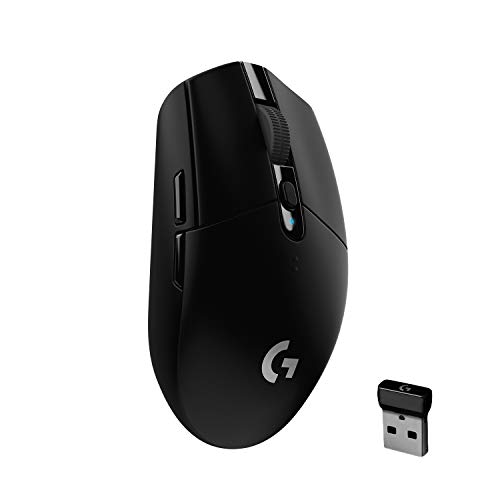
The Logitech G305 Lightspeed at ~$49 is the cheapest way into genuinely good wireless. LIGHTSPEED feels identical to a cable in play, the HERO sensor goes to 12,000 DPI, and a single AA battery lasts up to 250 hours. The compact body travels well and suits smaller hands, though larger palms may find it a touch small.

Top pick
Logitech G305 Lightspeed Wireless Gaming Mouse, Black
Logitech G

Logitech G305 Lightspeed Wireless Gaming Mouse, Black

4.5(2,375)
$49.00

Amazon.com.au price as of 02:48 pm AEST — subject to change

Buy on Amazon

As an Amazon Associate, NestPath earns from qualifying purchases.

The Razer Basilisk V3 at ~$65 earned the highest rating in this guide, 4.8 from 9,500+ reviews. You get a free-spinning HyperScroll wheel, 11 programmable buttons and a 26K sensor that never spins out, all in a comfortable ergonomic body with a thumb rest. It is heavier than the flick-aim specialists, so weight-conscious FPS players should look elsewhere.

Also great
Razer Basilisk V3 Customizable Ergonomic Gaming Mouse: Fastest Gaming Mouse Switch - Chroma RGB Lighting - 26K DPI Optical Sensor - 11 Programmable Buttons - HyperScroll Tilt Wheel - Classic Black
Razer

Razer Basilisk V3 Customizable Ergonomic Gaming Mouse: Fastest Gaming Mouse Switch - Chroma RGB Lighting - 26K DPI Optical Sensor - 11 Programmable Buttons - HyperScroll Tilt Wheel - Classic Black

4.8(9,563)
$64.99

Amazon.com.au price as of 02:48 pm AEST — subject to change

Buy on Amazon

As an Amazon Associate, NestPath earns from qualifying purchases.

The Razer Viper V3 HyperSpeed at ~$89 is the value entry into esports-grade wireless. An 82g mass-centralised body pairs with Razer's flagship Focus Pro 30K sensor and HyperSpeed wireless, and the AA battery runs up to 280 hours. The Gen-2 switches are rated to 60 million clicks, so it should outlast the mechanical-switch mice here.

Also great
Razer Viper V3 HyperSpeed Wireless Esports Gaming Mouse: 82g Lightweight - Up to 280 Hr Battery - 30K DPI Optical Sensor - Gen-2 Mechanical Switches - 8 Programmable Controls - Black
Razer

Razer Viper V3 HyperSpeed Wireless Esports Gaming Mouse: 82g Lightweight - Up to 280 Hr Battery - 30K DPI Optical Sensor - Gen-2 Mechanical Switches - 8 Programmable Controls - Black

4.4(1,612)
$89.00

Amazon.com.au price as of 02:48 pm AEST — subject to change

Buy on Amazon

As an Amazon Associate, NestPath earns from qualifying purchases.

The Logitech G PRO X Superlight 2 at ~$169 is the premium pick and the most copied pro mouse in the world. LIGHTFORCE hybrid switches outlast pure-mechanical ones, the HERO 2 sensor reaches 32,000 DPI, and the ultralight body makes flicking effortless. The 440+ review base is modest, but the lineage is the competitive benchmark. It is a splurge that only makes sense if competitive FPS is your priority.

Also great
Logitech G PRO X Superlight 2 Lightspeed Wireless Gaming Mouse, Lightweight, LIGHTFORCE Hybrid Switches, Hero 2 Sensor, 32,000 DPI, 5 Programmable Buttons, USB-C Charging, PC & Mac - Black
Logitech G

Logitech G PRO X Superlight 2 Lightspeed Wireless Gaming Mouse, Lightweight, LIGHTFORCE Hybrid Switches, Hero 2 Sensor, 32,000 DPI, 5 Programmable Buttons, USB-C Charging, PC & Mac - Black

4.4(446)
$169.00

Amazon.com.au price as of 02:48 pm AEST — subject to change

Buy on Amazon

As an Amazon Associate, NestPath earns from qualifying purchases.


Frequently Asked Questions

Is a wireless gaming mouse worth it, or does it add lag?

A modern wireless gaming mouse using Logitech LIGHTSPEED or Razer HyperSpeed has no latency penalty you can feel or measure in normal play. Pros compete on wireless mice every weekend. The Logitech G305 Lightspeed at ~$49 is the cheapest way to try it, and the Razer Viper V3 HyperSpeed at ~$89 adds an esports-grade sensor. If you prefer not to charge anything, a wired mouse like the Razer DeathAdder Essential at ~$35 is still excellent.

Does a high DPI number make a mouse better?

No. Almost nobody games above 3200 DPI, so a 32,000 DPI ceiling is marketing rather than something you will use. What actually matters is tracking accuracy: whether the cursor lands where your hand moved it and keeps tracking during a fast flick without spinning out. Treat DPI as a tiebreaker, not a headline.

Why does mouse weight matter for gaming?

In fast FPS games you whip the mouse across the pad to flick onto targets, and a lighter body changes direction faster while tiring your hand less. The ASUS TUF Gaming M3 Gen II at ~$34 is just 59 grams, and the Logitech G PRO X Superlight 2 at ~$169 is built around being ultralight. For slower games or MMOs, weight matters far less.

How many buttons do I need?

For FPS, two thumb buttons are usually enough, which the Razer DeathAdder Essential at ~$35 covers. For MMOs and MOBAs where you want a button per ability, more is better, and the Razer Basilisk V3 at ~$65 offers 11 programmable buttons including a free-spin wheel. Competitive FPS mice like the Logitech G PRO X Superlight 2 at ~$169 deliberately keep it to five to avoid accidental presses.

Are optical switches better than mechanical ones?

Optical and hybrid switches use a beam of light rather than metal contacts, which avoids the wear and double-clicking that mechanical switches can develop over time. The Razer Viper V3 HyperSpeed at ~$89 uses Gen-2 switches rated to 60 million clicks, and the Logitech G PRO X Superlight 2 at ~$169 uses LIGHTFORCE hybrid switches. Mechanical switches, like those in the Razer DeathAdder Essential at ~$35, are still perfectly good and warranty-backed.

Which brand should I trust for a gaming mouse?

Razer and Logitech G own the gaming-mouse category, with the sensors, switches, shapes and software the competitive scene standardised on. ASUS is the credible value alternative, and the TUF Gaming M3 Gen II at ~$34 punches above its price. Sticking to these three brands is the simplest way to avoid duds with poor sensors or short-lived switches.

What is the best gaming mouse for most people?

The Razer DeathAdder Essential at ~$35 is the pick most people should start with, because it nails the right-handed shape most hands prefer and has the largest review base in this guide. Step up to the Razer Basilisk V3 at ~$65 for more buttons and a free-spin wheel, or the Logitech G PRO X Superlight 2 at ~$169 if competitive FPS is your priority.

DETAILED REVIEWS
Budget pick
ASUS TUF Gaming M3 Gen II Gaming Mouse, Wired, 59g Lightweight, IP56 dust & Water Resistance, Antibacterial Guard, 8K DPI Optical Sensor, 6 Programmable Buttons, Teflon Mouse Feet, Black
ASUS

ASUS TUF Gaming M3 Gen II Gaming Mouse, Wired, 59g Lightweight, IP56 dust & Water Resistance, Antibacterial Guard, 8K DPI Optical Sensor, 6 Programmable Buttons, Teflon Mouse Feet, Black

4.5(233)
$34.00

Amazon.com.au price as of 02:48 pm AEST — subject to change

Buy on Amazon

As an Amazon Associate, NestPath earns from qualifying purchases.

Also great
Razer DeathAdder Essential Gaming Mouse: 6400 DPI Optical Sensor - 5 Programmable Buttons - Mechanical Switches - Rubber Side Grips - Classic Black
Razer

Razer DeathAdder Essential Gaming Mouse: 6400 DPI Optical Sensor - 5 Programmable Buttons - Mechanical Switches - Rubber Side Grips - Classic Black

4.4(11,572)
$35.19

Amazon.com.au price as of 02:48 pm AEST — subject to change

Buy on Amazon

As an Amazon Associate, NestPath earns from qualifying purchases.

Top pick
Logitech G305 Lightspeed Wireless Gaming Mouse, Black
Logitech G

Logitech G305 Lightspeed Wireless Gaming Mouse, Black

4.5(2,375)
$49.00

Amazon.com.au price as of 02:48 pm AEST — subject to change

Buy on Amazon

As an Amazon Associate, NestPath earns from qualifying purchases.

Also great
Razer Basilisk V3 Customizable Ergonomic Gaming Mouse: Fastest Gaming Mouse Switch - Chroma RGB Lighting - 26K DPI Optical Sensor - 11 Programmable Buttons - HyperScroll Tilt Wheel - Classic Black
Razer

Razer Basilisk V3 Customizable Ergonomic Gaming Mouse: Fastest Gaming Mouse Switch - Chroma RGB Lighting - 26K DPI Optical Sensor - 11 Programmable Buttons - HyperScroll Tilt Wheel - Classic Black

4.8(9,563)
$64.99

Amazon.com.au price as of 02:48 pm AEST — subject to change

Buy on Amazon

As an Amazon Associate, NestPath earns from qualifying purchases.

Also great
Razer Viper V3 HyperSpeed Wireless Esports Gaming Mouse: 82g Lightweight - Up to 280 Hr Battery - 30K DPI Optical Sensor - Gen-2 Mechanical Switches - 8 Programmable Controls - Black
Razer

Razer Viper V3 HyperSpeed Wireless Esports Gaming Mouse: 82g Lightweight - Up to 280 Hr Battery - 30K DPI Optical Sensor - Gen-2 Mechanical Switches - 8 Programmable Controls - Black

4.4(1,612)
$89.00

Amazon.com.au price as of 02:48 pm AEST — subject to change

Buy on Amazon

As an Amazon Associate, NestPath earns from qualifying purchases.

Also great
Logitech G PRO X Superlight 2 Lightspeed Wireless Gaming Mouse, Lightweight, LIGHTFORCE Hybrid Switches, Hero 2 Sensor, 32,000 DPI, 5 Programmable Buttons, USB-C Charging, PC & Mac - Black
Logitech G

Logitech G PRO X Superlight 2 Lightspeed Wireless Gaming Mouse, Lightweight, LIGHTFORCE Hybrid Switches, Hero 2 Sensor, 32,000 DPI, 5 Programmable Buttons, USB-C Charging, PC & Mac - Black

4.4(446)
$169.00

Amazon.com.au price as of 02:48 pm AEST — subject to change

Buy on Amazon

As an Amazon Associate, NestPath earns from qualifying purchases.

Compare these 6 picks side-by-side →
Save this guide for later
Pin it to your Pinterest board — one-click save, no signup needed.
Save to Pinterest
YOU MIGHT ALSO LIKE
Best Gaming Controller Australia
The right controller comes down to one question - …
Read guide →
Best microSD Card Australia
The right microSD card depends entirely on the job…
Read guide →
Best Resistance Bands Australia
Resistance bands are the cheapest way to build a f…
Read guide →
Best Webcam Australia
A plain-spoken guide to the best webcams in Austra…
Read guide →

Found this helpful?

Check out more guides for new homeowners.

Also explore

Free tools and guides for Australian first home buyers

FHB Eligibility Checker
Which schemes do you actually qualify for?
Borrowing Power Calculator
How much can you actually borrow?
Mortgage Repayment Calculator
Weekly, fortnightly & monthly repayments
Stamp Duty Calculator
Know your full upfront costs by state
Move-In Cost Calculator
The full first-30-days figure, not just stamp duty
Open Amazon AU Dataset
352 editorial picks. Free CSV + JSON, CC BY 4.0.
Affiliate Disclosure: As an Amazon Associate, NestPath earns from qualifying purchases. This means if you click a product link and buy something, we may receive a small commission at no extra cost to you. We only recommend products we genuinely believe will help new homeowners. This does not influence our recommendations.

CERTAIN CONTENT THAT APPEARS ON THIS SITE COMES FROM AMAZON. THIS CONTENT IS PROVIDED ‘AS IS’ AND IS SUBJECT TO CHANGE OR REMOVAL AT ANY TIME.