Best Laptop Cooling Pad Australia 2026: Researched Picks
By Anish Puri·6 June 2026·Last updated 18 October 2026·14 min read
The best laptop cooling pad in Australia for most people is the KLIM Wind RGB Laptop Cooling Pad, with 4.5 stars from 43,566 ratings shared across the KLIM Wind listings, 4 fans at 1200 RPM in its title and a 5 year warranty. For a fan its listing calls silent, choose the Cooler Master NotePal CMC3.
Prices checked 23 October 2026 on Amazon AU and subject to change.
Do laptop cooling pads actually work?
Yes, but results vary by laptop. A cooling pad lifts the laptop and pushes air across its base, which helps most on a thin or gaming laptop that slows itself down when hot, or one used on a bed or couch. Treat maker claims such as a 38 degree drop as best case figures.
A laptop cooling pad (also sold as a laptop cooler or cooling stand) is a stand with one or more fans that your laptop sits on, usually powered over USB, to push air across its underside. Thermal throttling is a laptop slowing itself down to protect itself from heat. RPM is fan speed: the listings here give 700RPM, 1200 RPM, 3500 RPM and 5000 rpm.
The cards below compare the pads on fan size, noise, laptop fit, USB ports and adjustable height, using each Amazon AU listing. If a pad uses one of your USB ports, a dual USB A and USB C flash drive can go in a spare one.
Best overall: KLIM Wind RGB Laptop Cooling Pad
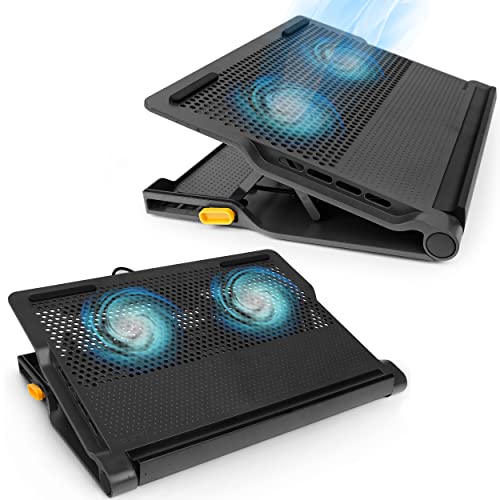
The KLIM Wind RGB Laptop Cooling Pad is the pad we put first. Its listing shows 4.5 stars from 43,566 ratings, which cover the KLIM Wind listing family, a title listing 4 fans at 1200 RPM, a 5 year warranty and room for laptops from 11 to 16 inches, with larger ones overhanging the edges.
It is sold by KLIM Technologies Australia and ships from Amazon. The listing says it has 2 USB ports that leave one free port and 2 rear legs for inclination.
Check three things before you buy. The title lists 4 fans, but the product information table says Number of Fans 2. The listing gives no decibel figure, and the maker's bullet calls the fans quiet. Laptops over 16 inches overhang the pad, which the listing says will remain perfectly stable.
Top pick
KLIM
KLIM Wind RGB Laptop Cooling Pad
4.5(43,566)
Listing shows 4.5 stars from 43,566 ratings, a figure that covers the KLIM Wind listing family. The title lists 4 fans at 1200 RPM, but the product information table says 2 fans, so check before you buy if the fan count matters. 5 year warranty. Sold by KLIM Technologies Australia, ships from Amazon.
$49.97
Amazon.com.au price as of 11:00 am AEDT, subject to change
As an Amazon Associate, NestPath earns from qualifying purchases.
Laptop cooling pads compared
Listing figures only, quoted from each Amazon AU listing.
Pad
Fan
Laptop fit
Stand and extras
USB
Rating (ratings)
Seller
KLIM Wind RGB Laptop Cooling Pad (best overall)
4 fans at 1200 RPM in the title; the product information table says 2
11 to 16 inches; 17.3 to 19 inch laptops overhang
2 rear legs and frontal pegs
2 USB ports, one left free
4.5 (43,566)
KLIM Technologies Australia, ships from Amazon
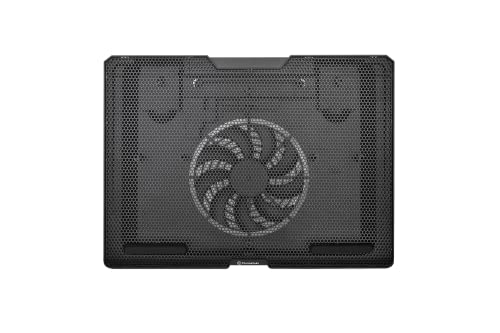
Thermaltake Massive S14 Notebook Cooler
Built in 140mm silent fan
Supports 15 inch gaming notebooks
Steel mesh surface, Ergonomic Design
USB cable management design
4.4 (71)
Amazon AU
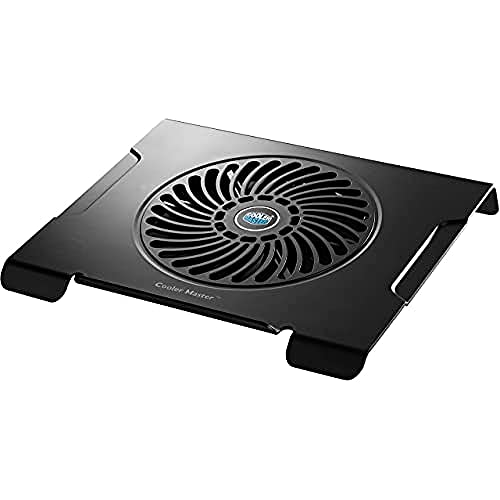
Cooler Master NotePal CMC3 Laptop Cooling Pad
200mm fan, 700RPM
Title: up to 15.6 inch; bullet: 12 to 15 inch
Front anti slip holder
No USB port listed
4.2 (652)
Tekit Coolstore
Targus Chill Mat+
Dual fans
No size in the title or bullets
Adjustable height, 4 levels; Velcro cable straps
Built in 4 port hub
3.8 (760)
Amazon AU
KLIM Wind Laptop Cooling Pad
4 fans at 1200 RPM in the title
11 to 16 inches; 17.3 to 19 inch laptops overhang
2 rear legs and frontal pegs
2 USB ports, one left free
4.5 (43,566)
Seller named in its section below
llano V10 RGB Gaming Laptop Cooling Pad
4.72 inch turbo fan, up to 3500 RPM
13 to 17.3 inches
3 level adjustable stand, front baffles
Ports 2A and 2C
4.4 (779)
llanopower tech, ships from Amazon
IETS GT500 Turbo Fan RGB Laptop Cooling Pad
Turbo fan, 5000 rpm, sealing foam
13 to 17.3 inch
Speed range 0 to 5000 rpm
3 port USB hub
4.6 (319)
Seller named in its section below
How we chose these laptop cooling pads
We read the Amazon AU listing for each pad, including the title, bullet points, product information table, ratings and the buy box seller. Specs come from the maker's bullet points and the product information on each listing. Where a listing contradicts itself, such as the KLIM Wind fan count or the Cooler Master laptop size, we show both figures. These are listing figures, not our own measurements.
Last checked: 17 October 2026.
Fan count and airflow: one big fan or four?
There are two designs. Some pads use one large fan: the Cooler Master NotePal CMC3 lists a 200mm cooling fan and the Thermaltake Massive S14 lists a built in 140mm fan. Others use several smaller fans: the KLIM Wind RGB lists 4 fans spinning up to 1200 rotations per minute.
The llano V10 and the IETS GT500 each use a turbo fan, listed at up to 3500 RPM and 5000 rpm.
The listings do not rank noise for you, so read the fan wording. The Thermaltake and Cooler Master listings call their fans silent or nearly silent, the KLIM bullets call the 4 fans quiet, and the IETS listing warns that noise can reach 65 dB at its highest speed.
Worth being clear about what a pad does: it cools the laptop, not the person using it. If the room is the problem on a hot afternoon, a quiet desk fan is the thing that makes the desk bearable.
Thermaltake Massive S14 Notebook Cooler: one 140mm fan
The Thermaltake Massive S14 lists a steel mesh surface with a built in 140mm silent fan and support for 15 inch gaming notebooks. Its listing shows 4.4 stars from 71 ratings, a small count. The product information table lists the seller as Amazon AU. The listing gives no decibel figure.
Budget pick
Thermaltake
Thermaltake Massive S14 Notebook Cooler
4.4(71)
One 140mm fan on a steel mesh surface, listed for 15 inch gaming notebooks, 4.4 stars from 71 ratings. The listing calls the fan silent and mentions USB cable management only. The listing gives no decibel figure. The product information table lists the seller as Amazon AU.
$25.00$35.00
Save 29%
Amazon.com.au price as of 05:01 am AEDT, subject to change
As an Amazon Associate, NestPath earns from qualifying purchases.
Fan noise: which pads are quiet enough for calls?
It depends on the fan. The Cooler Master NotePal CMC3 listing says Silent 200mm Fan, 700RPM, and the Thermaltake Massive S14 listing calls its 140mm fan silent. The IETS GT500 listing warns noise can reach 65 dB at its highest speed, so choose a large slow fan if you spend your day on calls.
The KLIM Wind RGB bullets call its 4 fans quiet. The llano V10 listing gives no decibel figure, so we cannot rank its noise. The IETS listing gives a speed range of 0 to 5000 rpm and says it can be set to the best speed for you in office, game and standby mode.
Cooler Master NotePal CMC3 Laptop Cooling Pad: a 200mm fan at 700RPM
The Cooler Master NotePal CMC3 listing title reads Silent 200mm Fan, 700RPM and its bullet says a 200mm cooling fan keeps your laptop cool to the touch, yet is nearly silent. It shows 4.2 stars from 652 ratings and is sold by Tekit Coolstore.
Also great
Cooler Master
Cooler Master NotePal CMC3 Laptop Cooling Pad
4.2(652)
The title says Silent 200mm Fan, 700RPM and supports up to 15.6 inch laptops, while the bullet says notebooks 12 to 15 inch, so check your size. The bullet adds a Front Anti Slip holder. 4.2 stars from 652 ratings. Sold by Tekit Coolstore.
$49.99
Amazon.com.au price as of 05:01 am AEDT, subject to change
As an Amazon Associate, NestPath earns from qualifying purchases.
Adjustable height: cooling pad or laptop stand?
Only some pads double as a stand. The Targus Chill Mat+ lists adjustable height with 4 levels for use with an external keyboard, and the llano V10 lists a 3 level adjustable stand. The KLIM Wind lists 2 rear legs for inclination. A dedicated laptop stand lifts the screen without fans.
If posture is the real reason you are shopping, look at the height wording first. The Thermaltake Massive S14 listing says Ergonomic Design but names no height levels, and the Cooler Master listing names a front anti slip holder only.
Targus Chill Mat+: adjustable height and a hub
The Targus Chill Mat+ listing shows dual fans, a built in 4 port hub, adjustable height (4 levels) and Velcro straps for cables. It shows 3.8 stars from 760 ratings. The listing title and bullets give no laptop size, so check the size before you buy.
Also great
Targus
Targus Chill Mat+ with 4-Port Hub
3.8(760)
Dual fans, adjustable height with 4 levels for use as a stand with an external keyboard, a built in 4 port hub and Velcro straps for cables. 3.8 stars from 760 ratings.
$48.65$64.00
Save 24%
Amazon.com.au price as of 05:01 am AEDT, subject to change
As an Amazon Associate, NestPath earns from qualifying purchases.
Laptop size: will a pad fit a 15.6 inch or 17 inch laptop?
Check the size range first. The Thermaltake Massive S14 lists support for 15 inch notebooks. The llano V10 and IETS GT500 list 13 to 17.3 inches, and the KLIM Wind lists 11 to 16 inches with 17.3 to 19 inch laptops overhanging the edges. The Cooler Master titles up to 15.6 inches but its bullet says 12 to 15.
The Targus Chill Mat+ listing gives no laptop size in its title or bullets. The KLIM listing says an overhanging laptop will remain perfectly stable, so match each pad's listed size range to your screen before you buy.
KLIM Wind Laptop Cooling Pad: a second KLIM Wind listing
On 17 October 2026 this listing was sold through the Amazon US Global Store, and Amazon notes that US imports may differ from local products. Its title lists 4 fans at 1200 RPM and its bullets match the KLIM Wind RGB listing. It shows 4.5 stars from 43,566 ratings, which cover the KLIM Wind listing family.
Also great
KLIM
KLIM Wind Laptop Cooling Pad
4.5(43,566)
The same Wind design as the KLIM Wind RGB above, with 4.5 stars from 43,566 ratings that cover the KLIM Wind listing family. On 17 October 2026 this listing was sold through the Amazon US Global Store, and Amazon notes that US imports may differ from local products.
$70.23
Amazon.com.au price as of 11:00 am AEDT, subject to change
As an Amazon Associate, NestPath earns from qualifying purchases.
USB ports: will a cooling pad cost you a port?
Some pads give a USB port back. The Targus Chill Mat+ listing has a built in 4 port hub, the IETS GT500 a 3 port hub, and the KLIM Wind listing says its 2 USB ports leave you with one free port. The llano V10 lists 2A and 2C ports. The Thermaltake listing mentions USB cable management only.
A USB hub is a port that connects several devices through one cable. If your laptop is short on ports, a USB C hub for extra ports is the other route.
The llano V10 listing says its upgraded ports (2A and 2C) connect more devices like mice and keyboards. It also lists a 4.72 inch turbo fan with up to 3500 RPM and a 3 level adjustable stand, and it shows 4.4 stars from 779 ratings. It is sold by llanopower tech and ships from Amazon.
Also great
llano
llano V10 RGB Gaming Laptop Cooling Pad
4.4(779)
4.72 inch turbo fan up to 3500 RPM, 3 level adjustable stand, up to 12 dynamic RGB modes, replaceable dust filter, 2A and 2C ports, fits notebooks from 13 to 17.3 inches. 4.4 stars from 779 ratings. The 38 degree drop is the maker's claim, so treat it as a best case. The listing gives no decibel figure.
$127.99$159.99
Save 20%
Amazon.com.au price as of 11:00 pm AEDT, subject to change
As an Amazon Associate, NestPath earns from qualifying purchases.
Gaming laptop cooling pads: when a turbo fan is worth it
A turbo fan pad is worth considering only for a gaming laptop that runs hot under load. The llano V10 lists a 4.72 inch turbo fan with up to 3500 RPM and the IETS GT500 lists a 5000 rpm fan with sealing foam, but the IETS listing warns that noise can reach 65 dB at the highest speed.
Maker claims need care. The llano V10 listing says its fan achieves a 38 degree drop in minutes, which we treat as the maker's best case. The IETS GT500 listing describes sealed foam meant to give the same cooling wherever your laptop's cooling hole sits, which is also the maker's claim. Both sell RGB lighting as a gaming feature: the llano lists up to 12 dynamic RGB modes and the IETS lists seven colours with 5 lighting modes. Pay for RGB only if you want it on show.
IETS GT500 Turbo Fan RGB Laptop Cooling Pad: sealed foam and a 3 port hub
On 17 October 2026 this listing was sold through the Amazon Germany Global Store, and Amazon notes that imports from Germany may differ from local products. It lists a turbo fan (5000 rpm), a speed range of 0 to 5000 rpm, a 3 port USB hub and a fit for 13 to 17.3 inch laptops, and it shows 4.6 stars from 319 ratings.
Also great
IETS
IETS GT500 Turbo Fan RGB Laptop Cooling Pad
4.6(319)
Turbo fan up to 5000 rpm with sealed foam, speed range 0 to 5000 rpm, 3 port USB hub, fits 13 to 17.3 inch laptops. The listing warns noise can reach 65 dB at the highest speed. 4.6 stars from 319 ratings. On 17 October 2026 this listing was sold through the Amazon Germany Global Store, and Amazon notes that imports from Germany may differ from local products.
$161.51
Amazon.com.au price as of 11:00 am AEDT, subject to change
As an Amazon Associate, NestPath earns from qualifying purchases.
Laptop cooling pad for a bed or couch
On a bed or couch a soft surface can cover the vents under a laptop, which is the case a pad is meant for. None of the listings quote bed or couch test results, so we give no figures. If you mainly work in bed or on the couch, a lap desk for a bed or couch is the other option, and the pad's listed size range still has to match your laptop.
What are the downsides of using a cooling pad?
Downsides are noise, size and uneven results. The IETS GT500 listing warns that noise can reach 65 dB at its highest speed. The KLIM Wind is described as a USB powered stand, and results vary by laptop, so treat maker temperature claims such as a 38 degree drop as best case figures.
So which laptop cooling pad should you buy?
For most people, buy the KLIM Wind RGB Laptop Cooling Pad: it shows 4.5 stars from 43,566 ratings, which cover the KLIM Wind listing family, and lists 4 fans at 1200 RPM, a 5 year warranty and an 11 to 16 inch fit. Pick another pad only for a specific need, as below.
For a fan its listing calls silent, the Cooler Master NotePal CMC3 lists Silent 200mm Fan, 700RPM, and the Thermaltake Massive S14 lists a built in 140mm silent fan. For a stand as well as a cooler, the Targus Chill Mat+ lists adjustable height with 4 levels and a built in 4 port hub. For a gaming laptop that runs hot, the llano V10 and the IETS GT500 list turbo fans, and the IETS warns that noise can reach 65 dB at the highest speed.
Frequently asked questions
Which laptop cooling pad is the best?
The KLIM Wind RGB Laptop Cooling Pad is the pad we put first. Its listing shows 4.5 stars from 43,566 ratings, which cover the KLIM Wind listing family, a title listing 4 fans at 1200 RPM, a 5 year warranty and room for laptops from 11 to 16 inches, with larger ones overhanging the edges.
Which brand of laptop cooling pad is the best?
No brand wins every job. In this guide the KLIM Wind RGB is the pad we put first on its listing figures, the Cooler Master NotePal CMC3 and Thermaltake Massive S14 list silent fans, and the IETS GT500 and llano V10 list turbo fans for gaming laptops.
Is it worth buying a laptop cooling pad?
A cooling pad is worth it if your laptop runs hot under load or sits on soft surfaces, and less so if it already stays cool on a desk. Pads range from quiet single fan trays to turbo fan models, so match the fan style and the laptop size to your problem before you buy.
Do laptop cooling pads actually lower temperatures?
Yes, but results vary by laptop. A cooling pad lifts the laptop and pushes air across its base, which helps most on a thin or gaming laptop that slows itself down when hot. Treat maker claims such as the llano listing's 38 degree drop in minutes as best case figures.
Are cooling pads loud during video calls?
It depends on the fan. The Cooler Master NotePal CMC3 listing says Silent 200mm Fan, 700RPM, and the Thermaltake Massive S14 listing calls its 140mm fan silent. The IETS GT500 listing warns noise can reach 65 dB at its highest speed, so choose a large slow fan if you spend your day on calls.
Will a cooling pad fit my 17 inch laptop?
Check the size range first. The Thermaltake Massive S14 lists support for 15 inch notebooks. The llano V10 and IETS GT500 list 13 to 17.3 inches, and the KLIM Wind lists 11 to 16 inches with 17.3 to 19 inch laptops overhanging the edges. The Cooler Master titles up to 15.6 inches but its bullet says 12 to 15.
Will a cooling pad use up one of my USB ports?
Some pads give a USB port back. The Targus Chill Mat+ listing has a built in 4 port hub, the IETS GT500 a 3 port hub, and the KLIM Wind listing says its 2 USB ports leave you with one free port. The llano V10 lists 2A and 2C ports. The Thermaltake listing mentions USB cable management only.
Is RGB lighting worth paying for?
RGB lighting is for looks, and the listings sell it as a gaming feature. The llano V10 lists up to 12 dynamic RGB modes and the IETS GT500 lists seven colours with 5 lighting modes. The KLIM Wind RGB bullets give no mode details, so pay for RGB only if you want it on show.
Do I need a turbo fan pad or is a basic one enough?
For most people a basic pad is enough. A turbo fan pad such as the llano V10 or IETS GT500 only earns its place on a gaming laptop that runs hot under load; the IETS lists noise up to 65 dB at top speed.
Can a cooling pad double as an ergonomic laptop stand?
Only some pads double as a stand. The Targus Chill Mat+ lists adjustable height with 4 levels for use with an external keyboard, and the llano V10 lists a 3 level adjustable stand. The KLIM Wind lists 2 rear legs for inclination. A dedicated laptop stand lifts the screen without fans.
What are the downsides of using a cooling pad?
Downsides are noise, size and uneven results. The IETS GT500 listing warns that noise can reach 65 dB at its highest speed. The KLIM Wind is described as a USB powered stand, and results vary by laptop, so treat maker temperature claims such as a 38 degree drop as best case figures.
What is a laptop cooling pad?
A laptop cooling pad is a stand with one or more fans that your laptop sits on, usually powered over USB, to push air across its underside. Many also tilt the laptop. Listings such as the KLIM Wind describe a USB powered stand.
DETAILED REVIEWS
Top pick
KLIM
KLIM Wind RGB Laptop Cooling Pad
4.5(43,566)
Listing shows 4.5 stars from 43,566 ratings, a figure that covers the KLIM Wind listing family. The title lists 4 fans at 1200 RPM, but the product information table says 2 fans, so check before you buy if the fan count matters. 5 year warranty. Sold by KLIM Technologies Australia, ships from Amazon.
$49.97
Amazon.com.au price as of 11:00 am AEDT, subject to change
As an Amazon Associate, NestPath earns from qualifying purchases.
Budget pick
Thermaltake
Thermaltake Massive S14 Notebook Cooler
4.4(71)
One 140mm fan on a steel mesh surface, listed for 15 inch gaming notebooks, 4.4 stars from 71 ratings. The listing calls the fan silent and mentions USB cable management only. The listing gives no decibel figure. The product information table lists the seller as Amazon AU.
$25.00$35.00
Save 29%
Amazon.com.au price as of 05:01 am AEDT, subject to change
As an Amazon Associate, NestPath earns from qualifying purchases.
Also great
Cooler Master
Cooler Master NotePal CMC3 Laptop Cooling Pad
4.2(652)
The title says Silent 200mm Fan, 700RPM and supports up to 15.6 inch laptops, while the bullet says notebooks 12 to 15 inch, so check your size. The bullet adds a Front Anti Slip holder. 4.2 stars from 652 ratings. Sold by Tekit Coolstore.
$49.99
Amazon.com.au price as of 05:01 am AEDT, subject to change
As an Amazon Associate, NestPath earns from qualifying purchases.
Also great
Targus
Targus Chill Mat+ with 4-Port Hub
3.8(760)
Dual fans, adjustable height with 4 levels for use as a stand with an external keyboard, a built in 4 port hub and Velcro straps for cables. 3.8 stars from 760 ratings.
$48.65$64.00
Save 24%
Amazon.com.au price as of 05:01 am AEDT, subject to change
As an Amazon Associate, NestPath earns from qualifying purchases.
Also great
KLIM
KLIM Wind Laptop Cooling Pad
4.5(43,566)
The same Wind design as the KLIM Wind RGB above, with 4.5 stars from 43,566 ratings that cover the KLIM Wind listing family. On 17 October 2026 this listing was sold through the Amazon US Global Store, and Amazon notes that US imports may differ from local products.
$70.23
Amazon.com.au price as of 11:00 am AEDT, subject to change
As an Amazon Associate, NestPath earns from qualifying purchases.
Also great
llano
llano V10 RGB Gaming Laptop Cooling Pad
4.4(779)
4.72 inch turbo fan up to 3500 RPM, 3 level adjustable stand, up to 12 dynamic RGB modes, replaceable dust filter, 2A and 2C ports, fits notebooks from 13 to 17.3 inches. 4.4 stars from 779 ratings. The 38 degree drop is the maker's claim, so treat it as a best case. The listing gives no decibel figure.
$127.99$159.99
Save 20%
Amazon.com.au price as of 11:00 pm AEDT, subject to change
As an Amazon Associate, NestPath earns from qualifying purchases.
Also great
IETS
IETS GT500 Turbo Fan RGB Laptop Cooling Pad
4.6(319)
Turbo fan up to 5000 rpm with sealed foam, speed range 0 to 5000 rpm, 3 port USB hub, fits 13 to 17.3 inch laptops. The listing warns noise can reach 65 dB at the highest speed. 4.6 stars from 319 ratings. On 17 October 2026 this listing was sold through the Amazon Germany Global Store, and Amazon notes that imports from Germany may differ from local products.
$161.51
Amazon.com.au price as of 11:00 am AEDT, subject to change
Affiliate Disclosure: As an Amazon Associate, NestPath earns from qualifying purchases. This means if you click a product link and buy something, we may receive a small commission at no extra cost to you. We only recommend products we genuinely believe will help new homeowners. This does not influence our recommendations.
CERTAIN CONTENT THAT APPEARS ON THIS SITE COMES FROM AMAZON. THIS CONTENT IS PROVIDED ‘AS IS’ AND IS SUBJECT TO CHANGE OR REMOVAL AT ANY TIME.