What a mouse pad does for your desk
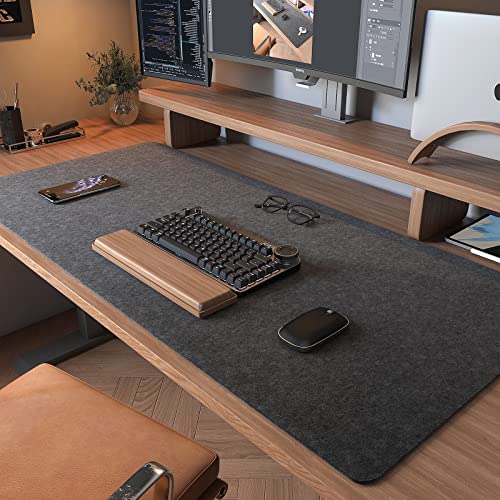
The best mouse pad for most Australian desks in this guide is the Cute Frog Mouse Pad Desk Pad Kawaii Green Desk Decor Mat, a large polyester fabric mat with a non skid natural rubber back, listed at 800mm x 400mm in its bullets. A mouse pad sounds like the most boring purchase on your desk, yet the eight listings below differ in size, surface, base, edges and care. Every product information table has a thickness row: 2 millimeters on the SteelSeries QcK Mini and the Logitech Desk Mat, 2.5 millimeters on the iLeadon, 3 millimeters on the Logitech G840 and 4 millimeters on the Cute Frog, while the YSAGi, DAWNTREES and Flodirise tables give theirs in inches.
The category splits in two. Small cloth pads such as the SteelSeries QcK Mini, 250x210mm in its title, are for the mouse alone, and its bullets call it an ideal mouse pad for small desks and limited spaces. Large desk mats such as the YSAGi at 80x40cm and the DAWNTREES at 100x40cm in their titles say in their bullets that they accommodate your laptop, mouse and keyboard. The eight cards below span both, so this guide is about matching the pad to how you use your desk. If the desk also needs somewhere for cables and pens to live, our desk organiser guide covers that.
How the eight mouse pads compare
The table lists the eight cards in the order of the product cards below. Sizes are the ones each listing gives, and where two parts of a listing give different sizes the size section below names both. Ratings and counts are as each Amazon AU listing shows them.
| Pick | Suits | Listed size | Surface as listed | Rating (count) |
|---|
| Cute Frog Mouse Pad Desk Pad Kawaii Green Desk Decor Mat | One large mat for a desk with a keyboard and mouse | 800mm x 400mm (bullets); 80L x 39.9W centimetres (product table) | Polyester fabric on a natural rubber back | 4.8 (1,293) |
| SteelSeries QcK Gaming Mouse Pad Mini | The mouse alone on a small desk | 250 x 210 mm (title and bullets); 21L x 21W cm (product table) | Micro woven cloth | 4.6 (60,509) |
| YSAGi Double Sided Leather and Cork Desk Pad | A desk mat whose leather face wipes clean | 80 x 40 cm (title and product table) | PU leather and cork | 4.6 (36,245) |
| iLeadon Extended XXL Gaming Mouse Pad | Covering the desk under keyboard and mouse | 90x40 cm (bullets); 890 x 400 mm (description); 39.9 x 89.9 cm (product table) | Wave textured surface on a rubber base | 4.4 (5,857) |
| DAWNTREES Large Felt Desk Mat | A felt desk mat that rolls up | 100 x 40 cm (title, bullets and product table) | Felt | 4.4 (2,795) |
| Logitech Desk Mat Studio Series | Stitched edges and a spill repellent surface | 70 x 30 cm (product table); called extra large in the bullets | Soft cloth, recycled polyester | 4.6 (656) |
| Logitech G840 Extra Large Gaming Mouse Pad | A large gaming surface with moderate friction | 900 x 400 x 3 mm (title); 90L x 40W cm (product table) | Soft cloth (description) | 4.4 (192) |
| Flodirise Non Slip Mouse Pad, Cat Pattern | A small pad with a cat pattern | 8x10 inch (title); 26x21cm (Size row and description) | Cloth | 4.8 (742) |
Best overall: Cute Frog Mouse Pad Desk Pad Kawaii Green Desk Decor Mat
The Cute Frog Mouse Pad Desk Pad Kawaii Green Desk Decor Mat is the best overall mouse pad for most Australian desks here. Its Amazon AU listing shows 4.8 stars from 1,293 ratings, the joint highest rating of the eight, and it is a large polyester fabric mat with a non skid natural rubber back. It ships from Amazon and is sold by HARUN CELIKEL.
The bullets give the size as 800mm x 400mm x4mm and call it a thickened design with thick cloth padding at the top of the mousepad. The product table gives 80L x 39.9W centimetres, a thickness of 4 millimeters and an item weight of 0.67 kilograms. The bullets describe durable heat resistant polyester fabric cloth and a non skid natural rubber back that keeps the mouse pad from sliding, and say the surface allows for optimum speed and accurate control while gaming and suits working in the office or playing games. The title says it comes with stitched edges, spelling the word as Eges.
Flaws but not dealbreakers
The listing gives some facts two ways. The product table lists waterproof among its additional features, while the bullets only say the fabric keeps the mouse pad from spilled and other accidents, and the only care line is easy cleaning and maintenance with no method. The stitched edges are named only in the title. The brand line reads Mechanical Cattle while the manufacturer row in the product table reads Xeniawashington. It has 1,293 ratings, fewer than the SteelSeries (60,509), the YSAGi (36,245), the iLeadon (5,857) and the DAWNTREES (2,795), and at 0.67 kilograms it is heavier than the YSAGi (0.33 kilograms) and the iLeadon (522 grams). The green frog print is a styling choice that suits some desks more than others.
How we chose these eight mouse pads
NestPath does not run a laboratory and did not test how any of these pads track. Each card is checked against two sources: its Amazon AU listing, and the maker's own wording on that listing, meaning its bullet points, product information table and description or A+ text. No separate maker page or manual is saved for these pads, and where a listing's A+ content is an image we could not read, we say so. We compared the listed size, surface, base, edges, care line, rating and rating count. Where a pad wins on one of those and loses on another we say so rather than picking a favourite and defending it, and where two parts of one listing give different sizes or care wording we name both and say where each sits. Ratings and counts are as each Amazon AU listing shows them.
Last checked: 24 October 2026.
Mouse pad size: small pad, large pad or full desk mat
Size is the first decision and it changes everything else. A small pad such as the SteelSeries QcK Mini, 250x210mm in its title, holds the mouse alone, and its bullets call it an ideal mouse pad for small desks, limited spaces or high DPI users. The Flodirise cat pattern pad is the other small pad, 8x10 inch in its title and 26x21cm in its Size row. Check the size against your desktop, and if you are choosing a new desk first, our adjustable height standing desk guide covers desks that rise to standing height.
Step up to a large mat and the surface changes. The YSAGi lists 80 x 40 cm in its title and product table, the Cute Frog 800mm x 400mm in its bullets, the iLeadon 90x40 cm in its bullets and the DAWNTREES 100 x 40 cm in its title, bullets and product table. The YSAGi and DAWNTREES bullets both say the mat accommodates a laptop, mouse and keyboard. If you want the whole desk covered rather than just the mouse area, that is a desk mat.
The listings do not always agree with themselves, so the table below sets out each size where it appears. The iLeadon gives its size four ways, so treat it as about 90 x 40 cm. The SteelSeries title and bullets give 250 x 210 mm while its product table gives 21L x 21W cm. The Flodirise title says 8x10 inch, its Size row and description say 26x21cm and its Item Dimensions row says 26L x 26W centimetres. The Logitech Desk Mat title and bullets give no size figure, and its product table gives 70 x 30 cm.
| Pick | Title | Bullets | Product table | Thickness row |
|---|
| Cute Frog Mouse Pad Desk Pad Kawaii Green Desk Decor Mat | 31.5x15.7 in | 800mm x 400mm x4mm | 80L x 39.9W centimetres | 4 Millimeters |
| SteelSeries QcK Gaming Mouse Pad Mini | 250x210mm | 250 x 210 x 2 and 9.84 inches x 8.27 inches | 21L x 21W cm | 2 Millimeters |
| YSAGi Double Sided Leather and Cork Desk Pad | 80x40cm | No size figure; mentions 3 sizes | 80 x 40 cm | 0.04 Inches |
| iLeadon Extended XXL Gaming Mouse Pad | 35.1 x 15.75 inch | 35.4x15.75 inches (90x40 cm) | 39.9 x 89.9 cm; the description says 890 x 400 x 2.5mm | 2.5 Millimeters |
| DAWNTREES Large Felt Desk Mat | 100x40cm | 100x40cm | 100 x 40 cm | 0.12 Inches |
| Logitech Desk Mat Studio Series | No size figure | No size figure; called extra large | 70 x 30 cm | 2 Millimeters |
| Logitech G840 Extra Large Gaming Mouse Pad | 900 x 400 x 3 mm | No size figure; called extra large | 90L x 40W cm | 3 Millimeters |
| Flodirise Non Slip Mouse Pad, Cat Pattern | 8x10 inch | No size figure | 26x21cm / 10x8 inch; Item Dimensions 26L x 26W centimetres | 0.12 Inches |
By the sizes the listings give, the DAWNTREES at 100 x 40 cm is the largest of the eight, the iLeadon and the Logitech G840 follow at about 90 x 40 cm, then the Cute Frog and the YSAGi at about 80 x 40 cm and the Logitech Desk Mat at 70 x 30 cm. The SteelSeries and the Flodirise are the two small pads.
Surface as the listings describe it
The listings use the words speed and control, each in its own way. The iLeadon description says its fine textured surface gives a unique combination of speed and control for your mouse sensors, and its bullets say the wave textured surface offers precise mouse control and a comfortable gliding experience. The Logitech G840 bullets describe moderate surface friction that gives the right amount of resistance to the mouse feet when starting or stopping a rapid or sudden movement common to low DPI gaming. The SteelSeries bullets say its exclusive QcK micro woven cloth is optimized for low and high DPI tracking movements.
The materials differ more than the words do. The SteelSeries, Logitech G840, Logitech Desk Mat and Flodirise listings describe cloth surfaces, the Cute Frog a polyester fabric cloth, and the DAWNTREES top quality felt fabric, which its bullets also say has an uneven surface and rough feel. The YSAGi bullets describe a cork and PU leather mat whose leather surface is soft, skin friendly and waterproof. The iLeadon title, bullets, description and product table name no cloth; its Material Type row says Rubber.
There is no test data here, so the choice comes down to whether you value glide, comfort or easy cleaning. NestPath did not test tracking, and every surface claim above is the maker's wording on the listing.
Stitched edges
Four of the eight listings name stitched edges. The Logitech Desk Mat bullets list flat stitch, anti fray edges. The Flodirise bullets list durable stitched edges that can prevent wear, deformation and degumming, with flat seams that are comfortable for your wrists and hands. The iLeadon description says its stitched edges prevent the mouse pad from fraying and degumming. The Cute Frog title says it comes with stitched edges, spelled Eges. The SteelSeries, YSAGi, DAWNTREES and Logitech G840 titles, bullets and product tables do not name stitched edges.
The four put the claim in different places: one in a title, two in bullets and one in a description. These are the makers' own words, not a wear test, and we did not test whether any edge frays, so look at the corners of any pad over time.
Rubber base and grip
Six of the eight listings name a rubber base or back in the title, bullets or product information table: the SteelSeries (bullets: steady rubber base, and a non slip rubber base that eliminates unwanted movement), the iLeadon (title: a rubber base), the Logitech Desk Mat (bullets: anti slip rubber base), the Logitech G840 (bullets: no slip rubber base), the Cute Frog (bullets: non skid natural rubber back) and the Flodirise (bullets: non slip natural rubber base). The YSAGi and DAWNTREES titles, bullets and product tables name no base material.
The Logitech Desk Mat bullets say its anti slip rubber base contains latex, so check that before buying if latex matters to you. The G840 bullets say its base prevents bunching and slipping, keeping the XL mouse pad in place with rapid, sweeping movements during low DPI gaming. The Flodirise bullets say the natural rubber base has an anti slip texture so the pad stays firmly on a desk of any surface like wood, glass and marble. These are the makers' claims, and we did not test grip.
Gaming mouse pad: what the listings say
Five of the eight titles say gaming mouse pad: the SteelSeries, iLeadon, Logitech G840, Cute Frog and Flodirise. The G840 title says Optimized for Gaming Sensors and Moderate Surface Friction at 900 x 400 x 3 mm, and the SteelSeries bullets call it the top choice of esports pros for nearly 20 years, which is the maker's claim.
The G840 bullets describe the gaming case in detail: a consistent surface texture that gives the sensor optimal imagery to translate mouse movement into cursor movement in high speed gaming, a surface texture designed to give players the fullest Logitech G mouse sensor accuracy and precision, and a no slip rubber base. Its description calls the surface soft cloth and says to roll it up and go, and its title names Mac and PC gaming accessories. On a smaller desk, the SteelSeries bullets say it is an ideal mouse pad for small desks, limited spaces or high DPI users.
NestPath did not test tracking, so these are maker claims, not results. A pad works together with the mouse on it, so read our gaming mouse guide next.
Mouse pad for a home office desk
For a home office desk, the Cute Frog bullets say the pad lets you work in the office in comfort, and its title lists Desk Computer Keyboard Laptop and Desk Decor Home Office Accessories. The YSAGi title calls it a Desk Mat, and its bullets call it a good desktop protector choice for office work, home and decor.
Several listings talk about protecting the desk. The DAWNTREES bullets say its felt based tabletop protector protects glass, wood or plastic tabletops from scratches, spills, heat and abrasions. The Logitech Desk Mat title calls it an office desk protector and its bullets say it keeps your desk protected. The YSAGi bullets call the leather surface the perfect desk pad protector, waterproof and easy to wipe with a cloth or wet wipes.
The choice many buyers face is a cloth pad or a leather desk mat. The SteelSeries and the Logitech G840 are described in their listings around mouse tracking. The YSAGi cork and PU leather mat is described around the desk: it is double sided, its leather surface is waterproof, and its bullets say the smooth surface can be used as a mouse pad and for writing and painting. The Logitech Desk Mat sits between the two as a soft cloth desk mat with flat stitch edges. If you also want support for your wrists while you type, our wrist rest guide covers that.
Small pads, travel and rolling up
A few listings talk about moving a pad. The SteelSeries bullets say it is easy to transport. The DAWNTREES bullets say its flexible, roll able material allows for easy roll up and portability to various locations, including office desks, student desks, dining tables and work from home desks, and the G840 description ends with roll it up and go. The Flodirise is a small pad at 8x10 inch in its title. If you work from your lap rather than a desk, our lap desk guide covers the surface under the laptop.
Spills and water as the listings describe them
The listings describe water in different ways, so read the wording before you rely on it. The YSAGi bullets say the leather surface is waterproof and stains can be easily wiped off with a cloth or wet wipes. The Logitech Desk Mat bullets say its spill repellent surface withstands accidental mishaps so liquids can easily be wiped away with a damp cloth. The iLeadon bullets say its water resistant surface allows for effortless cleaning and maintenance. The Cute Frog product table lists waterproof among its additional features, while its bullets say the polyester fabric keeps the mouse pad from spilled and other accidents.
The DAWNTREES listing says two things at once. Its bullets call the material water resistant, durable and easy to clean, and also say felt naturally absorbs water and will return to normal state within no time, so do not assume a felt mat repels liquid. The Flodirise bullets say liquid stains can be cleaned with water and that the pad will not fade with repeated cleaning. The SteelSeries and Logitech G840 titles, bullets and product tables give no spill or water line.
Lighting and cables
None of the eight titles or bullets mentions RGB, lighting or a USB cable, so no title or bullet here describes a lit pad. If a glowing desk is the point for you, none of these eight listings offers one in its title or bullets. The Logitech G840 bullets spend their words on surface friction, texture and the rubber base, not on lights.
Colour and pattern are how these listings dress the pad instead. The Logitech Desk Mat bullets name Dark Rose, Mid Gray and Lilac, the Cute Frog product table names Green Bean Frog, and the Flodirise bullets describe a grey cat sitting at a dining table with an empty plate.
Ratings and review counts
The SteelSeries QcK Mini has the most ratings of the eight, 60,509 at 4.6, followed by the YSAGi with 36,245 at 4.6, the iLeadon with 5,857 at 4.4, the DAWNTREES with 2,795 at 4.4, the Cute Frog with 1,293 at 4.8, the Flodirise with 742 at 4.8, the Logitech Desk Mat with 656 at 4.6 and the Logitech G840 with 192 at 4.4. The highest rating, 4.8, is shared by the Cute Frog and the Flodirise. All figures are as each Amazon AU listing shows them.
A rating and a count measure different things. The Cute Frog and Flodirise ratings rest on fewer ratings than the first four, and the G840 rests on the fewest of the eight at 192. Neither number tells you how a pad tracks or how long it lasts, and we tested neither.
Two listings add a track record in their own words. The SteelSeries bullets say it has been the top choice of esports pros for nearly 20 years, and the YSAGi bullets describe a young brand with mature pad production for over 15 years. Both are the makers' claims on their listings, not our findings.
What a listing does not tell you
Several things a buyer might want are missing from the listings, or sit where we could not read them. Nothing here is test data: there is no tracking result, no wear test and no wash test for any of the eight. The A+ content on the SteelSeries, YSAGi, DAWNTREES and Logitech Desk Mat listings is saved as images, so we could not read any text in it and this page claims nothing from it.
Sizes are the biggest gap. The iLeadon gives its size four ways, the SteelSeries title and bullets give 250 x 210 mm while its product table gives 21L x 21W cm, the Flodirise gives 8x10 inch, 26x21cm and 26L x 26W centimetres, and the Logitech Desk Mat gives no size in its title or bullets. The size table above sets each one out. Care lines vary as well: six of the eight listings give one, while the SteelSeries and Logitech G840 titles, bullets and product tables carry no cleaning instruction. Because we did not test, we make no claim about how long any pad lasts.
SteelSeries QcK Gaming Mouse Pad Mini
A small cat pattern pad: the artwork is a grey cat sitting at a dining table with an empty plate. The title says 8x10 inch, the Size row and the description say 26x21cm, and the Item Dimensions row says 26L x 26W centimetres, so check the size before you buy. The bullets list durable stitched edges with flat seams, a cloth surface that works with wired, wireless, optical and mechanical mice, and a non slip natural rubber base.
The bullets say liquid stains can be cleaned with water and the pad will not fade with repeated cleaning. The product table lists a thickness of 0.12 inches. The listing shows 4.8 stars from 742 ratings, with OSMart Australia as the seller.
Which mouse pad should you buy
For most desks, start with the Cute Frog Mouse Pad Desk Pad Kawaii Green Desk Decor Mat, listed at 4.8 stars from 1,293 ratings as a large polyester fabric mat with a non skid natural rubber back. Then match the pad to the job, using what each listing says.
| If you want | Look at | What the listing says |
|---|
| A small pad for the mouse alone | SteelSeries QcK Gaming Mouse Pad Mini | Ideal mouse pad for small desks, limited spaces or high DPI users; 250x210mm in the title |
| A desk mat whose leather face wipes clean | YSAGi Double Sided Leather and Cork Desk Pad | Leather surface waterproof, stains wiped off with a cloth or wet wipes |
| Stitched edges and a spill repellent surface | Logitech Desk Mat Studio Series | Flat stitch, anti fray edges; liquids wiped away with a damp cloth |
| A mat that covers more of the desk | DAWNTREES Large Felt Desk Mat or iLeadon Extended XXL Gaming Mouse Pad | 100 x 40 cm in the DAWNTREES title; 90x40 cm in the iLeadon bullets |
| A gaming surface with moderate friction | Logitech G840 Extra Large Gaming Mouse Pad | Optimized for Gaming Sensors, 900 x 400 x 3 mm in the title |
| A small pad with a pattern | Flodirise Non Slip Mouse Pad, Cat Pattern | Cat pattern, 8x10 inch in the title |
Match the pad to your desk and how you use it, and check the size where a listing gives more than one.
Cleaning as the listings describe it
Six of the eight listings give a cleaning line, and no two are the same. The Cute Frog bullets say easy cleaning and maintenance with no method, and its product table lists waterproof. The Flodirise bullets say liquid stains can be cleaned with water and the pad will not fade with repeated cleaning. The iLeadon bullets say the water resistant surface allows for effortless cleaning and maintenance. The YSAGi bullets say stains can be easily wiped off with a cloth or wet wipes. The Logitech Desk Mat bullets say liquids can easily be wiped away with a damp cloth. The DAWNTREES bullets say that if you want to clean it, simply brush its surface and remove debris.
The SteelSeries and Logitech G840 titles, bullets and product tables carry no cleaning instruction. No listing title or bullet here says the pad can be machine washed or put in a dryer, so we make no washing claim for any of them: follow only the line your own pad's listing gives.
Frequently asked questions
Which mouse pad is most recommended?
In this guide the Cute Frog Mouse Pad Desk Pad Kawaii Green Desk Decor Mat is the best overall choice: an 80 x 40 cm polyester fabric mat on a natural rubber back, shown at 4.8 stars from 1,293 ratings. The SteelSeries QcK Mini has the most ratings of the eight, 60,509 at 4.6 stars.
What is the best mouse pad for office use?
For a work desk the best overall choice is the Cute Frog Mouse Pad Desk Pad Kawaii Green Desk Decor Mat: its bullets promise comfort while you work in the office. The YSAGi Double Sided Leather and Cork Desk Pad has a leather surface whose bullets say stains wipe off with a cloth or wet wipes.
What is the best type of mouse pad for gaming?
It depends on how you play. The Logitech G840 bullets describe moderate surface friction for the rapid starts and stops of low DPI gaming on a 900 x 400 x 3 mm mat, while the SteelSeries QcK Mini bullets describe micro woven cloth optimized for low and high DPI tracking. Both listings name a rubber base.
Which mousepad is best for gaming?
In this guide the Logitech G840 is the pad built around gaming: its title says Optimized for Gaming Sensors, and its bullets describe a consistent surface texture for high speed gaming. For a smaller desk, the SteelSeries QcK Mini bullets call it the top choice of esports pros for nearly 20 years.
Is there a difference between a mouse pad and a gaming mouse pad?
In these listings the difference is in what the maker describes. The Logitech G840 gaming pad lists moderate surface friction and a texture for sensor accuracy, while the YSAGi desk mat lists a waterproof leather face that wipes clean and room for a laptop, mouse and keyboard. Gaming pads talk about tracking, desk mats talk about the desk.
Does a mouse pad really matter for gaming?
Several makers here say it does. The Logitech G840 bullets say its surface texture gives players the fullest Logitech G mouse sensor accuracy and precision, and the SteelSeries QcK Mini bullets say its cloth is optimized for low and high DPI tracking. These are maker claims, and NestPath did not test tracking.
Are cloth or hard mouse pads better?
None of the eight listings describes a hard pad, so we cannot rank cloth against hard here. The surfaces named are cloth, polyester fabric, felt and PU leather with cork. The DAWNTREES felt bullets recommend using it with a rubber mouse pad for high precision mouse operation, while the cloth pads name rubber bases.
Is memory foam or gel better for mouse pads?
We cannot say, because none of the eight listings names memory foam or gel in its title, bullets or product information table. The nearest wording is thickness: the Cute Frog bullets say thickened design at 4mm, and the Logitech G840 product table gives 3 millimeters. Check a listing's own words before choosing.