The best USB C cable in Australia
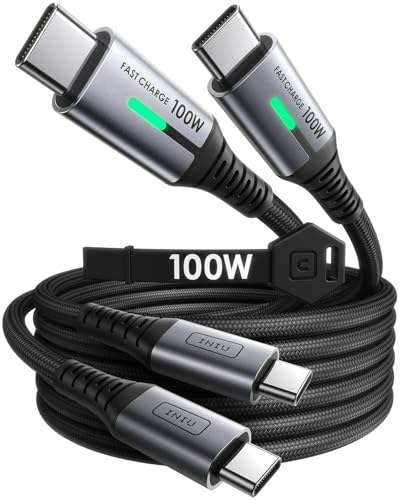
The INIU 100W 2 Pack is our pick for the best USB C cable in Australia. Its Amazon AU listing shows 4.8 stars from 56,051 ratings, two 1m cables rated 100W and a 3 year care promise, and INIU AU sells it. The Anker 333 2 Pack is the close alternative at 4.7 stars from 68,686 ratings.
A USB C cable, also called a Type C cable, has a USB C plug at both ends and carries power, data or both. The plug is standard but the ability is not: a 100W cable and a 240W cable can look identical, so the watts and the data speed are in the listing, not on the plug. This guide compares six USB C to USB C cables from their Amazon AU listings. We did not test them, so every figure is what the listing states. Each product card shows its current stock status.
| Pick | Best for | Key spec | Rating and count |
|---|
| INIU 100W USB C Cable, 2 Pack, 1m | Best overall, two 1m leads | 100W, 45,000+ bending test per the listing, data speed not stated in the bullets or details table | 4.8 from 56,051 |
| JSAUX 100W USB C Cable, 2 Pack, 2m | 2m reach, two leads | 100W, eMarker chip, 480Mbps data | 4.6 from 30,730 |
| Anker 333 USB C to USB C Cable, 2 Pack | Close alternative with a lifetime warranty | 100W with a compatible charger, 12,000 bend lifespan, 3.3 ft per the title | 4.7 from 68,686 |
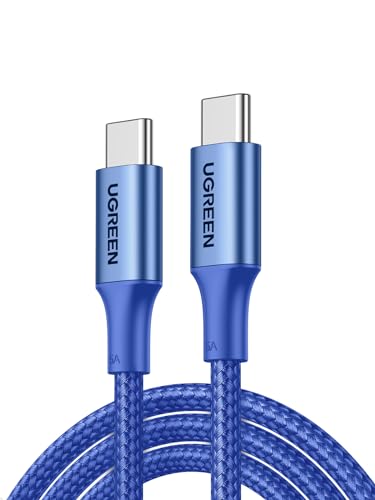
| UGREEN 100W USB C Cable, 2m | One 2m lead | 100W, up to 10,000 bends, 480Mbps data | 4.7 from 16,760 |
| UGREEN 240W USB C Cable, 2m | Laptops that draw more than 100W | 240W, eMarker (HUB332A) chip, up to 10,000 bends | 4.8 from 5,150 |
| Samsung C to C Cable, 1.8m | A Samsung branded lead | Max 100W in the title, Super Fast Charging 2.0 for compatible devices | 4.7 from 50 |
Should you buy a 60W, 100W or 240W USB C cable?
Buy 100W unless your laptop and charger are rated higher. All six cables here are listed at 100W or more, and the UGREEN 240W lists Max 48V 5A for 240W. The JSAUX listing notes that actual charging speed depends on your device and wall charger, so a bigger cable only helps when both support it.
If the cable plugs into a power board, see our surge protected power boards with USB C ports compared by joules.
A 60W cable is enough for phones and tablets, while laptops suit 100W or more. The INIU listing says its 100W cable can power phones, tablets and laptops, and the JSAUX listing says a MacBook Pro 14 reaches up to 68% in 35 minutes, depending on your device and wall charger. Our tablet guide and power bank guide cover devices you may charge with these cables.
What is an eMarker chip and do you need one?
An eMarker chip lets a cable tell the charger what it can carry. The JSAUX listing says its chip identifies the charging device and power, and the UGREEN 240W listing names an eMarker (HUB332A) chip for its 240W rating. The INIU, Anker, UGREEN 100W and Samsung bullets do not mention one.
The JSAUX names an eMarker chip at 100W, while the INIU, Anker, UGREEN 100W and Samsung listings reach 100W without naming one in their bullets. The UGREEN 240W is the only listing here that pairs an eMarker chip with 240W.
Which USB C cable has the fastest data transfer rate?
None of the six lists a fast data speed. The UGREEN listings state up to 480Mbps, the Samsung bullets state up to 480 Mbps and the Anker details table shows 0.48 gigabits per second. The INIU bullets and details table state no data speed. For SSDs, monitors or docks, look for a cable listed at 20 or 40 Gbps.
480Mbps is USB 2.0 speed. The JSAUX details table shows 480 Megabits Per Second, and the UGREEN 100W listing says about 1GB in 30 seconds, which suits an occasional photo dump rather than a large backup. For big files, buy a separate data cable and treat these six as charging cables.
When you need a data or video cable instead
The Anker, JSAUX, UGREEN 100W and UGREEN 240W listings each say the cable does not support video output, and the INIU and Samsung bullets do not mention video. For a portable monitor or a fast external drive, buy a cable that states video or high speed data support. Our portable monitor guide and portable SSD guide cover those devices.
How long should a USB C cable be?
Pick the length for where you sit. The JSAUX and both UGREEN titles say 2M, the Samsung title says 1.8M and the INIU pack is 1m each. The Anker title and details table say 3.3 ft, though its What You Get line says 6ft, so check the length shown before you buy.
A 2m cable reaches the couch or the far side of a desk, while a 1m cable keeps a desk or a power bank tidy. The 2m options are the JSAUX pair and the single UGREEN 100W and 240W leads.
Build and bend lifespan
The listings quote different bend figures. INIU says its cable stayed intact after a 45,000+ bending test, Anker quotes a 12,000 bend lifespan, and both UGREEN listings say up to 10,000 bends. The JSAUX and Samsung bullets state no bend rating. These are listing claims, not our own tests.
INIU lists FLYWEAVE braided nylon, Anker lists a hard wearing nylon exterior, and both UGREEN cables are nylon braided with aluminium housing. A braided nylon jacket is one more thing to compare when you choose a lead for a bag or the car.
Matching the cable to the job
You do not need one perfect cable, you need the right cable for each job. For a phone, the INIU listing names the iPhone 15 series, the JSAUX listing names iPhone 15 to iPhone 18 models and Pixel series, and the UGREEN listings name Galaxy S26 and Pixel series. For a laptop, the INIU listing names the MacBook Pro 16, the JSAUX listing names the MacBook Pro 14 and the UGREEN listings name MacBook, ThinkPad and Surface laptops.
For a gaming handheld, the JSAUX listing names Steam Deck, Switch 2 and Switch OLED/Lite. In the car, use a braided lead such as the INIU or a UGREEN next to your car phone mount, and keep it tidy with our cable clips guide. If you are short of ports rather than watts, a USB C hub adds ports to a laptop. For an SSD, monitor or dock, buy a data or video cable instead.
Best overall: INIU 100W USB C Cable, 2 Pack, 1m
We rank the INIU first on its Amazon AU rating: 4.8 stars from 56,051 ratings, against 4.7 stars from 68,686 for the Anker. The pack holds two 1m cables rated 100W, and the listing quotes FLYWEAVE braided nylon that stayed intact after a 45,000+ bending test, a 3 year care promise and an iPhone 15 series reaching 71% in 30 minutes. The bullets and details table state no data speed or video support, so treat it as a charging cable. INIU AU sells it and Amazon ships it.
JSAUX 100W USB C Cable, 2 Pack, 2m: more reach
The JSAUX pack gives you two 2m cables, enough to reach the couch or the far side of a desk. The listing says it supports up to 100W (20V/5A) and has a built in eMarker chip that identifies the charging device and power. It says a MacBook Pro 14 reaches up to 68% in 35 minutes, depending on your device and wall charger. Data is 480Mbps and the listing says it does not support video output. It has 4.6 stars from 30,730 ratings, sold by JS Digital AU.
Anker 333 USB C to USB C Cable, 2 Pack: the close alternative
The Anker has the most ratings of the six, 4.7 stars from 68,686, and a lifetime warranty. Its listing says charging up to 100W when used with a compatible charger, and a hard wearing nylon exterior with a 12,000 bend lifespan. The length is stated two ways: the title and details table say 3.3 ft while the What You Get line says 6ft, so check the length shown before buying. The details table shows 0.48 gigabits per second and the listing says it does not support video output. AnkerDirect AU sells it.
UGREEN 100W USB C Cable, 2m: a single lead
A single 2m lead for anyone who does not want a spare. The listing gives Max 20V 5A for 100W, nylon braiding up to 10,000 bends, aluminium housing, high purity copper wire and triple shielding. It states up to 480Mbps, about 1GB in 30 seconds, and says it does not support video output. It has 4.7 stars from 16,760 ratings, sold by UGREEN GROUP LIMITED AU.
UGREEN 240W USB C Cable, 2m: for high power laptops
A 2m braided cable listed at 240W, Max 48V 5A, with an eMarker (HUB332A) chip. It only helps for a laptop that draws more than 100W, paired with a charger that supports it. The listing states up to 10,000 bends and up to 480Mbps, and says it does not support video output, so treat it as a charging cable. It has 4.8 stars from 5,150 ratings, sold by UGREEN GROUP LIMITED AU.
Samsung C to C Cable, 1.8m: the Samsung branded option
The Samsung is the only Samsung branded cable here. Its title says 5A and Max 100W and its bullets say up to 100 watts and 5 amps, but the details table shows 3 Amps for maximum current, so check before relying on 100W. The listing says it enables Super Fast Charging 2.0 for compatible devices and gives data transfer up to 480 Mbps. It has 4.7 stars from 50 ratings, a small base, and Amazon AU is the seller.
How we chose
We used Amazon AU listings only and compared six USB C to USB C cables on charging watts, eMarker chip, data speed, length, build figures, rating and number of ratings. We did not test the cables, so every figure is what the listing states. The seller lines read INIU AU, JS Digital AU, AnkerDirect AU, UGREEN GROUP LIMITED AU and Amazon AU, and the Last checked line below gives the date we read them.
Specs come from the maker's bullet points and the product information on each listing.
Last checked: 17 October 2026.
The bottom line
For most Australians the INIU 100W 2 Pack is the best USB C cable here: 4.8 stars from 56,051 ratings, two 1m cables and a 3 year care promise. The Anker 333 2 Pack is the close alternative, with the most ratings of the six at 68,686 and a lifetime warranty. Need reach? The JSAUX 2 Pack or the single UGREEN 100W gives you 2m. For a high power laptop, the UGREEN 240W lists 240W. The Samsung suits buyers who want a Samsung branded cable. Every cable here is a charging cable first, because none lists a fast data speed, so buy a separate cable for SSDs and monitors.
Frequently asked questions
What is the best USB C cable in Australia?
The INIU 100W 2 Pack is our pick. Its Amazon AU listing shows 4.8 stars from 56,051 ratings, two 1m cables rated 100W and a 3 year care promise, and INIU AU sells it. The Anker 333 2 Pack is the close alternative at 4.7 stars from 68,686 ratings, with a lifetime warranty.
Which is better, a 60W or 100W USB C cable?
A 60W cable is enough for phones and tablets, while laptops suit 100W or more. All six cables in this guide are listed at 100W or more. The JSAUX listing notes that actual charging speed depends on your device and wall charger, so check both before you rely on the full wattage.
Should I buy a 100W or 240W USB C cable?
Buy 100W unless your laptop and charger are rated higher. The UGREEN 240W listing shows Max 48V 5A with an eMarker (HUB332A) chip, but the JSAUX listing notes that actual charging speed depends on your device and wall charger. A 240W cable only helps when both the charger and the laptop support it.
Is 100W USB C fast charging?
Yes, with a compatible charger. The INIU listing says an iPhone 15 series reaches 71% in 30 minutes, and the JSAUX listing says a MacBook Pro 14 reaches up to 68% in 35 minutes. The Anker listing says its 100W applies when used with a compatible charger.
Which USB C cable has the fastest data transfer rate?
None of the six lists a fast data speed. Five listings state 480Mbps or 0.48 gigabits per second, which is USB 2.0 speed, and the INIU bullets and details table state no data speed. For SSDs, monitors or docks, look for a cable listed at 20 or 40 Gbps, such as USB4 or Thunderbolt.
What is an eMarker chip and do I need one?
An eMarker chip is how a cable tells the charger what it can carry. The JSAUX listing says its chip identifies the charging device and power, and the UGREEN 240W listing names an eMarker (HUB332A) chip for its 240W rating. The INIU, Anker, UGREEN 100W and Samsung bullets do not mention one.
How long should a USB C cable be?
Choose the length by where the cable will sit. The JSAUX and both UGREEN titles say 2M, the Samsung title says 1.8M and the INIU pack is 1m each. The Anker title and details table say 3.3 ft, though its What You Get line says 6ft, so check the length shown before you buy.
Is the Samsung USB C cable worth buying?
Only if you want a Samsung branded cable. Its Amazon AU listing shows 4.7 stars from 50 ratings, a 1.8m length and Super Fast Charging 2.0 for compatible devices. The title says max 100W and 5A, but the details table shows 3 Amps, and the rating base is small.
Which is better, UGREEN or Anker?
Both have solid ratings. Anker has the larger rating base, 4.7 stars from 68,686 ratings, plus a lifetime warranty. UGREEN has 4.7 stars from 16,760 ratings for the 100W single cable and 4.8 from 5,150 for the 240W. Choose Anker for a pair, UGREEN for one 2m lead or 240W.
What is a USB C cable?
A USB C cable has the same connector at both ends and carries power, data or both. The plug is standard but the ability is not: the cables here run from 100W to 240W charging, and the listings state 480Mbps data where a speed is given. Check the watts and the data speed, not the plug.
Do I need a USB A to USB C cable instead?
Only if your charger or computer has USB A ports. All six cables in this guide have USB C at both ends, so they need a USB C port or a USB C wall charger. The JSAUX listing says it is not the USB A cable and needs a USB C wall charger.
Who makes the best quality USB C cables?
No single maker wins, but certification is a useful check. This guide covers Anker, INIU, JSAUX, UGREEN and Samsung cables. Of the six details tables, only the Samsung one lists USB-IF in its Specification Met row, so look for certification wording on any listing you buy.
Can you use a USB C cable for a monitor?
Only if the listing says so. The Anker, JSAUX, UGREEN 100W and UGREEN 240W listings each say the cable does not support video output, and the INIU and Samsung bullets do not mention video. For a monitor, look for a cable that states video support, such as USB4 or Thunderbolt.
Is a Lightning cable the same as USB C?
No. Lightning is Apple's older connector and does not fit a USB C port. The JSAUX listing names iPhone 15 to iPhone 18 series models as compatible with its USB C cable, so a recent iPhone can use a USB C cable. An older iPhone needs a USB C to Lightning cable, which is a different product.