You are out at work and your phone buzzes: "Motion detected at your front door." You pull up the live feed and see the delivery driver dropping off a package. You tap a button and say "Just leave it by the door, thanks" through your doorbell camera, from 30 kilometres away.
That is the everyday reality of a doorbell camera, and it is one of the best purchases you can make for a new home. The best doorbell camera in Australia for most homes is the Ring Battery Video Doorbell Pro, although saved video needs a Ring Protect plan. The eufy E340 kit has no monthly fee, while Ring and Google Nest both charge a monthly subscription for full video history. It deters package thieves (the mere presence of a visible camera reduces theft dramatically), it lets you check who is at the door without getting up, and it records evidence if anything does go wrong. A doorbell camera gives you 24/7 monitoring of your front door, the most common entry point for both visitors and burglars. Doorbell cameras sit alongside a smart lock and smoke alarm in the entry-tier smart-home stack, the three devices most first-home buyers install in week one.
But there is a catch that most people do not discover until after they have bought one: some doorbell cameras charge you a monthly subscription to access your own recordings. Ring, the most popular brand, charges a monthly fee for cloud video storage. That fee adds up year after year, on top of the purchase price. Other brands like Eufy and TP-Link Tapo store video locally for free, forever. Local-storage doorbells integrate with the same hub as the broader smart home devices guide, useful if you are already running cameras, locks and sensors through a single app.
Doorbell camera, video doorbell and front door camera all mean the same device in Australia, and this guide uses them interchangeably. This guide compares the best video doorbells available in Australia in 2026, with a focus on total cost of ownership, not just the sticker price.
Why Every New Homeowner Needs a Doorbell Camera
A doorbell camera (also called a video doorbell) is not about paranoia. It is about practical convenience and basic security. Here is what it actually does in daily life:
- Package delivery management. See when packages arrive, tell delivery drivers where to leave them, and have proof of delivery if anything goes missing. With the explosion of online shopping, this alone justifies the purchase.
- Deter porch pirates. Australia Post reported a significant increase in package theft in recent years. A visible doorbell camera is one of the most effective deterrents, and it pairs with a door and window sensor on the windows and back door, thieves do not want to be recorded.
- Know who is at the door before answering. Unexpected door knockers, salespeople, or strangers: you can see and speak to them without opening the door, even if you are in your pyjamas or not home.
- Security evidence. If someone does try to break in, vandalise your property, or steal a package, you have high-definition video evidence with timestamps that you can provide to police. This dramatically increases the chances of identifying the offender. A doorbell camera covers the front door only, so a security camera is what covers the rest of the block.
- Check on your home remotely. Travelling? Working late? Check your front door live from anywhere in the world via your phone.
- Monitor kids arriving home. Get a notification when your children arrive home from school, and see that they actually went inside rather than straight to a friend's house.
The utility you get from a doorbell camera is exceptional. It is one of the highest-value smart home purchases you can make. For more security options, check our complete security camera guide. A doorbell only ever watches the front door, so pair it with door and window sensors if you also want to know when the back door or a bedroom window opens.
Subscription vs No Subscription: The Hidden Cost
This is the single most important thing to understand before buying a doorbell camera, and it is the detail that most comparison sites gloss over.
Subscription-based cameras (Ring, Google Nest)
Ring stores video in the cloud, on Amazon's servers. Without a Ring Protect subscription, you get live view and real time alerts but no video recording. That means if you miss a live alert, the footage is gone. To record and review video, you need the subscription.
Google Nest Doorbell gives you free 3-hour event history (clips from the last 3 hours only). For 30 day history and 24/7 continuous recording, you need a Google Nest Aware subscription.
No-subscription cameras (Eufy, TP-Link Tapo, Reolink)
Eufy stores all video locally, either on the doorbell itself (8GB of built in storage on the E340 kit) or on a Eufy HomeBase if you have one. No cloud, no subscription, no monthly fees. Your video is stored on your property and accessible from the Eufy app anytime.
TP-Link Tapo stores video on a microSD card (up to 512GB) inserted in the camera. No subscription. You can also set up cloud storage with a Tapo Care plan, but it is entirely optional. The camera works perfectly without it.
Reolink stores on a microSD card or a Reolink NVR (network video recorder). No subscription for local storage.
Cloud video plans compared
| Camera | Cloud video plan |
|---|
| TP-Link Tapo | Optional paid plan; local microSD storage is free |
| Eufy Doorbell Dual | None; local storage with no monthly fee |
| Ring Doorbell 4 | Monthly plan needed to keep recordings |
| Google Nest Doorbell | Free 3 hour event history; paid plan for 30 day history |
The difference is the ongoing plan. Ring needs a monthly plan to keep recordings and Google Nest needs one for 30 day history, while Eufy and TP-Link Tapo need none. For most homeowners, a no-subscription camera offers better value. You get the same core functionality (video recording, alerts, two-way audio) without the ongoing cost.
Every pick side by side
| Doorbell | Power | Video | Storage and subscription |
|---|
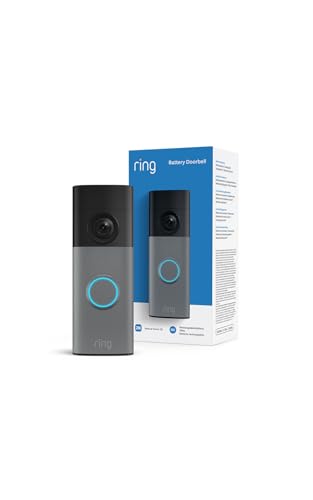
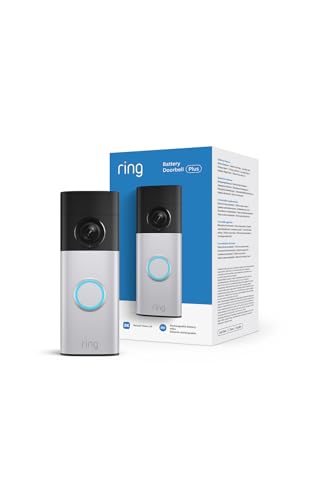
| Ring Battery Video Doorbell Pro (best overall) | Battery | 1536p HD, head to toe view, colour night vision | Saved video and package alerts need a Ring Protect plan, sold separately |
| Tapo D210 | Battery, up to 180 days per the listing | 2K, 160 degree view, full colour night vision | microSD or Tapo cloud, smart detection with no extra fees |
| eufy E340 kit | Battery, or wired at 16 to 24V | 2K, two cameras for visitors and the floor at your door | 8GB built in, no subscription |
| Ring Battery Video Doorbell 2K | Battery, recharges over USB-C | Retinal 2K, up to 6x zoom | Cloud recordings need a Ring Protect plan, sold separately |
| Ring Battery Video Doorbell 2K Plus | Battery, quick release pack | Retinal 2K, up to 6x zoom, colour night vision | Ring subscription plan, with a 30 day free trial in the listing |
| Reolink 2K HDR Battery Video Doorbell (2nd Gen) | Battery, or wired at 8 to 24VAC | 4MP 2K HDR, head to toe view | SD card up to 512GB, Reolink Home Hub or NVR, no subscription for smart detection |
| Tapo D225 | Battery, or wired at 8 to 24V | 2K QHD, 180 degree view | microSD up to 512GB, or the optional Tapo Care cloud plan |
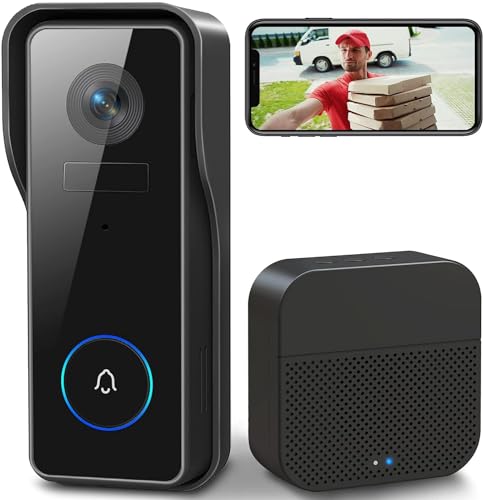
| XTU Doorbell Camera with Chime | Battery, 1 to 2 months per charge per the listing | 2K, 166 degree view | microSD up to 128GB (not included), or cloud storage |
Best overall: Ring Battery Video Doorbell Pro
The Ring Battery Video Doorbell Pro is our best overall pick because its Amazon Australia listing pairs one of the highest star ratings on this page with thousands of ratings, and Amazon Australia sells it itself. The listing describes 1536p HD video, a head to toe view for parcels on the doorstep, 3D motion detection with bird's eye zones that show on a map where motion began, and colour night vision.
Best Doorbell Cameras With No Subscription
If you want to buy once and never pay again, these are the best options:
TP-Link Tapo Doorbell Camera
The best budget option in the market. You get 2K resolution (sharper than Ring's 1080p), night vision, two way audio, motion detection with zones, and local storage via a microSD card, all with zero monthly fees. The Tapo app is clean and responsive, and you can set up motion zones so you do not get alerts every time a car drives past. The main limitation is that it is battery-powered and needs recharging every 2 to 4 months depending on traffic at your door. For the price, it is exceptional.
Eufy Video Doorbell Dual
This is the doorbell to buy if parcels get left on your doorstep and you want no subscription. The "Dual" means it has two cameras, one at eye level for faces and one angled downward for packages. This solves the biggest complaint about standard doorbells: you can see who is there AND see if they left a package at your feet. Resolution is 2K, local storage is built in (no SD card needed), human-only AI detection means fewer false alerts from pets and cars, and there is zero subscription cost. The E340 kit carried here has 8GB of built in storage and can pair with an existing mechanical chime, a eufy HomeBase 2 or 3, or a Minibase Chime.
Reolink Video Doorbell Wi-Fi
Reolink is a strong contender for people who want a wired doorbell camera (powered by existing doorbell wiring) with no subscription. It records to a microSD card and offers 2K+ resolution, person/vehicle detection, and a wide-angle lens. The Reolink app is functional if not as polished as Eufy's. If you have existing doorbell wiring and want a reliable, no-subscription option, Reolink is a solid choice.
Best Doorbell Cameras With Subscription
Subscription-based cameras are not inherently bad. They offer some features that local-storage cameras do not, like cloud backup (your footage is safe even if the camera is stolen) and more advanced AI processing. If you do not mind the monthly cost, these are the best options:
Ring Video Doorbell 4
Ring is the most popular doorbell camera brand in the world, and for good reason. The Video Doorbell 4 includes Pre-Roll Video, a feature that captures 4 seconds of black-and-white footage before the motion event is triggered, so you see the full context of what happened, not just the moment the camera woke up. This is a genuine advantage over most competitors. You also get seamless integration with Alexa (announce visitors on Echo devices, view the camera on Echo Show), a massive accessory ecosystem (solar panels, corner mounts, wedge kits), and Ring's Neighbourhood feature where users share security alerts in their area.
The downside: without a Ring Protect plan, you do not get video recording. You can see the live feed and get alerts, but you cannot review footage after the fact. For most people, the subscription is a must, which adds to the running cost every year.
Google Nest Doorbell (2nd Gen)
The Nest Doorbell offers best-in-class AI detection, it can tell the difference between people, animals, vehicles, and packages, and send you specific alerts for each. The 3 hour free event history is useful for catching recent events, but if you want 30 day history and 24/7 continuous recording, you need the paid Nest Aware subscription. Integration with Google Home is seamless, and the camera quality is excellent. However, with the paid plan added it costs more to run than the no subscription options on this list.
Battery vs Wired Doorbell Cameras
This is the other big decision: do you want a battery-powered camera (easy to install, needs periodic recharging) or a wired camera (never runs out, but needs existing doorbell wiring or an electrician to install)?
Battery-powered
- Installation: 10 minutes with a screwdriver. No wiring needed. Mount the bracket, attach the camera, connect to Wi-Fi.
- Recharging: Every 2 to 6 months depending on traffic and settings. Some models support solar panel charging, sold separately, to extend this indefinitely.
- Limitations: Cannot record 24/7 continuously (only records when motion is detected, to preserve battery). Live view is slightly delayed (1 to 3 seconds) because the camera needs to "wake up."
- Best for: Renters, homes without existing doorbell wiring, anyone who wants a quick DIY install.
Wired
- Installation: Requires existing doorbell wiring (8 to 24V transformer). If you do not have existing wiring, an electrician can install one.
- Power: Always on. Never needs recharging.
- Advantages: Faster response time (no wake-up delay), can support 24/7 continuous recording on some models, rings your existing indoor doorbell chime.
- Best for: Permanent homes with existing doorbell wiring, anyone who does not want to think about recharging.
Our recommendation: start with battery-powered. It takes 10 minutes to install, there is no risk of messing up wiring, and the recharging frequency (every 3 to 6 months for most users) is genuinely not a hassle. If you find yourself wanting 24/7 recording or faster response times, upgrade to wired later, or add a solar panel to your battery camera for continuous charging.
How to Install a Doorbell Camera
One of the best things about modern doorbell cameras is how easy they are to install, especially battery-powered models. Here is what to expect:
Battery-powered installation (10 minutes)
- Download the manufacturer's app (Eufy, Tapo, Ring, etc.) and create an account.
- Charge the camera fully using the included USB cable (takes 4 to 6 hours for a full charge).
- Use the included mounting bracket as a template to mark screw holes on your wall or door frame.
- Drill pilot holes (the camera comes with the right drill bit or wall plugs for brick, timber, and render).
- Screw the mounting bracket to the wall.
- Click the camera onto the bracket.
- Follow the app prompts to connect to your Wi-Fi and configure motion zones, alerts, and recording settings.
Total time: 10 to 15 minutes. Tools needed: a drill, a Phillips screwdriver, and a phone. That is it.
Wired installation (30 minutes if you have existing wiring)
- Turn off the power to your existing doorbell at the circuit breaker.
- Remove your existing doorbell and disconnect the wires.
- Connect the doorbell camera's wires to the existing low-voltage wires (they are safe to touch, typically 8 to 24V).
- Mount the camera using the included bracket and screws.
- Turn the power back on.
- Follow the app prompts to complete setup.
If you do not have existing doorbell wiring, an electrician can run a cable and install a transformer. This is a straightforward job that most sparks can do in under an hour.
Is it legal to record audio on a doorbell camera in Australia?
Under section 43 of Queensland's Invasion of Privacy Act 1971, using a listening device to record a private conversation carries a maximum penalty of 40 penalty units or 2 years in prison, unless the person using the device is a party to the conversation. A doorbell microphone can pick up conversations on your porch and audio rules vary by state, so check your own state's law before you leave audio recording on.
Doorbell cameras run on Wi-Fi at the front of the house, which is often the weakest signal point. Pair with a quality mesh Wi-Fi system if your router sits at the back.
How we picked
This guide is research, not a hands on test. We compared each doorbell's video resolution, power, storage and subscription terms from its Amazon Australia listing, and checked every card's seller and stock on Amazon Australia; the listing that could not be bought on Amazon Australia on 9 October 2026 carries a dated warning on its card. Star ratings and review counts come from those listings.
For the legal and privacy answers we used section 43 of Queensland's Invasion of Privacy Act 1971 as published on the Queensland Government legislation website, Scientific American's report on the doorbell study, MIT Technology Review's look at Ring's burglary claims and 9to5Mac's reporting on the Eufy security complaints.
Last checked: 9 October 2026, covering the stock, seller and rating of every listing on Amazon Australia.
Frequently Asked Questions
What is the best video doorbell in Australia?
Video doorbell and doorbell camera describe the same device. Our top pick is the Ring Battery Video Doorbell Pro, which has 1536p video and a head to toe view, although saved recordings need a Ring Protect plan. For no monthly fee the eufy E340 kit records locally and adds a second downward camera that catches parcels left at your feet, not just visitors at head height. The Tapo D210 is the budget pick. Full picks and trade-offs are ranked above.
Do doorbell cameras work at night?
Yes. All modern doorbell cameras include infrared night vision, which provides a clear black-and-white image in complete darkness. Some premium models (Eufy, Ring Pro) also have colour night vision that uses built-in spotlights to illuminate the area in full colour. Night vision typically activates automatically when ambient light drops below a certain level. The range is usually 5 to 10 metres, more than enough to cover your front porch and footpath.
Can I install a doorbell camera if I'm renting?
Yes, battery-powered doorbell cameras can be installed with minimal impact. Some models use adhesive mounting strips instead of screws, leaving no marks at all. If you do need screws, the two small holes left by the mounting bracket can be easily filled when you move out. Most rental agreements allow minor modifications like this. To be safe, check with your landlord or property manager first. When you move, you simply take the camera with you, battery-powered models are completely portable.
Are doorbell cameras worth it for security?
Absolutely. Studies consistently show that visible security cameras are one of the most effective deterrents against burglary and package theft. The front door is the most common point of approach for both legitimate visitors and would-be criminals. A doorbell camera gives you 24/7 monitoring of this entry point, motion-triggered recording, and video evidence that can be provided to police if an incident occurs. Combined with motion-triggered alerts on your phone, you are notified immediately if anyone approaches your door, whether you are home, at work, or on holiday.
Which is better, Eufy or Ring?
Eufy on total cost, Ring on ecosystem. Ring charges a monthly fee for cloud video, while Eufy stores locally for nothing. Ring wins on the number of accessories, the chime range and Alexa integration, and its app is the more polished of the two. If you want to buy once and never pay again, Eufy is the answer.
Why are people moving away from Ring doorbells?
The subscription is the main reason. Without a plan a Ring doorbell shows you a live view and sends alerts, but it does not keep the recording, so the monthly plan is not really optional if you want video evidence. Local storage brands like Eufy, TP-Link Tapo and Reolink do the same job with storage on the camera and no ongoing fee, which is why the no subscription category has grown.
How much does a doorbell camera subscription cost in Australia?
Ring charges a monthly fee, which adds up over the years you own the camera. Google Nest also charges a monthly fee for 30 day history and continuous recording. TP-Link Tapo offers an optional Tapo Care plan that you can ignore entirely, and Eufy and Reolink charge nothing because the video is stored locally, on the camera or on a microSD card. Add the subscription to the sticker price before you compare anything.
What is the best front door camera in Australia?
For a front door specifically, a video doorbell beats a general security camera because it gives you a doorbell button, a two-way intercom and a head-to-toe view of whoever is standing on the step. The Ring Battery Video Doorbell Pro is our top pick for the front door, and the eufy E340 kit adds a second camera pointed at the ground so you can see a parcel left on the mat. If you also want coverage of the driveway and the back of the house, add a separate camera rather than trying to make the doorbell do it.
How do you charge a battery doorbell camera?
Most battery models on this page unclip from their mounting bracket, usually with a small pin or a release tab, and charge over USB-C in two to five hours. Expect to do it every two to four months depending on how much traffic your door gets. Two things shorten it sharply: a motion zone that catches passing cars, and cold weather. Narrow the motion zone to the path and the doorstep and you will roughly double the interval between charges.
What is the best doorbell camera for the money?
The TP-Link Tapo is the budget pick. It gives you 2K resolution, which is sharper than the 1080p on a Ring Video Doorbell 4, plus night vision, two way audio, motion zones and local microSD storage with no subscription. Over five years the Ring's monthly plan keeps adding to its cost, while the Tapo's local storage does not. It is battery powered, so plan on recharging it every two to four months.
What's the best brand of doorbell camera?
Ring is the brand we would start with, because the Ring Battery Video Doorbell Pro is our best overall pick, although saved recordings need a Ring Protect plan. Choose Eufy or Tapo if you want no monthly fee: the eufy E340 kit has 8GB of built in storage, and the Tapo D210 supports a microSD card.
What was the Eufy camera scandal?
The Eufy camera scandal was a privacy dispute over whether cameras sold as local storage kept footage off the cloud. 9to5Mac reported that data said to be stored locally was sent to the cloud, and that the cameras could and did produce unencrypted video streams for Eufy's web portal.
Do burglars avoid homes with Ring doorbells?
No strong evidence shows that burglars avoid homes with Ring doorbells. Researchers found no strong evidence that video doorbells decrease property crime across Los Angeles, and a statistician told MIT Technology Review the 55 percent burglary drop Ring claimed could not be seen. Buy one to see and record visitors, not as a guaranteed deterrent.
What is the best doorbell camera without a subscription?
For no monthly fee, start with the eufy E340 kit or the Tapo D210. The eufy has two cameras and 8GB of built in storage, so parcels at your feet are covered without a plan, while the Tapo D210 is the budget option with microSD storage and smart detection at no extra fee. Reolink's battery doorbell also needs no subscription for smart detection.