How we pick a WiFi router for Australian homes
Of the six routers checked here, the TP-Link Archer AX55 Pro is the one we recommend first. Its Amazon AU listing shows AX3000 WiFi 6, a 2.5G port in its title and bullets and a 4.6 rating from 335 ratings. The TP-Link Archer AX1800 is the lowest speed tier here, and the NETGEAR Nighthawk RS100 is the only WiFi 7 router. If your problem is coverage across a big house rather than raw speed, a mesh system suits better than one router.
Buying a standalone WiFi router comes down to four questions: which WiFi standard you need, how fast a speed tier suits your home, how far the signal has to reach, and how many devices you run at once. Every title names a router, and every product table answers No to Is Modem Compatible. The six range from an AX1800 WiFi 6 unit to a WiFi 7 Nighthawk and a tri band WiFi 6E gaming router. TP-Link has four of the six cards, ASUS has one and NETGEAR has one.
For another connected device, compare the phone control options for an existing garage motor.
We use two sources: the Amazon AU listings, and the makers' own information on those listings. Specs come from the maker's bullet points and the product information on each listing, including the title, description and any A+ content. We quote what the listing states and name the part it sits in. Where a listing gives one fact two ways, we show both values or leave the figure out. We do not test routers or promise speeds, and we show no prices here, so check the live Amazon AU price before you buy.
Last checked: 24 October 2026.
How do the six routers compare at a glance?
This table sets the six listings side by side: the WiFi standard, the internet port speed each listing states, and the Amazon AU rating. The AX55 Pro and Nighthawk list a 2.5G port in their titles and bullets, the GXE75 lists 2.5 Gbps, the AX55 and AX1800 tables give 1000 Mbps, and the ASUS table gives 5400 Mbps.
| Router | WiFi standard | Internet port speed the listing states | Rating (count) | What the listing names |
|---|
| TP-Link Archer AX55 Pro WiFi 6 Router | WiFi 6 | 2.5G port in the title and bullets; the product table says 1000 Mbps | 4.6 (335) | HomeShield, VPN client, OneMesh |
| TP-Link Archer AX55 WiFi 6 Router | WiFi 6 | 1000 Mbps in the product table | 4.5 (3,728) | OFDMA, 3 year warranty |
| TP-Link Archer AX1800 WiFi 6 Router | WiFi 6 | 1000 Mbps in the product table | 4.4 (93) | EasyMesh, Parental Control |
| NETGEAR Nighthawk RS100 WiFi 7 Router | WiFi 7 | 2.5 Gig internet port in the title and bullets; the product table says 1000 Mbps | 4.2 (827) | 185 sq. m., NETGEAR Armor trial |
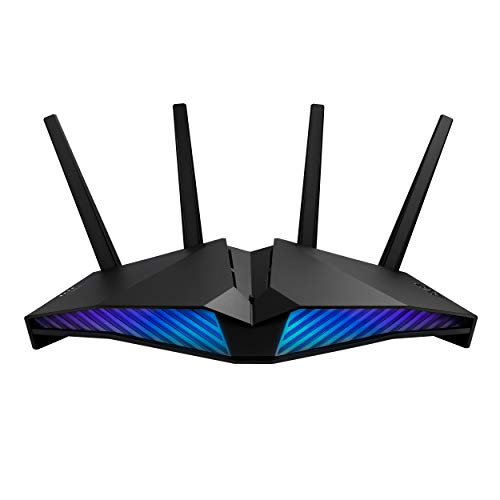
| ASUS RT-AX82U AX5400 Gaming Router | WiFi 6 | Product table says 5400 Mbps, the same as its WiFi figure | 4.4 (2,794) | Gaming Port, AiMesh |
| TP-Link Archer GXE75 AXE5400 WiFi 6E Router | WiFi 6E | 2.5 Gbps in the title, bullets and product table | 4.7 (145) | 6 GHz band, Game Acceleration |
Ratings and counts are those each Amazon AU listing showed when we read it, as dated in the method section above.
Best overall: TP-Link Archer AX55 Pro WiFi 6 Router
The Archer AX55 Pro is the AX55 with a 2.5G port added. Its title gives AX3000, 160MHz and 2.5Gbps, and its description lists a 1× 2.5 Gigabit WAN/LAN port, a 1× Gigabit WAN/LAN port, 3× Gigabit LAN ports and a USB 3.0 port, with AX3000 WiFi at up to 3.0 Gbps (2402 Mbps + 574 Mbps) in the bullets. The product table adds 5 ports, 4 antennas and a 3 year manufacturer warranty.
The listing shows 4.6 from 335 ratings, with Amazon AU as the seller. The Archer GXE75 shows a higher 4.7, but from 145 ratings, and the Archer AX55 shows 4.5 from 3,728 ratings. We put the Pro first because it pairs a 4.6 on 335 ratings with a 2.5G port that the AX55 listing does not show.
Two parts of this listing differ. The title, bullets and description give a 2.5 Gigabit WAN/LAN port, while the product table's LAN Port Bandwidth row says 1000 Mbps. The bullets say four high gain antennas, the description says external antennas, and the product table lists the antenna type as Internal. We name both and do not rank on either.
The bullets say it supports OneMesh with a OneMesh supported Range Extender, so you can add one later if a far room stays weak. The description gives power as 12 V/ 2 A (US Version) and 12 V/ 1.5 A (EU Version) and names no Australian version, so check the plug and voltage on the adapter that arrives. The bullets also list VPN client support, TP-Link HomeShield and compatibility with Alexa.
TP-Link Archer AX55 WiFi 6 Router
On 24 October 2026 this listing showed no buy box seller and no add to cart button, so check who sells and ships it before you order.
The title gives AX5400 WiFi 6, a Gaming Port, Mobile Game Mode, Aura RGB, AiProtection Pro, Instant Guard and AiMesh compatibility. The bullets give speeds up to 5400 Mbps on 160MHz channels, a 1.5 GHz tri core processor and a one click sharable secure VPN when away from home. It shows 4.4 from 2,794 ratings on Amazon AU.
The product table lists 5 ports and 4 antennas, with a LAN Port Bandwidth row of 5400 Mbps, which matches its WiFi figure, so we do not read it as a wired port speed. It lists the voltage as 110 Volts (AC) and names no Australian plug, so confirm the plug and voltage with the seller before you buy. The item type name row adds MU-MIMO, Dedicated Gaming Port and Lifetime Free Internet Security.
TP-Link Archer GXE75 AXE5400 WiFi 6E Router
The Archer GXE75 is the only WiFi 6E router here and shows the highest rating of the six: 4.7 from 145 ratings on Amazon AU. The bullets describe a 6 GHz band with exclusive bandwidth and congestion free channels for Wi-Fi 6E devices, speeds up to 5.4 Gbps, a 2.5 Gbps port with 4 Gbps ports and a USB 3.0 port, Game Acceleration, a Gamers Private Network, four antennas with Beamforming, and HomeShield with parental controls.
The bullets label it NBN2000 and say it fully supports NBN's 2000 Mbps speeds; those are the listing's words, not our test. The product table lists 240 Volts, a LAN Port Bandwidth of 2.5 Gigabits per second and QoS among its special features. The bullets say the 6 GHz band is for Wi-Fi 6E devices, so check that your phones and laptops support WiFi 6E.
The WiFi standard: 6, 6E or 7
The standard names a router's generation, so it is worth getting right. The product tables give the generation for all six listings:
- WiFi 6 (AX): four of the six, the Archer AX1800, Archer AX55, Archer AX55 Pro and ASUS RT-AX82U. Their product tables give the generation as Wi-Fi 6 or WiFi 6.
- WiFi 6E (AXE): the Archer GXE75, whose bullets say the 6 GHz band offers exclusive bandwidth and congestion free channels for Wi-Fi 6E devices.
- WiFi 7 (BE): the NETGEAR Nighthawk RS100, whose bullets say WiFi 7 delivers 1.2x faster speeds than WiFi 6.
The catch with 6E and 7 is that the extra band or standard helps only with devices that also support it, so check your phones and laptops before you pay for either. The wireless compatibility rows differ too: the AX55 Pro table lists 802.11ac and 802.11ax, the ASUS table lists 802.11a, 802.11ac, 802.11ax, 802.11g and 802.11n, and the Nighthawk table lists 802.11.be.
The speed tier: AX1800, AX3000 or AX5400
The number after the standard is a headline speed class, not a promise of real speeds. On the Archer AX55 Pro, the bullets describe AX3000 as up to 3.0 Gbps (2402 Mbps + 574 Mbps), and the description gives 2402 Mbps on 5 GHz and 574 Mbps on 2.4 GHz. The tiers on these listings are:
- AX1800: the Archer AX1800, with 1.8 Gbps in its title, the lowest tier here.
- AX3000: the Archer AX55 and AX55 Pro, whose product tables both give a Data Transfer Rate of 3000 Megabits Per Second.
- BE3600: the NETGEAR Nighthawk RS100, with up to 3.6 Gbps in its title.
- AX5400 and above: the ASUS RT-AX82U, with speeds up to 5400 Mbps in its bullets, and the Archer GXE75, with AXE5400 in its title and speeds up to 5.4 Gbps in its bullets.
A tier far above what your home uses gives you speed you never use, and one too low can become the bottleneck when everyone is online. Your internet plan and the walls between the router and each room set what you actually get.
Coverage and antennas for a bigger home
The product tables give the antenna count: 4 for the Archer AX1800, AX55, AX55 Pro, ASUS RT-AX82U and Archer GXE75, and 2 for the NETGEAR Nighthawk RS100. The AX55 and AX55 Pro bullets say four high gain antennas with Beamforming. The AX55 bullets add external while its table says Internal, and the AX55 Pro description says external while its table also says Internal. The Nighthawk title gives coverage up to 185 sq. m., and the GXE75 bullets say four optimally positioned antennas. We found no wall figure on the Nighthawk listing.
A single router can struggle to push a strong signal through several walls and floors. If that sounds like your place, a mesh system that spreads nodes around the house suits better than any one unit. If the weak spot is one room, a compact Wi-Fi extender is the lighter fix. The AX55 Pro bullets list OneMesh support, the AX1800 title says EasyMesh and the ASUS title says AiMesh Compatible, so each can grow later. See our mesh page if coverage rather than raw speed is your real problem.
How many devices a router can juggle
OFDMA is the technology the listings name for serving more devices at once. The AX1800 bullets say it communicates with more devices using OFDMA while simultaneously reducing lag, and the AX55 and AX55 Pro bullets say OFDMA technology increases capacity by 4 times to enable simultaneous transmission to more devices. That is the makers' claim, not our test. The Nighthawk title gives 50 devices.
OFDMA appears in the bullets of three of the six listings. MU-MIMO appears in the ASUS product table's item type name row and in the title of a video on the AX55 listing, so we do not claim every router has both.
Count your own devices before you choose: phones, laptops, TVs, speakers, cameras, doorbells and plugs all use the network.
Device count is the quiet reason a router ages badly. A house that added a doorbell, three speakers, a robot vacuum and a set of smart home devices is asking far more of the same router than it did two years ago, and the listings that name OFDMA say it helps a router serve more devices at once.
Security features the listings name
We do not test security; these are the listings' words. The Archer AX55 Pro bullets name TP-Link HomeShield (enhanced security) and VPN client support. The GXE75 bullets name HomeShield with robust parental controls and real time IoT security. The Archer AX1800 table lists Parental Control as a special feature, and the GXE75 table adds Guest Mode, Parental Control and QoS. The Nighthawk bullets name security measures and updates and NETGEAR Armor with a 30 day trial, and its table says Has Security Updates: Yes. The ASUS title names AiProtection Pro and Instant Guard, with AiProtection Pro powered by Trend Micro in the bullets.
The security protocol rows differ by part of the listing. The AX1800 title and table both name WPA3. The AX55 title names WPA3, while its product table lists the security protocol as WPS. The AX55 Pro table lists WPS only. The Nighthawk table lists WPA3, WPA2-PSK and WPS, and the ASUS and GXE75 tables list WPA3.
Gaming features: Game Acceleration and Mobile Game Mode
The gaming features on these listings are about lag and latency. The ASUS RT-AX82U title names a Gaming Port and Mobile Game Mode, and its bullets say Mobile Game Mode minimizes lag and latency for mobile gaming with just a tap on the ASUS Router app. The Archer GXE75 bullets name Game Acceleration to reduce lag and latency during network congestion for mobile gaming, and a Gamers Private Network, and its table lists QoS as a special feature. These are the makers' claims on the listings, not our test results.
The ASUS item type name row also lists Game Acceleration and a Dedicated Gaming Port, and the GXE75 title ends with the word Game. Neither the AX55 Pro, AX55, AX1800 nor Nighthawk titles name a gaming feature.
Ethernet ports including faster 2.5G
Wired connections suit anything that does not move, such as a desktop PC, a console or a NAS, so the ports matter. The listings give port speeds in different parts. The AX55 and AX1800 product tables give a LAN Port Bandwidth of 1000 Mbps and 4 ports. The GXE75 listing states a 2.5 Gbps port in its bullets and 2.5 Gigabits per second in its table. The AX55 Pro and Nighthawk titles and bullets state a 2.5G internet port, while their product tables give a LAN Port Bandwidth of 1000 Mbps. The ASUS table row says 5400 Mbps, equal to its WiFi figure, so we do not read it as a port speed.
A 2.5G port is a port rated at 2.5 Gbps. The Nighthawk bullets say its 2.5 Gig internet port enables multi gig speeds with the latest cable or fiber internet service plans. Whether that matters to you depends on your plan, which your internet provider can tell you.
Internet plans and these routers
The listings make these statements about plans. The AX1800 and AX55 bullets say NBN ready for current high speed plans and future upgrades. The AX55 Pro bullets say its NBN ready design supports current high speed plans and is future proofed for upcoming faster NBN upgrades. The GXE75 bullets use the label NBN2000 and say it fully supports NBN's ultra fast speeds. The Nighthawk bullets mention cable or fiber internet service plans. We found no plan statement in the ASUS title or bullets.
Every product table answers No to Is Modem Compatible. We do not cover which connection types need a modem router, so ask your internet provider before you buy. If your home also runs a landline handset, see our cordless phone buying guide for an NBN home.
No router makes a slow plan faster, so a better router improves the WiFi inside the house, not the plan. WiFi speed and plan speed are different problems: a device far from the router can be limited by the walls in between before it is limited by the plan, which is where a mesh wifi system earns its price.
Where the listings disagree with themselves
Some listings give one fact two ways. We name both values, say where each sits and do not rank on either:
- AX55 Pro ports: the title, bullets and description give a 2.5 Gigabit WAN/LAN port, while the product table's LAN Port Bandwidth row says 1000 Mbps.
- AX55 Pro antennas: the bullets say four high gain antennas, the description says external, and the product table says Internal.
- AX55 antennas: the bullets say external, and the product table says Internal.
- AX55 security: the title names WPA3, and the product table lists WPS.
- AX55 Pro power: the description gives 12 V/ 2 A (US Version) and 12 V/ 1.5 A (EU Version) and names no Australian version.
- Nighthawk ports: the title and bullets list a 2.5 Gig internet port and 4 x 1 Gig LAN ports, while the product table says Number of Ports 3 and 1000 Mbps.
- Nighthawk speed unit: the title says up to 3.6 Gbps, while the table's Data Transfer Rate row reads 3600 Gigabits Per Second.
- Nighthawk power: the product table says 240 Volts, and the box row names a 12V/1.5A power adapter.
- ASUS port speed: the title and bullets give none, and the product table says 5400 Mbps, the same as its WiFi figure.
- ASUS voltage: the product table says 110 Volts (AC) and names no Australian plug.
Which router for which home
Start with the Archer AX55 Pro: it lists AX3000 WiFi 6, a 2.5G port in its title and bullets, and 4.6 from 335 ratings. Pick the Archer AX55 if you want the larger rating count of 3,728 and the 1000 Mbps ports in its product table are enough. Pick the Archer AX1800 for a flat or small home if the lowest speed tier suits your devices. Pick the NETGEAR Nighthawk RS100 if you own WiFi 7 devices, the ASUS RT-AX82U or the Archer GXE75 if gaming features matter, and the GXE75 if you own WiFi 6E devices. If the real problem is coverage across a big, multi storey home, a single router is the wrong tool.
Frequently Asked Questions
What is the best Wi-Fi router in Australia?
Of the six routers we checked, the TP-Link Archer AX55 Pro is the one we recommend first. Its listing shows AX3000 WiFi 6, a 2.5G port in its title and bullets and a 4.6 rating from 335 ratings. The Archer GXE75 shows 4.7 from 145 ratings, and the NETGEAR Nighthawk RS100 is the only WiFi 7 router here.
Is Wi-Fi 6 worth it in Australia?
The listings name real benefits for WiFi 6: the TP-Link Archer AX55 says its OFDMA technology increases capacity by 4 times to enable simultaneous transmission to more devices, and four of our six routers are WiFi 6. That is the maker's claim, so check how many devices you run and whether your phones and laptops support WiFi 6.
What is the best Wi-Fi 7 router in Australia?
We checked one WiFi 7 router, the NETGEAR Nighthawk RS100. Its title shows BE3600 speeds up to 3.6 Gbps, a 2.5 Gig internet port and coverage up to 185 sq. m., and its listing shows a 4.2 rating from 827 ratings. The bullets say WiFi 7 delivers 1.2x faster speeds than WiFi 6, so check your devices support it.
Do you just plug in a new router?
It depends on your internet connection. Each of the six product tables answers No to Is Modem Compatible, and each listing is for a router, not a modem. The TP-Link Archer AX55, AX55 Pro, NETGEAR and ASUS listings name a cable in the box. Ask your internet provider whether your service needs a modem router.
Is TP-Link or Netgear better?
On these listings the TP-Link cards range from 4.4 to 4.7 stars, and the NETGEAR Nighthawk RS100 shows 4.2 from 827 ratings, but a star rating is not a verdict. NETGEAR is the only WiFi 7 router here. Choose by the WiFi standard, the port speeds and the features each listing states, not by brand alone.
What is the best router for my home?
It depends on your home and your internet plan. The TP-Link Archer AX1800 is the lowest speed tier here at 1.8 Gbps, and the AX55 Pro lists a 2.5G port in its title and bullets. The ASUS RT-AX82U and TP-Link Archer GXE75 are listed as gaming routers. For one weak room, see our WiFi extender guide.
What is the best Wi-Fi extender that actually works?
We have not tested extenders on this page, so we cannot say which one actually works. Some router listings name a way to extend later: the TP-Link Archer AX55 Pro lists OneMesh support with a OneMesh supported range extender, the AX1800 title says EasyMesh and the ASUS title says AiMesh Compatible. See our WiFi extender guide for extenders.
Does Wi-Fi 7 penetrate walls?
The NETGEAR Nighthawk RS100 listing gives a coverage figure of up to 185 sq. m. but we found no wall figure in its title, bullets, product table or description, so we cannot say how WiFi 7 copes with walls. If weak signal in far rooms is your problem, a mesh system may suit better than any single router.