How much does a 3D printer cost in Australia?
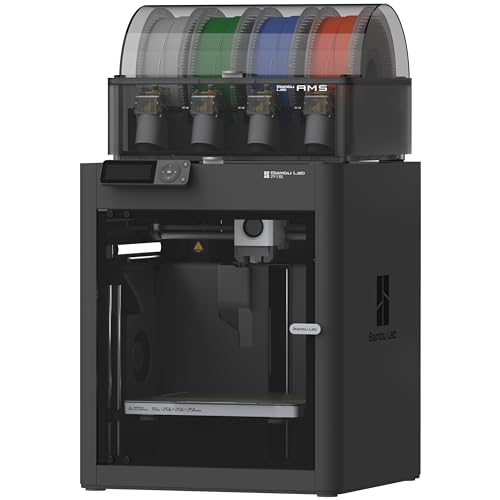
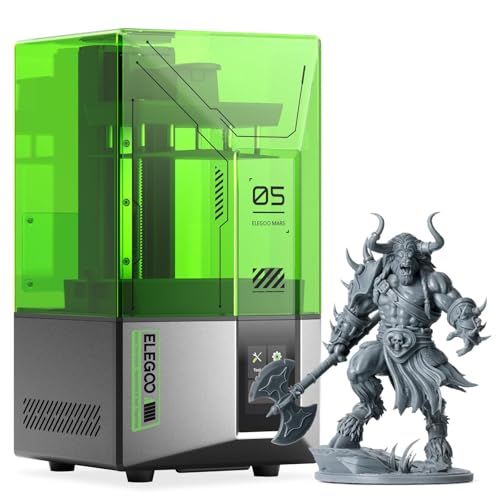
A 3D printer in Australia starts with entry-level machines such as the fully assembled FLASHFORGE Adventurer 5M and the ELEGOO Mars 5 4K resin printer, rises through the multi-colour Bambu Lab A1 Combo with the AMS lite included, and tops the mainstream range with the enclosed Bambu Lab P1S Combo that can print ABS and ASA. Each card below links to the Amazon Australia listing. Running costs are small: a typical household print uses 20 to 50 grams of filament, so each object uses very little plastic.
Build volumes are the manufacturer figures where the maker publishes one for the Australian listing.
How to choose a 3D printer in Australia
A 3D printer earns its place in a home the same way a decent drill does: the first time it fixes something, it stops being a toy. The choice in 2026 comes down to three questions. First, FDM or resin: FDM printers melt plastic filament and build practical parts, resin printers cure liquid resin and build fine detail. Second, how much tinkering you want: the new generation of printers calibrates itself and just works, while kit machines reward people who like to build. Third, what you will make: hooks and replacement parts need a modest build volume and tough filament, miniatures need resin, and outdoor parts need an enclosed printer that can handle ABS or ASA. This guide covers six machines, five FDM and one resin, each the strongest answer to a different version of those questions on Amazon Australia. A 3D printer is not a replacement for a home printer, which prints documents on paper: these machines build objects out of plastic and cannot print a page.
FDM or resin: which type you actually need
This is the fork in the road, so settle it first. FDM (fused deposition modelling) printers feed a spool of filament through a hot nozzle and draw the object layer by layer. They are the practical choice: filament is cheap, prints are tough enough to use, and the workflow is clean: print, snap off the supports, done. Every pick here except one is FDM. Resin printers like the ELEGOO Mars 5 work differently: a screen cures liquid resin one whole layer at a time, producing detail FDM cannot touch: no visible layer lines, crisp 28 mm miniature faces, jewellery-fine surfaces. The cost is the workflow. Resin is a skin irritant before it is cured, so you wear gloves, wash prints in alcohol, cure them under UV and keep the room ventilated. Buy resin if you paint miniatures or make display models and you know what you are signing up for. Buy FDM for everything else, and if in doubt, buy FDM.
What about the Bambu Lab P2S Combo?
Google's own answer for this category names the Bambu Lab P2S Combo as the best 3D printer, and it is the current flagship above the P1S. It is not a pick here because the Australian buying route for it is the official Bambu Lab store rather than the Amazon AU buy box, and this guide only recommends what you can add to an Amazon Australia cart today. If you want the newest machine, buy it from the official Bambu Lab Australian store so the warranty and the spare parts stay local. For most households the A1 Combo still does the job the P2S is being praised for, which is multicolour printing that works from day one.
Best 3D printer for home use in Australia
Home use is a narrower job than the specification sheets suggest: replacement parts, organisers, hooks and toys. That needs a build volume of about 220 mm, tough filament and a machine that does not need tuning before every print. The Bambu Lab A1 Combo is the answer for most homes because it calibrates itself and prints in four colours out of the box, and the FLASHFORGE Adventurer 5M is the answer on a tighter budget. Neither needs a workshop. Both live on a shelf in a study or a garage and print from a phone.
Buyer traps on Amazon Australia
Two patterns catch 3D printer shoppers, and both are easy to dodge once named. The first is the pooled review count. Some long-running printer listings show enormous rating counts, but the count is pooled across every variant the listing has ever carried, including entry-level models that date back to 2019. The five-star review you read may describe a machine several generations and an entire design philosophy older than the one your click adds to the cart. This is common on listings for older budget lines such as early Ender-era models. The fix is simple: check that reviews mention the exact model you are buying, and weight recent reviews far more heavily than the total. If you are printing replacement parts you will also want a way to measure the broken one accurately, which means a vernier caliper rather than a tape measure. The second trap is the cheap no name mini printer. These are toys: tiny build volumes, no levelling automation, weak hotends and orphaned software, and the money is genuinely wasted, because the frustration ends most of those printing journeys within a month. The Adventurer 5M is the real floor for an FDM machine you will still be using next year; the Mars 5 is the equivalent floor for resin.
What 3D printing actually costs to run
The printer is the entry fee, not the whole bill, so here are the real numbers. FDM filament for quality PLA or PETG is cheap, and a kilogram goes a long way: a typical phone stand or wall hook uses 20 to 50 grams, so the plastic in each useful object costs very little. Resin printing costs more per print: the resin itself, plus isopropyl alcohol for washing and gloves as ongoing consumables. Electricity is minor for both, similar to running a desktop computer while printing. The cost nobody advertises is failure: prints fail, especially in your first months, and a failed print is spent material. Budget for it the way you budget for burnt toast: irritating, normal, and less frequent as you learn. A realistic first year on an FDM machine is a few spools of filament, one or two spare nozzles, and a roll of glue stick for bed adhesion: well under $200 in consumables for steady hobby use.
What can you actually make around the house
The question every non-owner asks, and the answer is more domestic than the hobby image suggests. The killer category is replacement parts: the dishwasher rail end cap, the broken blind bracket, the vacuum attachment clip, the missing furniture foot. These are parts that cost more in postage from a manufacturer than the few cents of filament and the hour of printing they take from a free model library. Then come the organisers: drawer dividers sized to your exact drawer, cable clips, battery holders, under-shelf hooks, wall mounts for tools. Print the divider, then run a label maker along the drawer fronts, because a sorting system nobody else in the house can read does not survive a month. For households with kids, the printer earns a second life in toys (figurines, puzzles, board game pieces, party favours), which is where the multi-colour printing of the A1 Combo and P1S Combo turns prints from grey prototypes into finished things. Renters print damage-free hooks and brackets sized to their fittings. The pattern across all of it: a 3D printer is less a gadget than a general-purpose fixing tool, and the 220 to 256 mm build volumes of the FDM picks here cover almost all of it.
Safety and ventilation
Two safety topics deserve plain words. Resin first: uncured resin is a skin and respiratory irritant, and the Mars 5 workflow assumes nitrile gloves, eye protection when handling liquid, and a room with airflow: a garage, a laundry with a window, or a dedicated corner with a vented enclosure, never a bedroom desk. Once a print is washed and UV-cured it is inert and safe to handle. FDM second: PLA is the mildest case and printing it in a living space with normal airflow is widely considered low-risk, but ABS and ASA release styrene fumes as they print, which is exactly why they belong in an enclosed printer like the P1S in a ventilated room rather than an open frame next to the sofa. General rules for both technologies: keep printers away from young children while running (beds and nozzles run hot), let parts cool before grabbing them, and never leave a brand-new printer running overnight until it has earned your trust across many supervised prints.
How we picked these 3D printers
We do not run long print trials ourselves. We started from the 3D printers with real listings and sellers on Amazon Australia and read each listing for printer type, build volume, speed, enclosure and multi-colour support, quoting the maker where a claim is the maker's. We last checked stock, seller and ratings on 8 October 2026: all six were in stock, and the Prusa MK4S kit sold through the Amazon US Global Store with only one left. Ratings are given with their counts and there is no rating minimum. We also read the recurring complaints in the reviews, and the buyer traps section names the kinds of printer we left out and why.
Our verdict
For most people the Bambu Lab A1 Combo is the one to buy: the printer that made the hobby mainstream, multi-colour out of the box with the included AMS lite, genuinely easy from day one, and sold by Bambu Lab on Amazon Australia. If the budget is tighter, the FLASHFORGE Adventurer 5M is the best cheap FDM starter, fully assembled, auto-levelling and fast, while the ELEGOO Centauri Carbon delivers enclosed CoreXY speed and the biggest review base here at the mid price. The step up is the Bambu Lab P1S Combo, whose enclosed chamber unlocks ABS and ASA for parts that survive outdoors: the serious-hobbyist sweet spot, rated 4.5 stars. Tinkerers should go straight to the Original Prusa MK4S kit and enjoy the build, noting that it sold through Amazon US at our 8 October 2026 check. And if miniatures and fine detail are the whole point, the ELEGOO Mars 5 is the resin pick; just go in with eyes open about the gloves-and-washing workflow.
Frequently Asked Questions
What is the best 3D printer for a beginner in Australia?
For most beginners the Bambu Lab A1 Combo is the best first printer: it calibrates itself, the software walks you through everything, and the included AMS lite prints in up to four colours out of the box, so the early experience is finished objects rather than troubleshooting. If that is over budget, the FLASHFORGE Adventurer 5M is the best cheap starter: fully assembled, auto levelling and fast at up to 600 mm/s. Both remove the tinkering that used to define the hobby.
Should I buy an FDM or a resin 3D printer first?
Buy FDM unless you have a specific reason not to. FDM printers like the Adventurer 5M and A1 Combo print tough, practical parts with a clean workflow and cheap filament. Resin printers like the ELEGOO Mars 5 produce far finer detail, ideal for miniatures and display models, but the workflow involves gloves, washing prints in alcohol, UV curing and a ventilated room. Resin rewards a specific hobby; FDM suits a household.
Is Bambu Lab available in Australia?
Yes. Both Bambu Lab printers in this guide, the A1 Combo and the P1S Combo, are sold by Bambu Lab on Amazon Australia, which means local stock, Australian consumer guarantees and normal Amazon AU delivery and returns rather than grey-import shipping. Buying from the official store also keeps warranty support straightforward. Bambu Lab spare parts and filament are likewise available locally, so running one here is no harder than running any other appliance.
How much does a 3D printer cost to run?
Less than most people expect. Quality PLA or PETG filament is cheap, and a typical household print (a hook, a bracket, a phone stand) uses 20 to 50 grams, so the plastic in each object costs very little. Electricity while printing is similar to running a desktop computer. Resin printing costs more per print once you add the resin, isopropyl alcohol and gloves. Budget for some failed prints while you learn; a realistic first year of steady FDM use is well under $200 in consumables.
What can you actually make with a 3D printer at home?
The most valuable category is replacement parts (the broken blind bracket, the dishwasher rail cap, the missing furniture foot), printed from free model libraries for cents instead of waiting on a posted spare. After that come custom organisers (drawer dividers, cable clips, tool mounts sized to your exact space), damage free hooks for renters, and toys, puzzles and game pieces for kids, which is where multicolour printers like the A1 Combo shine. Think of it as a general-purpose fixing tool rather than a gadget.
Are cheap 3D printers under $200 any good?
No. The no-name mini printers under $200 are toys, with tiny build volumes, no levelling automation, weak hotends and software that stops being updated. Most of them end a printing journey within a month. Also watch for older budget listings showing 27,000 or more ratings: those counts are often pooled across every variant back to 2019-era models, so the reviews may not describe the machine you are actually buying. The real floor for a printer you will still use next year is the Adventurer 5M for FDM or the Mars 5 for resin.
Do 3D printers need ventilation?
It depends on the technology and material. Resin printers like the Mars 5 always need a ventilated space, because uncured resin is a skin and respiratory irritant, so use gloves and work in a garage or a room with airflow, never a bedroom desk. For FDM, PLA in a living space with normal airflow is widely considered low risk, but ABS and ASA release styrene fumes and belong in an enclosed printer like the P1S Combo in a ventilated room. Keep any running printer away from young children, because beds and nozzles run hot.
How much is a 3D printer in Australia?
Three price bands cover almost everything sold here. The entry point is a resin machine like the ELEGOO Mars 5 4K, or a fully assembled auto-levelling FDM starter like the FLASHFORGE Adventurer 5M. The mainstream is where the multicolour Bambu Lab A1 Combo and the enclosed ELEGOO Centauri Carbon sit. Above the mainstream you are buying an enclosed chamber for ABS and ASA, or a self assembly kit. Anything at the very bottom of the market is a toy and the money is wasted.
How does a 3D printer work?
It builds the object one thin layer at a time from the bottom up. An FDM printer pulls plastic filament through a nozzle heated to around 200 degrees, draws the outline and infill of a layer onto the bed, lifts a fraction of a millimetre and draws the next one, welding to the layer below. A resin printer works the other way up: a screen shines an image of the whole layer into a vat of liquid resin, which cures solid where the light hits, and the build plate lifts a fraction of a millimetre for the next.
What is a 3D printer?
A 3D printer is a machine that turns a digital model into a physical object by adding material layer by layer, which is why the industry calls it additive manufacturing. You download or draw a model, slice it into layers with free software, and send it to the printer. At home the two kinds that matter are FDM, which melts plastic filament and makes practical parts, and resin, which cures liquid resin and makes fine-detail models. The useful mental picture is a hot glue gun on rails, drawing the same shape a thousand times.
Which 3D printer brand is best?
Bambu Lab is the brand that changed the market and the one to buy if you want a printer that behaves like an appliance. ELEGOO is the value brand and covers both resin, with the Mars line, and fast enclosed FDM with the Centauri Carbon. FLASHFORGE owns the cheap fully assembled starter. Prusa is the open-source reference: slower to buy into, unbeatable documentation, and the machine you want if you like maintaining things. Creality is the volume brand behind most older budget listings, which is exactly where the pooled review-count trap lives.
What is the best 3D printer for a beginner under $600 in Australia?
The FLASHFORGE Adventurer 5M if you want a fully assembled starter at the entry price, and the ELEGOO Centauri Carbon if you want an enclosed CoreXY machine inside the budget. The Adventurer 5M arrives assembled, levels itself and prints at up to 600 mm/s, which is everything a first printer needs. The Centauri Carbon adds an enclosed CoreXY frame and a 256 mm build volume, so it will still suit you in two years when you want to print ABS. Neither needs any tuning before the first print.
What is the best midrange 3D printer in Australia?
For most homes, the Bambu Lab A1 Combo: it calibrates itself and prints in up to four colours out of the box with the included AMS lite. If you would rather have an enclosed frame for ABS later, the ELEGOO Centauri Carbon brings enclosed CoreXY speed to the mid price, with a 500 mm/s top speed and a 256 mm build volume.
Which 3D printer has the best print quality?
For fine detail, a resin printer: the ELEGOO Mars 5 cures a whole layer at a time, with no visible layer lines and crisp 28 mm miniature faces. Among FDM machines, Prusa carries a worldwide reputation for print quality and reliability through the MK4 family. This guide does not run print trials of its own, so it makes no measured quality ranking.
What is the best 3D printer for home use?
The Bambu Lab A1 Combo for most homes. Home printing means replacement parts, organisers, hooks and toys, which need a build volume of about 220 mm, tough filament and a machine that does not need tuning before every print. The A1 Combo calibrates itself and prints in four colours out of the box; the FLASHFORGE Adventurer 5M suits a tighter budget.
What are the best affordable 3D printing kits for hobbyists?
The one self assembly kit in this guide is the Original Prusa MK4S, which you build over a weekend, backed by open source designs and exhaustive documentation. Its Amazon AU listing sold through the Amazon US Global Store, so check the seller, delivery and warranty terms on the card. For a cheaper start without the build, the FLASHFORGE Adventurer 5M arrives fully assembled.