Standalone reader or Bluetooth adapter? That is the real question
Before you compare a single spec, answer this: do you want a tool with its own screen, or do you want your phone to be the screen? It is the question that splits this whole category in two. A standalone code reader like the Autel MS309 plugs into the diagnostic port and shows the fault code on its own little display - no phone, no app, no pairing - which makes it almost impossible to get wrong. A Bluetooth adapter is a tiny dongle with no screen of its own; it pairs with an app on your phone, which is where you read codes, watch live data and, on some cars, reach deeper systems. Get that one decision right and the rest is easy.
The six picks below run from an Autel up to an OBDLink MX+, and they map cleanly onto that split: the first two are standalone readers for the simplest, most foolproof routine, and the rest are Bluetooth adapters for people who want live data, brand specific coding or pro level systems. The other things worth weighing as you read are how deep you need to go - basic engine codes versus ABS, airbag and live graphing - and whether a tool is built around your particular car brand, so match the scanner to how you will actually use it and you will not overspend.
Autel MaxiScan MS309 OBD2 Scanner
If you just want to know why the check-engine light is on without any fuss, the Autel MS309 is the entry point. It is the cheapest pick here, and it does the standalone job perfectly: you plug it into the port, it powers up off the car, and its own LCD screen shows the trouble code so you can read it, see what it means from a built in database of more than 3000 definitions and clear it. There is no phone, no app and no Bluetooth pairing, so there is almost nothing to get wrong.
Beyond reading and clearing codes it shows freeze-frame data and I/M readiness, which is genuinely useful when you are checking over a used car before you buy. The trade-offs at this price are honest ones: it reads engine and emissions codes only - not ABS, airbag or live graphing - and it is built for petrol cars rather than diesels, so it is the simplest path rather than the most capable.
ANCEL AD310 OBD2 Code Reader
The ANCEL AD310 is the pick if you love the simplicity of a standalone reader but want the reassurance of an enormous track record behind your purchase. It follows the same plug-in-and-read routine as the Autel - read and clear engine codes, view live data, freeze frame and I/M readiness - all completely offline, with no app, no internet and no batteries to manage.
With well over 62,000 ratings it is one of the most-reviewed OBD2 tools you can buy, and the sturdy thick cable and large, clearly labelled screen make it comfortable to use crouched beside the car. The honest caveat is the same as any basic reader: it covers engine and emissions codes rather than ABS or airbag systems, so it is the dependable everyday tool rather than the one for deep diagnostics.
Veepeak OBDCheck BLE Bluetooth Adapter
The Veepeak OBDCheck BLE is the easiest, cheapest step into the Bluetooth world, where the dongle has no screen of its own and your phone does the work instead. It plugs into the port and pairs with iOS or Android, then apps like Car Scanner, OBD Fusion and Torque let you read and clear codes, watch live data and check readiness far more flexibly than a fixed reader.
With more than 22,900 ratings it is a proven, widely trusted adapter, and Veepeak is upfront that in Australia it suits petrol cars from 2006 and diesels from 2007. The honest trade-offs matter: the app is not included and some apps or features cost extra, advanced systems like ABS and SRS only work on selected cars through special apps, and service reset is not supported - so it is brilliant for engine codes and live data rather than dealer-level work.
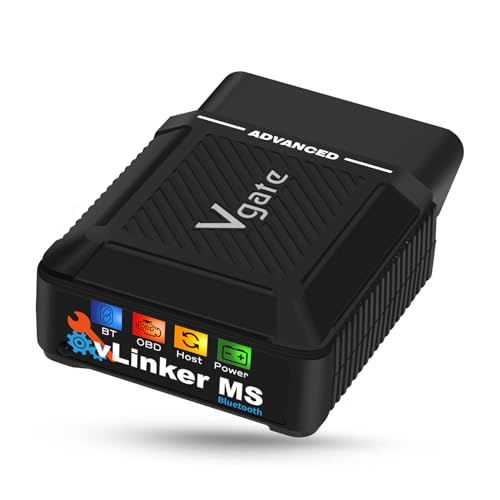
Vgate vLinker MS Bluetooth OBD2 Adapter
The Vgate vLinker MS is the pick when a basic dongle is not enough and you want to reach systems that ride on the extra networks inside a car. It supports five additional CAN protocols beyond standard OBD2, which is what lets compatible apps dig into modules a plain adapter cannot see, and it works in both 12V and 24V vehicles so it covers larger rigs as well as everyday cars.
It pairs with iPhone, Android and Windows, plays nicely with apps such as Car Scanner and JScan, and adds a battery-saver sleep mode plus firmware updates over your phone or a PC. Two honest caveats temper the appeal: like every adapter it depends entirely on the app you pair it with, and many of the deeper apps are Android-only, so iOS owners should confirm their app supports the features they want before buying.
OBDLink CX Bluetooth OBD2 Adapter
The OBDLink CX is the adapter to buy if you drive a BMW or Mini and want to code features rather than just read fault codes. It is made for BimmerCode and recommended by the BimmerCode team, with 100 percent coverage of the vehicles, protocols and advanced features that app supports, so it unlocks the personalisation and coding that owners specifically seek out a dedicated adapter for.
The Bluetooth 5.1 connection is rock-solid to avoid corrupted data, a sleep mode lets you safely leave it plugged in, and the included OBDLink app handles live parameters and clearing the check-engine light on any OBD2 car. The honest caveat is that its standout value is brand-specific: the BimmerCode app is sold separately, and if you do not own a BMW or Mini you are paying for coding depth you may never touch.
OBDLink MX+ Bluetooth OBD2 Scanner
The OBDLink MX+ is the standout in this guide and the one to reach for once you have outgrown engine codes. It turns your iPhone, Android or Windows PC into a professional-grade scanner that clears the check-engine light and reads ABS, SRS and TPMS - the safety and chassis systems cheaper tools simply cannot touch - with enhanced OEM support for Ford, GM, Mazda, Nissan, Toyota, Honda, Hyundai and Kia.
It is the recommended adapter for serious apps like FORScan, Torque, BimmerCode and Carista, and it adds over-voltage and battery-drain protection so it is built to live in the port long term. The honest caveat is that it is the dearest pick here and, like all adapters, its power comes from the apps you pair it with, many of which cost extra, so it earns its place only if you genuinely use that depth.
How to match the scanner to how you will use it
The single biggest mistake is buying for the diagnostics you imagine rather than the ones you will actually run. If the honest answer is that you just want to read and clear the check engine light and check a car over, a standalone reader is the smart buy, and a pricier Bluetooth tool would mostly add steps and apps you never use. If you specifically want live data graphing, ABS and airbag codes, or brand-specific coding, a Bluetooth adapter paired with the right app earns its keep. It is worth knowing what a scanner will not tell you, too: a rough idle or a flat spot with no code stored behind it points at the slow, gummed-up fuel-system pattern a fuel injector cleaner is aimed at rather than a fault to chase in a workshop.
A scanner also stops at the engine management system, so for a flat battery, a blown fuse or a wiring fault you want a multimeter beside it rather than a second scanner. Brand depth is the other deciding factor. Most adapters read generic OBD2 codes on any car, but the deeper features are often tied to a particular brand or app - the OBDLink CX is built around BMW and Mini coding, while the MX+ adds enhanced support for a long list of mainstream makes. Be realistic about your car and your patience for apps, because the best scanner is the one whose features you will genuinely use rather than the one with the longest spec sheet.
What the key specs actually mean
A few details do most of the work when you compare these scanners. Tool type tells you the routine: a standalone reader is foolproof but shows engine codes on a small screen, while a Bluetooth adapter has no screen and leans on a phone app for everything. How deep it reads is the next thing - basic tools handle engine and emissions codes, while pricier ones reach ABS, SRS and TPMS, the chassis and safety systems behind those other warning lights.
Car compatibility matters more than the marketing suggests. Almost every car sold in Australia from around 2006 is OBD2, but a given adapter may list its own start years and may suit petrol and diesel differently, so check the fit for your exact car and fuel. App dependence is the last piece for adapters: the hardware is only half the story, because the app you pair it with - often a separate purchase - decides what you can actually see and do. Read tool type, system depth, compatibility and app support together and any product page starts to make sense.
Frequently Asked Questions
Will an OBD2 scanner work with my car?
Almost certainly, if your car is reasonably modern. OBD2 became the standard on petrol cars in the United States from 1996, across Europe and Asia from around 2000 to 2001, and effectively every new car sold in Australia from about 2006 has the standard 16-pin OBD2 port. So if your car is from roughly 2006 onward you can be confident a scanner will plug in, and even many cars from the early 2000s are covered. The honest exceptions are that some tools are petrol-only and not suited to diesels, and electric and plug-in hybrid vehicles often do not use standard OBD2, so check the listing for your exact car and fuel.
Standalone reader or Bluetooth adapter - which should I buy?
It depends on whether you want simplicity or flexibility. A standalone reader like the Autel MS309 or ANCEL AD310 has its own screen - you plug it in, read the code and clear the light, with no phone, app or pairing - which makes it the cheapest and most foolproof option. A Bluetooth adapter has no screen of its own; it pairs with an app on your phone, which adds live data graphing and, on some cars, deeper systems, at the cost of relying on that app. If you just want to read and clear engine codes, buy a standalone reader; if you want live data or to dig deeper, choose a Bluetooth adapter.
Can an OBD2 scanner clear the check-engine light?
Yes - reading and clearing the check-engine light is the core job every scanner here does. You plug it in, it reads the diagnostic trouble code behind the light, and once you have noted or fixed the cause you can clear the code to turn the light off. The honest caveat is that clearing the code does not fix the underlying fault, so if the problem is still present the light will usually come back after a drive cycle or two. Clearing is genuinely useful for resetting after a repair or checking whether a fault is intermittent, rather than a way to make a real problem disappear.
Does an OBD2 scanner read ABS and airbag codes?
Only some of them, and this is where price shows. Basic readers and cheaper adapters handle engine and emissions codes - the powertrain side of the car - but they do not touch ABS, SRS airbag or TPMS systems. To read those you generally need a more capable tool like the OBDLink MX+, which is built to reach ABS, SRS and TPMS, and even then the exact coverage can depend on your car and the app you use. If those warning lights are why you are buying a scanner, skip the entry-level readers and choose a tool that explicitly lists ABS and airbag support.
Do Bluetooth OBD2 adapters need an app, and is it included?
Yes, a Bluetooth adapter is useless on its own and the app is usually a separate purchase. The dongle has no screen, so it simply relays data to an app on your phone or PC - something like Car Scanner, Torque, OBD Fusion or BimmerCode - which is where you actually read codes and view live data. Most adapters do not include that app in the price, and some apps or their advanced features cost extra. The honest tip is to pick your app first, confirm it runs on your phone, and check that the adapter is recommended for it - app compatibility, not the hardware, is what usually trips people up.
Will a cheap OBD2 reader do everything a mechanic does?
No, and it helps to be realistic about that. An inexpensive reader is brilliant for the everyday job of finding out why a light is on, clearing it after a fix and checking a used car before you buy, which covers most home needs. But a workshop scan tool reads far more systems, performs service resets and module coding, and carries deep manufacturer databases that cheap readers do not. The good news is that a Bluetooth adapter paired with the right app closes a lot of that gap for far less money - just not the full dealer-level depth, so very specialised jobs can still need a professional.
Is an OBD2 scanner worth it for a regular driver?
For most car owners, yes. The moment a check-engine light comes on, a cheap scanner tells you whether it is something minor or something that needs a workshop, which saves a guessing-game trip to the mechanic and the diagnostic fee that often comes with it. Reading the actual fault code also puts you in a far stronger position when you do visit a workshop, and the cheapest readers cost less than a single diagnostic charge. The honest counterpoint is that if you rarely drive or always take the car straight to a trusted mechanic, you may not get enough use out of one to bother.