The Elgato Stream Deck Plus is our top pick for its dials, touch strip and eight LCD keys, while the Stream Deck MK.2 is the best value all rounder and the Stream Deck Mini is the cheapest way in. We compared eight decks on keys, software and real Amazon AU ratings.
Prices checked 24 September 2026 on Amazon AU and subject to change.
Which stream deck should you actually buy in Australia?
If you want the short answer: most people in Australia should buy the Elgato Stream Deck MK.2. It has fifteen customisable LCD keys, the largest review count of any deck in this guide, and it regularly sells on Amazon AU for under $190. It is the safe, do-everything choice for streaming, video calls, editing and general productivity. If you want hands-on volume and scrubbing control, step up to the Stream Deck + with its four dials and touch strip. If you only need a handful of shortcuts and want to spend the least, the six-key Stream Deck Mini is the cheapest sensible way in.
A stream deck is a small box of programmable keys that sits next to your keyboard. Each key shows a tiny screen, and you assign it an action: mute your mic, switch an OBS scene, open a folder, paste a block of text, toggle your camera in Teams, or fire a whole sequence at once. The name comes from streaming, but in 2026 most buyers are not streamers at all. They are people who live in Zoom, Excel, Photoshop or a code editor and want one tap instead of a three-key shortcut they keep forgetting.
The category is dominated by one brand, Elgato, and that dominance is earned. Elgato's software is the most mature, the plugin library is the deepest, and the hardware is built to last. The catch is price, and that is where the cheaper challengers from Fifine and AJAZZ come in. Below we compare eight decks that are genuinely in stock on Amazon Australia right now, with real star ratings and review counts pulled from the Australian storefront, so you can match the right deck to how you actually work.
TL;DR: our quick picks for 2026
Short on time? Here is the whole guide in one breath. Last updated June 2026.
Best overall: Elgato Stream Deck + (around $223). Eight keys plus four push dials and a touch strip. The most flexible control surface here, rated 4.6 from more than 4,300 Amazon AU reviews.
Best value and best for most people: Elgato Stream Deck MK.2 (around $190). Fifteen keys, the most-reviewed deck in this guide at nearly 10,000 ratings, and a 4.7 average.
Best budget: Elgato Stream Deck Mini (around $91). Six keys, the lowest price of our three headline picks, rated 4.7 from more than 7,700 reviews.
Best for clean desks and beginners: Elgato Stream Deck Neo (around $124 to $159). Eight keys, two touch points, a built-in clock and no separate stand to lose.
Best for power users: Elgato Stream Deck XL (around $314). Thirty-two keys and the highest rating in this guide at 4.8.
Best all-in-one audio: Elgato Stream Deck + XLR. Stream Deck + with a built-in XLR mic interface, for solo podcasters and streamers who want one box.
Cheapest 15-key alternatives: Fifine AmpliGame D6 (around $105) and AJAZZ AKP153 (around $101) if you want fifteen keys without paying Elgato money.
Every product card below shows the live Amazon AU price and rating. Prices on stream decks move a lot during sales, so always check the current figure before you buy.
How does our comparison stack up at a glance?
The honest summary is that this is an Elgato guide with two budget challengers, because that is what the Australian market actually looks like. The six Elgato decks differ mainly in key count and whether you get dials. The two non-Elgato decks save you money and give you fifteen keys, but they run third-party software that is rougher around the edges. The table below the picks lays out keys, dials, price band and rating side by side. Use it to narrow down by the one spec that matters most to you, which for most people is simply how many keys you need.
One thing worth saying up front: more keys is not automatically better. Every Elgato deck supports folders and pages, so a fifteen-key MK.2 can hold dozens of actions across multiple pages. The reason to buy a bigger deck is to see more of your actions at once without tapping into folders, not because you run out of room.
How we evaluated these stream decks
NestPath is a research desk, not a testing lab. We do not claim to have bench-tested every unit. Instead we aggregate the evidence that already exists and filter it for Australian buyers, so you are not reading a rewritten American review that lists prices in US dollars and links to a US store. Here is exactly what went into these picks.
Live Australian availability. Every deck here was confirmed in stock on Amazon.com.au at the time of writing. We dropped anything that only ships grey-import or is structurally unavailable in Australia.
Real ratings and review counts. The star ratings and review numbers come from the Australian Amazon storefront, not the US one. A 4.7 from nearly 10,000 Australian-visible reviews carries more weight than a 5.0 from a dozen.
Verified specs. Key counts, dials, dimensions, connectivity and software requirements were read directly from each product listing, not guessed from the model name.
Reviewer consensus. We read through Australian and global reviews to find the patterns: which decks people praise, which flaws keep coming up, and who each deck genuinely suits.
Use-case fit. We weighted picks toward first-time buyers and home-office users, not just streamers, because that is where most of the search demand now sits.
Value in context. We compared price against key count and software quality, so a cheaper deck only wins its slot if the savings are not cancelled out by clunky software.
Where a cheaper option has a real catch, such as software you have to hunt down online, we say so plainly rather than burying it.
Best overall stream deck: Elgato Stream Deck +
The Elgato Stream Deck + is our top pick because it is the only deck here that gives you three kinds of control in one box: eight LCD push keys, four push-and-turn dials, and a long touch strip. Buttons are great for things that are on or off, like muting a mic or switching a scene. Dials are far better for anything with a range, like volume, brightness, video scrubbing or zoom. Once you have used a physical dial to ride your microphone level mid-call, going back to a row of buttons feels clumsy. It carries a 4.6 average from more than 4,300 Amazon AU reviews and typically sells around $223.
Top pick
Elgato
Elgato Stream Deck +, Audio Mixer and Studio Controller
4.6(4,381)
The only deck here with keys, dials and a touch strip in one box, which makes it the most flexible control surface for a home office or stream. Rated 4.6 from more than 4,300 Amazon AU reviews.
$272.05$299.00
Save 9%
Amazon.com.au price as of 10:00 pm AEST, subject to change
As an Amazon Associate, NestPath earns from qualifying purchases.
In practice this is the deck for people whose work has knobs in it. Photographers and video editors use the dials for exposure, scrub and timeline control in Lightroom, Photoshop and Premiere. Streamers and podcasters use them as a live mixer through Elgato's free Wave Link software, adjusting game, mic, music and chat levels independently. Remote workers use them for system and call volume without diving into menus. The eight keys above the dials switch context automatically, so the controls change depending on which app is in focus. Australian reviewers repeatedly describe it as becoming indispensable within a week, with one amateur photographer noting it now drives Photoshop, Lightroom and his Office apps interchangeably.
It connects over USB-C, weighs a solid 470 grams so it stays put on the desk, and carries Elgato's two-year manufacturer warranty. The touch strip can show page tabs, clocks or live data, which adds a surprising amount of glanceable information to your desk. If your budget stretches and you want the most capable single deck, this is it.
Flaws but not dealbreakers
It is the pricier end of the mainstream range, and if your work has no sliders or scrubbing in it, you may never touch the dials, in which case the cheaper MK.2 makes more sense. A few reviewers mention the keys can feel slightly mushy and occasionally need a dead-centre press, and one noted the unit froze after locking Windows until a software update fixed it. The Elgato software, while the best in class, still gets the odd glitchy plugin. None of these stop it being the most flexible deck you can buy.
Best value stream deck: Elgato Stream Deck MK.2
If you are not sure which deck to buy, buy this one. The Elgato Stream Deck MK.2 is the fifteen-key model that sits in the sweet spot of price, capability and proven track record. It has by far the most reviews of any deck in this guide, nearly 10,000 ratings on Amazon AU, with a 4.7 average, and it regularly discounts to around $190. Fifteen keys is enough to see a useful set of actions at a glance, and with folders and pages you can layer in far more behind them.
Runner-up
Elgato
Elgato Stream Deck MK.2 Studio Controller, 15 Macro Keys
4.7(9,980)
Fifteen keys in the sweet spot of price and capability, with the largest review count of any deck here and a 4.7 average. It is the safest, do-everything choice for the largest number of buyers.
$208.86$239.00
Save 13%
Amazon.com.au price as of 04:00 pm AEST, subject to change
As an Amazon Associate, NestPath earns from qualifying purchases.
The MK.2 is the deck Elgato sells the most of for good reason. It is the same fifteen-key layout that built the category, refreshed with a swappable faceplate, a removable desktop stand and a USB-C cable with a tidy ninety-degree connector. The keys are bright enough to read next to a window, and the software handles the full range of actions: hotkeys, multi-actions that fire several commands in sequence, app launching, text snippets, OBS and Twitch control, Discord, Spotify, Philips Hue and far more. Australian reviewers use it for everything from VTuber soundboards to cut, copy and paste mapped across every page. One called it an essential computer accessory ranking just behind the mouse.
For a home office, fifteen keys comfortably covers your daily apps, your meeting controls and a row of universal shortcuts with room to spare. For streaming, it is the standard kit that almost every plugin and tutorial assumes you own. If you want the broadest compatibility and the lowest risk, the MK.2 is the answer for the largest number of people, which is exactly why it is our value pick.
Flaws but not dealbreakers
There are no dials, so anything range-based still relies on increment buttons rather than a smooth turn. The keys are a tactile membrane rather than mechanical switches, which a minority of users find slightly soft. The Elgato setup software, while powerful, is functional rather than pretty, and one reviewer wished it looked more modern. The download page lists Windows 11, but reviewers confirm it runs fine on Windows 10. These are nitpicks against an otherwise faultless all-rounder.
Best budget stream deck: Elgato Stream Deck Mini
The Elgato Stream Deck Mini is the cheapest way to get real Elgato hardware and software, and at roughly $91 it is the lowest price of our three headline picks. You get six LCD keys instead of fifteen, but crucially you get the exact same software, the same plugin store and the same build quality as the larger decks. For a lot of people, six keys is genuinely all they need. It is rated 4.7 from more than 7,700 Amazon AU reviews.
The lowest price of our three headline picks and real Elgato hardware and software. Six keys cover the daily pain of video calls, making it the easiest budget yes. Rated 4.7 from over 7,700 reviews.
$96.03
Amazon.com.au price as of 04:00 am AEST, subject to change
As an Amazon Associate, NestPath earns from qualifying purchases.
Six keys sounds small until you map them. A common home-office layout is mic mute, camera toggle, a screen-share shortcut, a leave-meeting button and two app launchers, and you have covered the daily pain of video calls. Because the Mini also supports folders, you can nest more actions behind a key if you want, so it is not a hard ceiling of six. The integrated USB cable keeps the desk tidy, and the unit is small enough to tuck beside a laptop. Australian reviewers who work from home single out the mic and camera toggles alone as worth the price, and several say they only bought the Mini to test the waters before upgrading.
This is the deck to buy if you are stream-deck-curious, if your needs are simple, or if you want a cheap second deck dedicated to one app. It does everything the big decks do, just with fewer keys visible at once. For first-home-office setups on a budget, it is the easiest yes in this guide.
Flaws but not dealbreakers
Six keys means more reliance on folders and pages if your needs grow, and a few buyers admit they wished they had bought more keys from the start. The cable is integrated rather than detachable, so you cannot swap it. And like every deck, the deeper customisation rewards a bit of patience to set up. For the price, none of this is a real complaint.
Best for a clean desk and beginners: Elgato Stream Deck Neo
The Elgato Stream Deck Neo is the friendliest deck for someone buying their first one. It has eight LCD keys plus two touch points for paging, and unlike the other decks it has no separate stand to attach or lose, because the base is built in with a soft glowing footbar. It usually sells between $124 and $159 and holds a 4.6 average across roughly 1,200 Amazon AU reviews.
The friendliest deck for a first-time buyer: eight keys, two touch points, a built-in clock and no separate stand to lose. A clean-looking middle option between the Mini and MK.2.
$148.09$159.00
Save 7%
Amazon.com.au price as of 04:00 pm AEST, subject to change
As an Amazon Associate, NestPath earns from qualifying purchases.
Elgato pitched the Neo squarely at productivity rather than hardcore streaming, and it shows in the little touches. Out of the box it can show a clock and page through your actions with the two capacitive touch points, and the always-on info area is handy for glanceable detail. The white finish and rounded, low-profile shape look more at home on a tidy desk than the blockier gaming-styled decks. It runs the same full Elgato software as every other deck here, so it controls Word, Excel, PowerPoint, Teams, Zoom, Spotify and the rest with drag-and-drop setup.
Eight keys lands neatly between the six-key Mini and the fifteen-key MK.2, which makes the Neo a great middle option if six feels tight but fifteen feels like overkill. If you value how a device looks on your desk and you want something that feels approachable from the first plug-in, the Neo is the pick.
Flaws but not dealbreakers
The two touch points are for paging, not the rich dials of the Stream Deck +, so this is still a button-led deck. The built-in stand means you cannot adjust the angle or lay it flat. And at its higher price points it can creep close to the more capable MK.2, so watch the live price before choosing. None of this undercuts how easy it is to live with.
Best for power users: Elgato Stream Deck XL
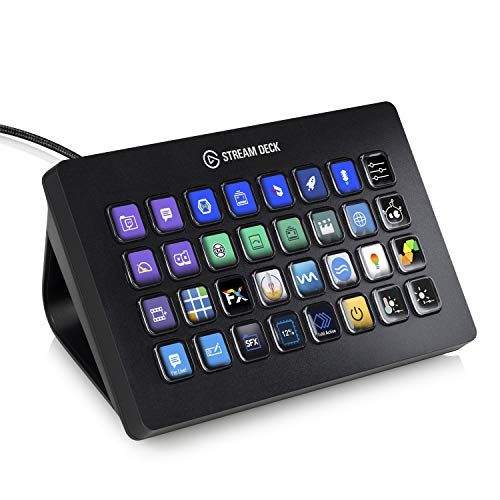
The Elgato Stream Deck XL is for people who want everything on one surface. Thirty-two keys in an eight-by-four grid means you can lay out a huge control panel without tapping into folders at all. It carries the highest rating in this guide, a 4.8 average from more than 8,300 Amazon AU reviews, and typically sells around $314, rising toward $379 at full price.
Also great
Elgato
Elgato Stream Deck XL Advanced Studio Controller, 32 Keys
4.8(8,358)
Thirty-two keys in an eight-by-four grid for power users who want everything on one surface. The highest-rated deck in this guide at 4.8 from more than 8,300 Amazon AU reviews.
$335.29$379.00
Save 12%
Amazon.com.au price as of 10:00 am AEST, subject to change
As an Amazon Associate, NestPath earns from qualifying purchases.
Thirty-two keys changes how you use a deck. Instead of paging between sets of actions, you can have your whole streaming setup, or your entire editing workflow, visible at once: every scene, every source, every effect, every shortcut laid out like a cockpit. Serious streamers, broadcast operators, and video and audio editors are the natural buyers, but plenty of power users in trading, development and creative work love having that many one-tap actions on the desk. It ships with a magnetic stand and a detachable USB-C cable, and it runs the identical software as the rest of the range, so everything you learn on a smaller deck carries straight over.
If you already know you want maximum keys, or you have outgrown a fifteen-key deck and find yourself paging constantly, the XL is the obvious upgrade and the highest-rated deck here.
Flaws but not dealbreakers
It is large and it is the most expensive mainstream Elgato deck, so it only makes sense if you will actually use the keys. Thirty-two blank keys can also be intimidating to set up, and you will spend real time building good layouts before it pays off. For anyone who does not need that many actions visible at once, the MK.2 delivers most of the value for far less.
Best all-in-one audio deck: Elgato Stream Deck + XLR
The Elgato Stream Deck + XLR is the niche-but-brilliant option for solo creators who want their controller and their microphone interface in a single box. It is the same eight-key, four-dial, touch-strip Stream Deck + body, but with a proper XLR microphone input and headphone output on the back, plus a preamp with up to 75 dB of gain and 48-volt phantom power. It holds a 4.4 average from over 230 Amazon AU reviews.
Also great
Elgato
Elgato Stream Deck + XLR Audio Mixer, Rear Mic Interface
4.4(231)
Stream Deck + with a built-in XLR mic interface, preamp and headphone output. A near-endgame device for solo podcasters and streamers who want their controller and audio chain in one box.
No current price: out of stock at Amazon AU
Amazon.com.au price as of 04:00 pm AEST, subject to change
Currently out of stock at Amazon AU, last verified on 23 September
As an Amazon Associate, NestPath earns from qualifying purchases.
The appeal is simple: one device on the desk does your scene switching, your shortcuts and your entire audio chain. You plug a professional XLR microphone straight into the back, monitor through the headphone jack, and ride your levels with the front dials through Wave Link. Australian reviewers describe it as a clean replacement for a separate GoXLR-style mixer, removing a box and a tangle of cables from the setup. With that much gain on tap, it can drive demanding dynamic microphones that normally need a separate booster.
This is a specialist pick. If you are a single-person podcast or stream using an XLR mic and you want to consolidate your gear, it is close to an endgame device. If you use a USB mic or a headset, you do not need the XLR version and should buy the standard Stream Deck + instead.
Flaws but not dealbreakers
It has a single XLR input, so it suits solo creators, not multi-person podcasts. The XLR control software draws mixed reviews, with one Australian buyer finding it frustrating enough to recommend the plain USB Stream Deck + instead. The unit is also on the light side, which a reviewer noted when reaching for the dials. For a one-person audio setup, though, the all-in-one convenience is hard to beat.
Cheapest 15-key alternatives: Fifine AmpliGame D6 and AJAZZ AKP153
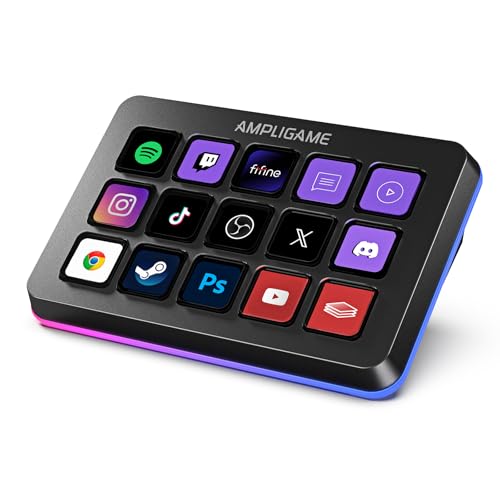
If you want fifteen keys but not the Elgato price, two challengers are worth knowing about. The Fifine AmpliGame D6 sells for around $105 and adds an RGB ring, holding a 4.4 average from nearly 700 Amazon AU reviews. The AJAZZ AKP153 is around $101, adds a side information screen showing CPU, temperature and weather, and carries a 4.1 average from a smaller pool of reviews. Both undercut the MK.2.
The hardware on these is decent. You get fifteen customisable LCD keys, drag-and-drop setup, OBS, Twitch, YouTube and Streamlabs support, and on the AJAZZ that extra status screen is a genuinely nice touch. For straightforward shortcuts, launching apps and switching audio sources, plenty of buyers are happy. Where they fall down is software. The third-party apps are less polished than Elgato's, and reviewers report missing features: one Fifine owner found Photoshop plugin buttons that did not trigger the right tools and a scene picker that would not accept custom apps, and ultimately bought the real thing.
The AJAZZ has a bigger catch worth flagging. Several Australian reviewers say there is no obvious official download for the software, leaving you to find the installer through forums or Reddit, which is a poor experience for a brand-new device. If you are comfortable with that and you only need basic actions, these decks save you real money. If you want it to just work, the small premium for an Elgato deck buys you a far smoother ride.
Flaws but not dealbreakers
The shared theme is software. The Fifine's app is basic and misses some of the advanced multi-action and plugin behaviour Elgato owners take for granted. The AJAZZ's software can be hard to source officially and a couple of reviewers flagged needing the app open to use the device. Build quality on both is fine but the keys feel cheaper and the units are light enough to slide on the desk. Buy these for the price, not the polish.
What should you look for in a stream deck?
Once you have a shortlist, a few features decide which deck is right for you. Here is what actually matters, in order.
How many keys do you need?
This is the big one. Six keys (Mini) suit simple call and shortcut setups. Eight keys (Neo) add a little headroom. Fifteen keys (MK.2 and the budget decks) is the mainstream sweet spot that covers most home and streaming use. Thirty-two keys (XL) is for people who want everything visible at once. Remember that folders and pages mean even a small deck can hold many more actions than it has keys, so buy for what you want to see at a glance, not the total number of actions.
Do you need dials?
Dials are the dividing line. If your work involves volume, brightness, scrubbing or any continuous value, the Stream Deck + and Stream Deck + XLR are worth the premium because a turn beats a tap every time. If your actions are mostly on-or-off, you can save money and skip them entirely.
How good is the software?
The software is at least half the product. Elgato's app is the most mature, with the largest plugin marketplace, regular updates and ready-made profiles for popular apps. The budget decks run third-party software that does the basics but can be rough and, in one case, hard to even download. If you value reliability, weight this heavily.
Will it work with your apps?
All these decks work on Windows and Mac and cover the big names: OBS, Streamlabs, Twitch, YouTube, Discord, Zoom, Teams, Spotify, Office and Adobe apps. Elgato's deeper plugin ecosystem pulls ahead for niche tools and smart-home control like Philips Hue. Check that your specific must-have app is supported before you buy a budget deck.
Build, cable and stand
Heavier decks stay put when you press keys; very light ones can slide and may need securing. Detachable cables and stands are nicer to live with than integrated ones. None of this is a dealbreaker, but it affects the daily feel.
How do you set up and care for a stream deck?
Stream decks are low-maintenance, but a little setup discipline makes them far more useful. Here is how to get the best out of one.
Download the official software first. For Elgato decks, get the Stream Deck app from Elgato directly, then plug in the deck. Setup is drag-and-drop: pick an action, drop it on a key, choose an icon. For budget decks, make sure you can find a legitimate official installer before you commit.
Start with profiles, not blank keys. Use the ready-made profiles for OBS, Zoom or your editor as a starting point, then tweak. It is far faster than building from scratch.
Use folders and pages. Group actions by app or task into folders so a small deck behaves like a much larger one. Keep a row of universal actions, like cut, copy and paste, on every page.
Let it switch automatically. Set the deck to change layout based on the app in focus, so the right controls appear without you doing anything.
Keep firmware and software updated. Several reviewers traced early glitches, like freezing after a screen lock, to outdated firmware that an update fixed. Update before you assume something is faulty.
Clean it gently. Wipe the keys with a dry or barely damp microfibre cloth. Avoid harsh solvents on the LCD surfaces.
Spend an hour building good layouts in the first week and the deck pays you back every day after.
You will also want these to complete the setup
A stream deck rarely lives alone on a desk. These accessories round out a home-office or streaming setup, and all are available on Amazon Australia.
A USB microphone for clearer calls and recording, if you are not going the XLR route. See our guide to the best USB microphones on Amazon AU.
A microphone boom arm to get the mic off your desk and out of shot. Browse boom arms on Amazon AU.
A ring light or key light so your camera looks good on every call. Compare ring lights on Amazon AU.
A webcam if your laptop camera is letting you down. Look at webcams on Amazon AU.
A USB-C hub to add ports back to a laptop once the deck, mic and camera are plugged in. See USB-C hubs on Amazon AU.
A few other decks show up when you shop in Australia, and it is worth knowing why they did not make our headline slots. Corsair sells a Stream Deck XL-equivalent keypad and the Galleon 100 SD, but they are typically pricier through Australian retailers and overlap heavily with the Elgato range, since Corsair owns Elgato. The Loupedeck Live S is a capable creator console but sits in a smaller review pool and a higher price band. Kogan and Redragon sell genuinely cheap fifteen-key decks, but they tend to carry thin review counts or weaker software support, which is exactly the trade-off we flagged with the Fifine and AJAZZ models.
The ULanzi Stream Controller D200 is a strong budget option that appears in Australian shopping results with solid ratings, and it is worth a look if our two budget picks are out of stock. We stuck with the Fifine and AJAZZ because they were clearly in stock with verifiable Amazon AU ratings at the time of writing. As always, availability and price on these challengers move quickly, so check the live listing before deciding.
Frequently asked questions
What is the best stream deck to buy in Australia?
For most people it is the Elgato Stream Deck MK.2. It has fifteen keys, the most reviews of any deck in this guide, mature software and a price that regularly drops under $190. If you want dials for volume and scrubbing, choose the Stream Deck +. If you want to spend the least, the six-key Stream Deck Mini is the cheapest sensible Elgato deck.
Are stream decks worth it?
If you repeat the same shortcuts, app switches or call controls every day, yes. A stream deck turns multi-key combinations into a single tap and removes the need to remember them. Reviewers across home offices, editing, gaming and streaming consistently describe it as becoming indispensable within a week. If your computer use is light and varied, the benefit is smaller.
Do you have to be a streamer to use a stream deck?
No. Despite the name, most buyers now use them for productivity, not streaming. Common uses include muting your mic and toggling your camera in Zoom or Teams, launching apps, pasting text snippets, controlling Spotify, and running editing shortcuts in Photoshop, Premiere or Office. The streaming features are there if you want them, but they are optional.
Is there anything better than an Elgato stream deck?
For raw hardware value, budget decks like the Fifine AmpliGame D6 and AJAZZ AKP153 give you fifteen keys for less. But Elgato still leads on software maturity, plugin support and update frequency, which is most of what makes a deck pleasant to use. Unless price is the deciding factor, Elgato remains the safest choice in Australia in 2026.
How many keys do I need on a stream deck?
Six keys cover a basic call-and-shortcut setup, eight add a little headroom, and fifteen is the mainstream sweet spot for home and streaming use. Thirty-two suits power users who want everything visible at once. Because every Elgato deck supports folders and pages, even a small deck can hold many more actions than it has keys, so buy for what you want to see at a glance.
Do stream decks work on Mac and PC?
Yes. Every deck in this guide works on both Windows and macOS. Check the listed minimum operating system version, since newer Elgato decks ask for recent versions of Windows and macOS, though many run on slightly older versions in practice. Budget decks also support both platforms but rely on their own third-party software, so confirm the installer is available before buying.
Build out the rest of your home office
A stream deck is one piece of a good desk setup. If you are kitting out a home office or studio, these NestPath guides cover the gear that pairs naturally with it, all checked for Australian availability.
Anish Puri founded NestPath in 2026 after going through the Australian first-home-buyer process himself. NestPath focuses on Australian first-home buyers because the existing review sites are American, generic, or both. Anish handles editorial selection across the homeowner hub. Reach out: hello@nestpath.com.au
DETAILED REVIEWS
Top pick
Elgato
Elgato Stream Deck +, Audio Mixer and Studio Controller
4.6(4,381)
The only deck here with keys, dials and a touch strip in one box, which makes it the most flexible control surface for a home office or stream. Rated 4.6 from more than 4,300 Amazon AU reviews.
$272.05$299.00
Save 9%
Amazon.com.au price as of 10:00 pm AEST, subject to change
As an Amazon Associate, NestPath earns from qualifying purchases.
Runner-up
Elgato
Elgato Stream Deck MK.2 Studio Controller, 15 Macro Keys
4.7(9,980)
Fifteen keys in the sweet spot of price and capability, with the largest review count of any deck here and a 4.7 average. It is the safest, do-everything choice for the largest number of buyers.
$208.86$239.00
Save 13%
Amazon.com.au price as of 04:00 pm AEST, subject to change
The lowest price of our three headline picks and real Elgato hardware and software. Six keys cover the daily pain of video calls, making it the easiest budget yes. Rated 4.7 from over 7,700 reviews.
$96.03
Amazon.com.au price as of 04:00 am AEST, subject to change
The friendliest deck for a first-time buyer: eight keys, two touch points, a built-in clock and no separate stand to lose. A clean-looking middle option between the Mini and MK.2.
$148.09$159.00
Save 7%
Amazon.com.au price as of 04:00 pm AEST, subject to change
As an Amazon Associate, NestPath earns from qualifying purchases.
Also great
Elgato
Elgato Stream Deck XL Advanced Studio Controller, 32 Keys
4.8(8,358)
Thirty-two keys in an eight-by-four grid for power users who want everything on one surface. The highest-rated deck in this guide at 4.8 from more than 8,300 Amazon AU reviews.
$335.29$379.00
Save 12%
Amazon.com.au price as of 10:00 am AEST, subject to change
As an Amazon Associate, NestPath earns from qualifying purchases.
Also great
Elgato
Elgato Stream Deck + XLR Audio Mixer, Rear Mic Interface
4.4(231)
Stream Deck + with a built-in XLR mic interface, preamp and headphone output. A near-endgame device for solo podcasters and streamers who want their controller and audio chain in one box.
No current price: out of stock at Amazon AU
Amazon.com.au price as of 04:00 pm AEST, subject to change
Currently out of stock at Amazon AU, last verified on 23 September
Affiliate Disclosure: As an Amazon Associate, NestPath earns from qualifying purchases. This means if you click a product link and buy something, we may receive a small commission at no extra cost to you. We only recommend products we genuinely believe will help new homeowners. This does not influence our recommendations.
CERTAIN CONTENT THAT APPEARS ON THIS SITE COMES FROM AMAZON. THIS CONTENT IS PROVIDED ‘AS IS’ AND IS SUBJECT TO CHANGE OR REMOVAL AT ANY TIME.