A cable management tray ends the spaghetti under your desk in one move: it lifts the power board and every metre of slack off the floor, so you can vacuum freely, stop kicking plugs loose and make the desk look intentional from every angle. The right one comes down to how it mounts (a no-drill clamp suits renters, screws suit a permanent install on your own desk), how long it is, and how much weight it can carry. We compared six options across trays, a cable box and the long-tray standing desk play. They run from the $19.99 Auvo clamp tray up to the $87.30 Univivi, a 91 cm tray that spans nearly the full width of a standing desk.
Prices checked 27 October 2026 on Amazon AU and subject to change.
How to choose a cable management tray in Australia
Under desk cable management is one of those jobs that costs less than $30, takes ten minutes, and changes how a room feels every single day afterwards. The problem is always the same: the power board lives on the floor, every device drops its full cable length down to reach it, and within a month there is a nest of slack you cannot vacuum around and do not want visitors to see. A cable tray fixes the cause, not the symptom - it bolts or clamps a metal basket under the back edge of the desk, the power board goes inside it, and suddenly only one cable in the whole setup ever touches the floor.
Choosing the right tray comes down to three questions. How does it mount? A clamp needs no drilling and suits renters; screws give a permanent hold on a desk you own. How long is it? A 39 cm basket suits a single-screen desk, while a standing desk wants as much length as it can get. How much can it carry? A loaded power board plus plugpacks adds up fast, so the 6 kg and 8 kg ratings on these picks are not academic. This guide covers six options from $19.99 to $87.30, including one cable box for floor-level mess that a tray cannot reach.
Tray, box or sleeve - which type fixes your mess?
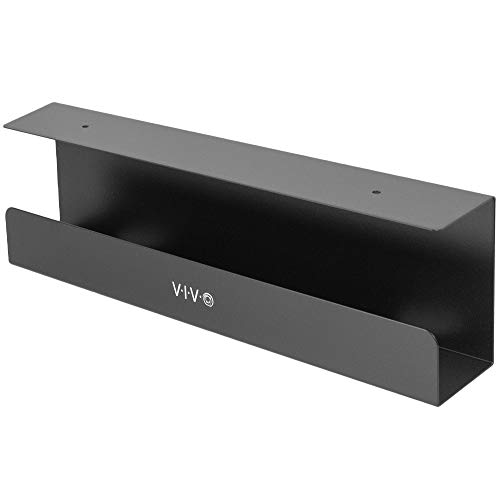
An under-desk tray is the default answer for any desk. It mounts beneath the back edge, holds the power board and all the slack at desk level, and leaves the floor completely clear - you can vacuum right under the desk, nothing gets kicked loose, and from the front the desk simply has no visible cables. Every pick in this guide except one is a tray, because for hiding cables at a desk nothing else does the whole job.
A cable box works at floor level instead. The power board sits inside a ventilated enclosure, cables exit through slots, and the lid hides the clutter. It is the right call where the mess is on the floor and staying there - behind a TV unit, under a router shelf, beside a desk that never moves - and it adds a safety layer a tray does not, keeping dust, pets and small fingers away from live plugs. The D-Line below is the category classic.
A cable sleeve is a zip-up fabric tube that bundles several cables into one tidy trunk. On its own it just makes the mess neater rather than making it disappear, so we treat it as a companion piece: the tray handles everything under the desktop, and a sleeve dresses the single run of cable that still has to travel from the desk down to the wall. On a standing desk that pairing is essential, as covered below.
Budget pick
Auvo
Auvo ACM01 Under-Desk Cable Tray
4.5(70)
$17.59$21.99
Save 20%
Amazon.com.au price as of 05:01 am AEDT, subject to change
As an Amazon Associate, NestPath earns from qualifying purchases.
Hiding a whole power board - the cable box option
Some cable mess never hangs under a desk, and for that the tray is the wrong tool. The power board behind the TV, the router and its plugpack on the hallway shelf, the charging station on the floor of the study - this is floor-level clutter, and the fix is a box that swallows it whole. D-Line is the heritage brand in this space, and its Cable Tidy Box is about as simple as a product gets: power board in, cables out through the end slots, lid on. The slots double as ventilation so heat from the transformer bricks escapes, while the closed lid keeps dust off the contacts - and keeps curious pets and toddlers away from live plugs, which is the quiet reason so many parents buy one. The review base runs to tens of thousands of reviews across the size and colour range, the kind of long-run proof that newer tray listings simply cannot show yet. At $23.50 it is the cheapest peace of mind in this guide.
Also great
D-Line
D-Line Cable Tidy Box (Small)
4.5(37,733)
$23.50
Amazon.com.au price as of 05:01 am AEDT, subject to change
As an Amazon Associate, NestPath earns from qualifying purchases.
Clamp or screw mount - renters versus a permanent install
If you rent, clamp. A clamp-mount tray grips the edge of the desktop with padded jaws, which means zero drilling, zero holes and zero awkward conversations at the final inspection. It also means the tray moves out when you do. The one thing to measure first is the desk lip: a clamp needs roughly 2 to 5 cm of desktop overhang to bite onto. Most flat-pack desks, office desks and standing desk tops have it, but a desk with a deep apron or a frame that runs flush to the edge may leave the clamp nothing to grab - check the back edge before you order.
If you own the desk, screws are better. A screwed tray is fixed to the desk rather than gripping it, so it can never slip, sag or creep along the edge, and screwing into the underside of your own desktop voids nothing and harms nothing - four small holes under the back edge that no one will ever see. The single hard exception: never drill a glass desk. Glass desktops cannot be screwed into safely at home, so on glass it is clamp or nothing. The WUHUIXOZ below is the clamp pick, the VIVO after it is the screw pick, and the Ultimate Setup and Univivi ship with both options so you can switch when you move from renting to owning.
Top pick
WUHUIXOZ
WUHUIXOZ No-Drill Cable Management Tray (39cm)
4.5(392)
$28.99$32.99
Save 12%
Amazon.com.au price as of 11:00 am AEDT, subject to change
As an Amazon Associate, NestPath earns from qualifying purchases.
What about adhesive trays?
You will see adhesive trays and stick-on cable clips all over the listings, usually a few dollars cheaper than a clamp tray, and we do not recommend them here. The foam tape that holds them is tested in mild conditions, and Australian rooms are not mild: a garage in January, a sun room, a study with a west-facing window will all push desk-edge temperatures past what the adhesive holds reliably. When stick-on cable management fails it fails completely - the tray lets go and drops the power board and the entire loom onto the floor in one fall, which is both the mess you paid to avoid and a tug on every plugged-in port at once. A clamp grips mechanically and a screw is fixed mechanically; neither cares how hot the room gets. For a few dollars more than adhesive, buy a mount that holds in February.
Runner-up
VIVO
VIVO 17-inch Under Desk Cable Management Tray (DESK-AC06-1C)
4.6(1,078)
$34.99
Amazon.com.au price as of 11:00 am AEDT, subject to change
As an Amazon Associate, NestPath earns from qualifying purchases.
Size and load - matching the tray to your setup
Count what is actually going in the basket before you pick a size. A single-monitor desk generates less than it seems - a power board, a monitor cable, a laptop charger - and a standard 39 cm tray with a 6 kg rating swallows it easily. A serious setup is another story: two or three monitors, a dock, a desktop PC, a desk lamp and a phone charger means a bigger power board, more bricks and far more slack, and that is XL territory - 42.9 cm and an 8 kg rating buys the headroom to hold all of it without the lid-of-the-toybox effect where the tray technically closes but only just. Plugpack bricks are the trap; four of them weigh more than the power board they hang off. If in doubt, size up - an oversized tray hides its spare room under the desk, while an undersized one puts the overflow right back on the floor.
Also great
Ultimate Setup
Ultimate Setup XL Cable Management Tray (42.9cm)
4.7(594)
$69.44
Amazon.com.au price as of 11:01 pm AEDT, subject to change
As an Amazon Associate, NestPath earns from qualifying purchases.
Standing desk cable management - cables that travel with the desk
A standing desk breaks every floor-based cable plan, because the desk moves and the floor does not. Each time the desktop rises 40 to 50 cm, any cable anchored to the floor, the wall or a floor-level power board gets pulled taut - and twice a day, every day, that tension works on ports, plugs and connectors until something gives. The fix is to move the entire electrical life of the desk onto the desk: the tray mounts under the desktop, the power board lives in the tray, every device plugs in at tray level, and the whole loom rises and falls as one piece with the frame. Only a single cable - the one feeding the power board - runs down to the wall, dressed in a sleeve along one leg with enough slack for the full height range.
This is also why tray length matters more on a standing desk than anywhere else, and why adhesive clips stuck along the frame are the wrong answer - clips hold single cables, fail in heat, and do nothing for the power board itself. A long tray plus one sleeved drop beats a constellation of clips every time. Match the tray to the desk width: the 91 cm Univivi spans nearly the full width of a typical 100 to 120 cm sit-stand top, which means every cable on the desk has tray directly beneath it, and nothing has to travel sideways to find storage. If you are still choosing the desk itself, our best standing desk guide covers the frames these trays bolt onto.
Also great
Univivi
Univivi 36-inch Cable Management Tray (91cm)
4.7(718)
$72.10$85.42
Save 16%
Amazon.com.au price as of 11:01 pm AEDT, subject to change
As an Amazon Associate, NestPath earns from qualifying purchases.
How to route your cables - the ten-minute setup
Once the tray arrives, the routing job is short. Done in this order it stays short:
Clear the deck. Unplug everything and pull every cable out from under the desk so you start from zero, not from a knot.
Mount the tray under the back edge of the desktop - clamp or screws depending on your pick - positioned behind where the monitors sit so the drops are short.
Power board in the tray. This is the move that makes everything else work: the board lies in the basket, sockets facing out for easy access.
Plug in at tray level. Every device cable now only needs to reach the tray, not the floor. Coil the spare length of each cable and drop the coil in the basket beside the board - velcro ties keep coils from re-tangling, but the tray works without them.
One cable down the leg. The power board feed is now the only cable leaving the desk. Run it down one desk leg inside a sleeve or spiral wrap, and on a sit-stand desk leave generous slack at the top so the desk reaches full height without pulling it tight.
Total time is about ten minutes for a simple desk and half an hour for a multi-monitor setup, and the result holds because nothing is relying on tape, tension or good intentions.
Our verdict
For most desks the WUHUIXOZ No-Drill Cable Tray at $28.99 is the one to buy - the category bestseller with the Amazon's Choice badge, 39 cm of mesh basket, a 6 kg rating and a clamp that fits desks 2 to 5 cm thick, so renters and owners get the same clean result with zero drilling. If you want to spend the minimum, the Auvo ACM01 at $19.99 is the same clamp-tray formula from a newer listing with a small but happy review base. Floor-level mess behind the TV or router is the D-Line Cable Tidy Box at $23.50, the heritage-brand box with tens of thousands of reviews across the range. On your own desk, the VIVO 17-inch at $34.99 screws down permanently and never moves. Heavy multi-monitor setups should go straight to the Ultimate Setup XL at $59.50 with its 8 kg rating, and standing desk owners should buy length: the Univivi 36-inch at $87.30 spans 91 cm - nearly the full desk width - so the whole loom travels with the desk.
Frequently Asked Questions
What is the best cable management tray in Australia?
The WUHUIXOZ No-Drill Cable Tray at $28.99 is our top pick for most desks. It is the category bestseller, a 39 cm metal mesh basket that clamps to desks 2 to 5 cm thick with zero drilling, and it carries a 6 kg load rating - enough for a full power board plus plugpacks. Renters lose nothing because there are no holes, and owners get the same clean result without touching a drill. If you want a permanent screw-down install instead, the VIVO 17-inch tray at $34.99 is the rock-solid alternative.
Do clamp-on cable trays damage your desk?
No - that is the point of them. A clamp tray like the WUHUIXOZ ($28.99) or the Auvo ($19.99) grips the desk edge with padded jaws, so there are no holes, no adhesive residue and nothing to explain to a landlord when you move out. The one thing to check before buying is the desk lip: clamp trays need an overhang of roughly 2 to 5 cm of desktop to bite onto. Most flat-pack and standing desks have it, but a desk with an apron or a frame flush to the edge may need a screw-mount tray instead.
Can you put a power board inside a cable management tray?
Yes - housing the power board is the whole strategy. Mount the tray under the back edge of the desk, sit the power board inside it, then plug everything into the board at tray level so only one cable runs to the wall. Mesh and ventilated trays let heat escape and dust fall through rather than settle. Just respect the load rating - 6 kg on the WUHUIXOZ, 8 kg on the Ultimate Setup XL - and never daisy-chain a second power board off the first one.
What is the best cable management for a standing desk?
Keep every cable on the desk so the loom travels with it. On a sit-stand frame the desktop rises and falls by around 50 cm, and any cable anchored to the floor or wall gets yanked twice a day. The Univivi 36-inch tray ($87.30) spans 91 cm - nearly the full width of a typical standing desk - so the power board and every device cable live up top, and a single sleeved wall cable runs down one leg with enough slack for the full height range. A long tray plus a sleeve beats adhesive clips every time.
Are adhesive cable trays any good?
We do not recommend them in Australia. Adhesive trays and stick-on clips test fine in a cool office, but the foam tape that holds them softens in heat, and an Australian summer in a garage, a sun room or a west-facing study will find the limit. When the adhesive lets go you get a power board and a full loom of cables on the floor in one drop. A clamp tray like the WUHUIXOZ ($28.99) costs about the same and grips mechanically, and a screwed tray like the VIVO ($34.99) never moves at all.
Should I buy a cable tray or a cable management box?
It depends where the mess lives. If the clutter hangs under a desk, buy a tray - it lifts the power board and slack off the floor so you can vacuum freely. If the mess sits on the floor behind a TV unit, a router shelf or a fixed desk you never move, a cable box like the D-Line Cable Tidy Box ($23.50) is the simpler fix: the power board goes inside, the lid closes over the clutter, and ventilation slots keep heat out while keeping dust, pets and small fingers away from the plugs.
How long should an under-desk cable tray be?
Match the tray to the loom, not just the desk. A standard 39 cm tray like the WUHUIXOZ ($28.99) holds a power board and the slack from a single-monitor setup. Multi-monitor desks with a dock, a desktop PC and a few plugpacks fill that fast - step up to the 42.9 cm Ultimate Setup XL ($59.50) with its 8 kg rating. On a standing desk, longer is better because every cable must live on the desktop: the 91 cm Univivi spans nearly the full width and swallows the entire loom in one run.
DETAILED REVIEWS
Budget pick
Auvo
Auvo ACM01 Under-Desk Cable Tray
4.5(70)
$17.59$21.99
Save 20%
Amazon.com.au price as of 05:01 am AEDT, subject to change
Affiliate Disclosure: As an Amazon Associate, NestPath earns from qualifying purchases. This means if you click a product link and buy something, we may receive a small commission at no extra cost to you. We only recommend products we genuinely believe will help new homeowners. This does not influence our recommendations.
CERTAIN CONTENT THAT APPEARS ON THIS SITE COMES FROM AMAZON. THIS CONTENT IS PROVIDED ‘AS IS’ AND IS SUBJECT TO CHANGE OR REMOVAL AT ANY TIME.