Which USB-C hub should you actually buy?
A USB-C hub is the cheapest upgrade that makes a laptop feel like a proper desktop - one cable plugs in and suddenly you have a monitor, full-size USB ports, an SD card slot and power, all at once. But the category is a minefield of identical-looking dongles with wildly different capabilities, and the spec that matters most is often buried in the fine print. If the same laptop runs hot at the desk, a laptop cooling pad with a USB hub gives a port back.
We compared six options on Amazon Australia, from a four-port data splitter at about $22 up to a Thunderbolt 4 dock at about $163. Below we match each to a real setup and walk through the gotchas - the display compatibility trap, charging wattage, HDMI refresh rate and data speed - that decide whether a hub delights you or quietly drives you mad.
The number one gotcha: does your laptop support DisplayPort Alt Mode?
This is the trap that catches the most people, so read it before you buy anything with an HDMI port. A USB-C hub does not generate a video signal on its own - it just passes through the one your laptop sends down the USB-C port. For that to happen, your laptop's USB-C port must support a feature called DisplayPort Alt Mode. If it does not, the HDMI output on the hub simply will not work, no matter how good the hub is.
The good news: most modern laptops - MacBooks, Dell XPS, recent ThinkPads, Surface and the like - support it. The bad news: some cheaper and older laptops have USB-C ports that only do data and charging, and many phones do not support video output at all. The quickest check is to search your exact laptop model plus "USB-C DisplayPort Alt Mode", or look for a small DisplayPort logo (a D with a P) next to the port. If your laptop cannot do Alt Mode, skip the HDMI hubs entirely and buy the data-only UGREEN 4-in-1 instead.
Power Delivery passthrough: charging your laptop and the hub at once
If you want one cable on your desk, the hub has to charge your laptop while also running everything plugged into it. That is what the "PD" or "Power Delivery" port is for - you plug your laptop charger into the hub, and the hub feeds power up to the laptop. The numbers here are worth understanding.
A hub rated for "100W PD" does not deliver 100W to your laptop. You lose roughly 10-15W to running the hub itself, which is why Anker quotes 85W passthrough on a 100W port - that gap is normal and expected, not a fault. For a typical 13-14 inch laptop, 85W is plenty. For a power-hungry 16-inch laptop under heavy load, it is on the edge, and the Satechi's 60W upstream would be marginal. The practical rule: feed the hub a 90-100W charger, expect about 85W to reach the laptop, and you will be fine for everyday work.
HDMI 4K@60Hz versus 4K@30Hz: the refresh-rate trap
Here is the spec that separates a good desk experience from a slightly maddening one. Two hubs can both claim "4K HDMI" while delivering very different results, because the refresh rate matters as much as the resolution. A 4K@30Hz output redraws the screen 30 times a second; 4K@60Hz does it 60 times.
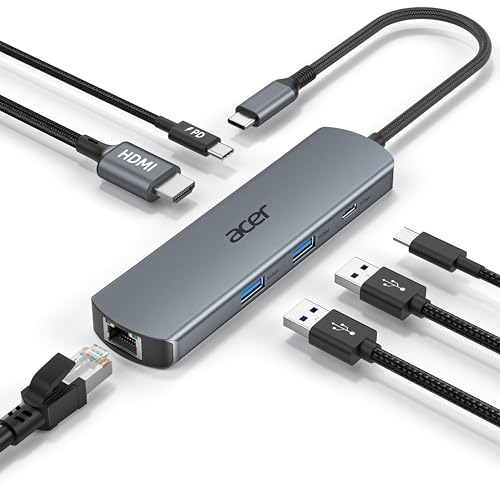
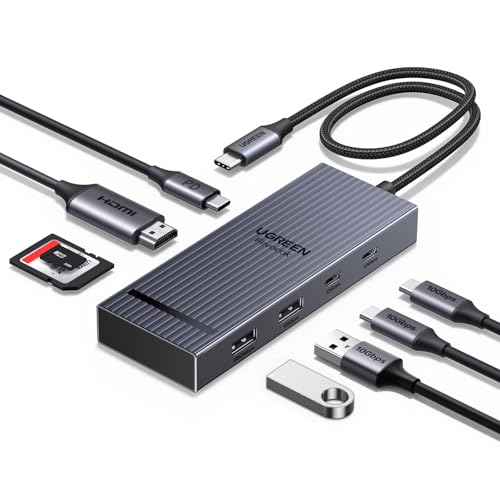
For watching video or reading documents, 30Hz is perfectly fine. But the moment you start moving a mouse cursor around a 4K desktop, 30Hz feels visibly laggy and stuttery - the cursor smears slightly and scrolling looks choppy. It is the kind of thing you do not notice in the spec sheet but cannot un-see once you are working on it daily. The budget-friendly Anker 332 is a 4K@30Hz hub; the Acer 6-in-1 and the UGREEN Revodok Pro 108 both do the smoother 4K@60Hz. If the hub is going to be your permanent desk setup, pay the small premium for 60Hz.
Data-port speed: 5Gbps versus 10Gbps
The USB data ports on a hub come in two common speeds, and the difference is real if you move large files. 5Gbps (USB 3.2 Gen 1) is the older standard and is fine for keyboards, mice, hubs of slow flash drives and printers. 10Gbps (USB 3.2 Gen 2) is twice as fast and is what you want if you regularly plug in an external SSD or shuttle big video files around.
In this group, the Anker 332 and Anker 341 run their data ports at 5Gbps, while the two UGREEN models hit the full 10Gbps. The UGREEN 4-in-1 is the standout for pure transfer speed - it claims a 20GB file in about 16 seconds across all four ports. If your daily workflow is documents and a couple of peripherals, 5Gbps is genuinely all you need and not worth paying extra to exceed. If you live off an external SSD, the 10Gbps UGREEN options earn their keep.
SD card readers and Gigabit Ethernet: do you actually need them?
Two features push a hub from "good enough" to "perfect for me" - but only if you genuinely use them, otherwise they are just ports gathering dust. A built-in SD and microSD reader is a real time-saver for photographers and drone pilots, since you can offload a card straight into the laptop without a fiddly separate dongle. The Anker 341 and the UGREEN Revodok Pro 108 both include dual SD and microSD slots; the Revodok's run at a brisk 170MB/s.
Gigabit Ethernet is the other one. A wired connection is dramatically more stable than Wi-Fi for video calls and large transfers, and if you work from home it can be the difference between a smooth meeting and a stuttering one. The Acer 6-in-1 is the only hub here with an RJ45 Ethernet port - just remember to use a CAT6 cable to actually reach the full gigabit speed. If you never plug into wired internet and never touch a camera card, save your money and skip both.
Why brand matters: cheap no-name hubs overheat and drop the display
It is tempting to grab the cheapest hub in the search results, but this is one category where the no-name discount option genuinely costs you. The most common failure mode is heat. A hub crams a lot of high-speed circuitry into a tiny aluminium or plastic shell, and cheap units with poor power management run hot - hot enough that the display signal cuts out intermittently or the connection drops mid-task. It is maddening and hard to diagnose.
Every pick on this list comes from a known brand - UGREEN, Anker, Acer and Satechi - precisely because they handle heat and power properly and back the product with a warranty. Anker's 18-month cover and Satechi's 2-year warranty are not marketing fluff; they reflect units built to run cool for years. The few extra dollars over a generic hub buy you reliability, and with a device that everything on your desk plugs through, reliability is the whole point.
Thunderbolt 4 docks are a different, pricier class
The Satechi 5-in-1 sits apart from the rest of this list, and it is worth understanding why. It is not a USB-C hub - it is a Thunderbolt 4 dock, which is a more capable and more expensive class of device built for power users. Its three downstream ports run at 40Gbps (four times the fastest hub here), and it can drive dual 4K@60Hz monitors or a single 8K display, which no $40 USB-C hub can do.
That capability comes with conditions. Your laptop needs a genuine Thunderbolt 4 port - not just any USB-C port - or you lose most of the benefit. Some MacBook models will not run two external displays regardless of the dock. And at about $163 it costs four times the best USB-C hubs, so it only makes sense if you specifically need that dual-monitor, high-bandwidth setup. For everyone running a single screen and a few peripherals, a $25-$39 hub does the job for a fraction of the price.
How we chose these six
We started from what Australian laptop owners actually plug in day to day - a monitor, a couple of USB devices, power, and sometimes a card or Ethernet - and worked back to the hubs that cover those jobs without overpaying. We weighed real Amazon Australia review counts and ratings, the four specs that decide everyday experience (Alt Mode display support, PD wattage, HDMI refresh rate and data speed), and stuck to brands with a track record of running cool and honouring warranties.
Two of our picks are newer AU listings with smaller review counts - the Acer 6-in-1 (190+ reviews) and the Satechi dock (22 reviews) - so we have flagged that openly rather than pretending they are long-proven sellers. Their specs and brands justify the place; the review history simply has not built up yet. Everything else here carries thousands of reviews. We earn a small commission if you buy through our links, at no extra cost to you, and it never changes which products we recommend.
Frequently asked questions
Will any USB-C hub charge my laptop?
Only hubs with a Power Delivery (PD) passthrough port can charge your laptop, and you have to plug your own laptop charger into that port. The UGREEN 4-in-1 (about $22) has no PD port, so it will not charge anything. The Anker 332, Acer 6-in-1, Anker 341 and UGREEN Revodok Pro 108 all have a 100W PD port that delivers up to about 85W to the laptop.
Why won't my hub's HDMI output work?
Almost always because your laptop's USB-C port does not support DisplayPort Alt Mode, which is the feature that lets a USB-C port carry a video signal. Most modern laptops support it, but some budget and older laptops - and most phones - do not. Check your exact model before buying any hub with HDMI, and if it cannot do Alt Mode, buy a data-only hub like the UGREEN 4-in-1 instead.
What's the difference between 4K@30Hz and 4K@60Hz?
Both show a 4K image, but 60Hz redraws the screen twice as often, so motion - moving the mouse, scrolling, dragging windows - looks smooth instead of slightly laggy. For video and reading, 30Hz is fine; for a daily desktop, 60Hz is noticeably better. The Anker 332 (about $25) is 4K@30Hz, while the Acer 6-in-1 (about $35) and UGREEN Revodok Pro 108 (about $39) both do 4K@60Hz.
Do I need a Thunderbolt 4 dock like the Satechi?
Only if you specifically want to run two external monitors or need 40Gbps transfer speeds, and your laptop has a true Thunderbolt 4 port. The Satechi (about $163) is overkill - and four times the price - for anyone running a single screen and a few peripherals, where a $25-$39 USB-C hub does the job.
What's the difference between 5Gbps and 10Gbps ports?
10Gbps ports transfer data twice as fast as 5Gbps ones, which matters if you use an external SSD or move large video files. For keyboards, mice and slower flash drives, 5Gbps is plenty. The two UGREEN hubs run at 10Gbps; the two Anker hubs run their data ports at 5Gbps.
Which hub is best for photographers?
Either the Anker 341 (about $38) or the UGREEN Revodok Pro 108 (about $39), since both include dual SD and microSD card readers for offloading cards directly. The Revodok edges ahead with faster 170MB/s card slots, 10Gbps data ports and 4K@60Hz HDMI, while the Anker 341 has the larger 27,700+ review track record.
Are cheap no-name USB-C hubs worth it?
Usually not. The common failure is overheating - cheap hubs run hot and intermittently drop the display or connection, which is hard to diagnose and infuriating to live with. Sticking to known brands like UGREEN, Anker, Acer and Satechi costs a few dollars more but buys proper heat management and a real warranty.