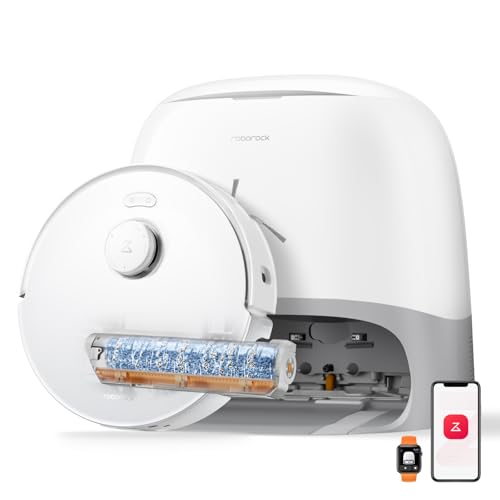
For a robot vacuum and mop in Australia, compare the mop first: the ECOVACS DEEBOT N20 uses a flat pad, the T30S Pro and dreame L10s Ultra Gen3 use spinning pads, and the roborock Qrevo Curv 2 Flow and ECOVACS DEEBOT X11 PRO Omni use rollers. The right choice depends on your floors, the dock chores you want to avoid and how the robot handles carpet.
At our 2 October 2026 check, the docking station or supply unit for each of these five cards had a Level 3 EESS register record. No listing or manual showed an Australian plug or an RCM mark on the sold unit; How we checked these robot mops explains the limit.
A robot vacuum-mop does both jobs in one run
A vacuum-mop combo collects loose dirt and carries a mop for the same floor-cleaning routine. That makes it useful to compare both halves of the machine. A suction figure describes the vacuum side, while the pad or roller, water handling and dock determine how the wet pass works. A robot with a mop attachment is still a different proposition from one whose dock washes the mop after a run.
The ECOVACS DEEBOT N20 illustrates the simpler arrangement. It has 8,000 Pa advertised suction, a washable flat mopping pad and a charging dock. You handle the pad after mopping. The T30S Pro adds spinning mops and an OMNI station, while the dreame L10s Ultra Gen3 combines spinning pads with automatic mop washing and drying. The two roller models refresh their mops during cleaning as well as using more capable docks.
Think about the floor areas the robot can reach before comparing a headline number. Rugs, stairs and furniture create different jobs. A robot remains a floor tool, so a stick vacuum can still serve places the robot cannot reach. For this guide, the useful question is how much of your regular hard-floor and carpet routine each combo can take on, and which pad, tank and dock tasks come back to you.
The five robots at a glance
This table puts the documented hardware side by side. Suction values are advertised figures, not a measure of cleaning results. A dock that washes a mop changes the maintenance routine, while mop lifting and carpet settings matter where hard floors meet rugs.
Five robot vacuum and mop combos compared| Model | Advertised suction | Mop | Dock | Carpet handling |
|---|
| ECOVACS DEEBOT N20 | 8,000 Pa | Washable flat pad | Charging dock | Carpet detection listed |
| ECOVACS DEEBOT T30S Pro | 11,000 Pa | Spinning pads with TruEdge | OMNI station with dust emptying and mop care | Carpet cleaning settings listed |
| dreame L10s Ultra Gen3 | 25,000 Pa | Spinning pads with MopExtend RoboSwing | Dust emptying, mop washing and drying | 10.5 mm mop lift |
| roborock Qrevo Curv 2 Flow | 20,000 Pa | SpiraFlow roller | Dust emptying, robot refill from a hand-filled tank, mop washing and drying | Up to 15 mm mop lift and Roller Shield |
| ECOVACS DEEBOT X11 PRO Omni | 19,500 Pa | OZMO ROLLER 2.0 | OMNI station that refills the robot from a hand-filled tank | Carpet cleaning features listed |
ECOVACS DEEBOT N20
The N20 pairs its 8,000 Pa advertised suction with a 400 ml dust bin, ZeroTangle brush and TrueMapping navigation. Its washable mopping pad is a flat cloth rather than a rotating pad or roller. That makes pad rinsing part of ownership. The included charging dock does not provide the mop washing described for the other four cards. If your reason for buying a combo is the wet pass, pay attention to that difference before comparing suction alone.
The AU manual lists the CH2405 docking station supply input as 100 to 240 V AC, 50 to 60 Hz.
The listing also describes carpet detection and app mapping. Those features help you plan where the N20 travels, but they do not turn its flat pad into a powered scrubber. Compare its brush and dust-bin arrangement with the docked models if pet hair or regular bin emptying matters to your routine.
How we checked these robot mops
We checked the five Amazon AU listings, the maker manuals linked from or identified for these models, and the EESS register on 2 October 2026. The figures in this guide are documented specifications and listing claims. They are not measurements from use in a home, and this guide runs no cleaning, pickup or stain tests of its own. A register match was checked by the station or supply code in the manual, rather than by a brand-name search alone.
- ECOVACS DEEBOT N20: the AU manual names docking station CH2405 and an input of 100 to 240 V AC, 50 to 60 Hz. Level 3 record E2024159859 lists ICAL & TRADING CO as Responsible Supplier and expires 28 May 2029.
- ECOVACS DEEBOT T30S Pro: the AU manual names station CH2366 and an input of 220 to 240 V AC, 50 to 60 Hz. Level 3 record E2024160402 lists ANZ ELECTRICAL COMPLIANCE PTY LTD and expires 5 June 2029.
- dreame L10s Ultra Gen3: the maker manual names base station RCLE0510 and an input of 220 to 240 V, 50 to 60 Hz. Level 3 record E2026011329 lists SUBEMO PTY LTD and expires 14 August 2030.
- roborock Qrevo Curv 2 Flow: the maker manual names dock EWFD53HRR and an input of 220 to 240 V AC, 50 to 60 Hz. Level 3 record E2025014364 lists G & A AUSTRALIA TRADE PTY LTD and expires 22 August 2030.
- ECOVACS DEEBOT X11 PRO Omni: the AU manual names station CH24C0 and an input of 220 to 240 V AC, 50 to 60 Hz. Level 3 record E2025013118 lists ANZ ELECTRICAL COMPLIANCE PTY LTD and expires 5 August 2030.
Our model-code search found no Level 3 record for the robots themselves; the Level 3 matches above cover their docks or supply units. The listings and manuals did not show an Australian plug or an RCM mark on the sold units, so those details remain unverified. The maker manuals, Amazon AU listings and EESS register records are the sources for this check.
The dreame L40 Ultra AE is not carded in this guide. The dreame X40 Ultra is not carded: its dock record sits under a Responsible Supplier whose registration had expired at the check, and its listing's package image shows a European two-pin cord.
The mop type is what really separates these robots
Start with the part that touches the floor. The N20 carries a washable flat pad behind its vacuuming hardware. The T30S Pro and dreame L10s Ultra Gen3 use spinning pads, while the roborock Qrevo Curv 2 Flow and ECOVACS DEEBOT X11 PRO Omni use rollers. Those designs create different maintenance tasks and different ways of bringing water to the floor. Upkeep follows from the mechanism: the N20's flat pad is rinsed by hand, while the spinning-pad and roller models wash their mops at the station.
A flat pad gives the N20 a wet wiping function, with the owner responsible for rinsing the cloth. The T30S Pro's OZMO TURBO 2.0 pads and the L10s Ultra Gen3's spinning pads move against the floor. The L10s Ultra Gen3 listing also names MopExtend RoboSwing for reaching along edges. For the T30S Pro, TruEdge extends the mopping area beside walls. Compare those reach features with the shape of the rooms you plan to mop, especially where furniture legs and skirting boards interrupt a straight path.
The roborock roller is fed water at multiple points and scraped during a run, according to its listing. The X11 PRO Omni uses ECOVACS' OZMO ROLLER 2.0 and a station that washes it afterward. Both approaches differ from taking a flat pad off the robot to rinse it. If you want a separate tool for a floor-cleaning job outside the robot's routine, our steam mop guide covers that category. For a powered floor washer you guide by hand, see our hard-floor cleaner comparison.
The self-cleaning dock is the convenience leap
Self-emptying moves dust out of the robot's bin. Mop washing cleans the pad or roller. Mop drying dries it after washing. Robot refilling tops up the robot's water supply. Check these functions separately when comparing a self-emptying robot vacuum mop.
Dock functions are easy to confuse because a charging dock and a mop-care station both give the robot a place to return. The N20's included dock charges it; you wash its pad yourself. The T30S Pro's OMNI station adds dust emptying and mop care. The dreame L10s Ultra Gen3 station empties collected dust and washes and dries the pads. These are different ownership routines even before you compare mop types or suction figures.
The roborock Qrevo Curv 2 Flow dock adds robot refilling from its clean water tank, mop washing and warm-air drying to dust emptying. The ECOVACS DEEBOT X11 PRO Omni station also refills the robot from its clean water tank and washes and dries its roller. Check exactly where fresh and dirty water go for the station you are considering. A feature described as automatic does not erase every owner task: pads, brushes, dust containers and water arrangements still need attention as described by the relevant listing and manual.
Choose a dock by the task you want it to handle. If rinsing a pad after each wet run is acceptable, the N20's simpler arrangement is clear. If you want the robot to return for mop care, compare the other four stations. If water handling is a priority, note that the roborock and X11 PRO Omni docks both refill the robot from a clean water tank that you fill with tap water. The labels on a product page can sound similar while referring to different parts of the cleaning cycle.
On the X11 PRO Omni, cleaning solution goes into the separate solution containers, not the clean water tank. The AU manual puts standard solution in the blue box and heavy-duty solution in the black box, and the water tank is filled separately.
X11 PRO Omni maintenance example (AU manual)| Part | Maintenance frequency |
|---|
| Main brush | Every week |
| Filter | Every week |
| Side brush | Every two weeks |
| Clean water tank | Every three months |
Lidar mapping and obstacle avoidance keep it tidy
Mapping tells the robot where rooms and boundaries are; obstacle recognition addresses objects encountered within that plan. The N20 listing names TrueMapping laser navigation and app map restoration. The T30S Pro listing names TrueMapping 2.0 and AIVI 3D 2.0. The roborock listing names PreciSense LiDAR and Reactive AI obstacle recognition. These are named systems on the respective listings, and they do not mean each machine will react identically to the same cable, shoe or chair.
Make a map useful by looking at your own floor plan. Identify the rooms you want cleaned together, the places a robot should avoid and the objects you normally leave down. The roborock listing describes support for up to four floor plans, which is relevant if the machine will be moved between levels. The X11 PRO Omni listing describes floor and pet zones in its room-based planning. For the N20, the app mapping and carpet detection are more useful facts than a claim that it will find every piece of clutter.
Good setup is still part of the routine. A no-go area can keep a machine away from a known tangle of cords, while a room boundary can separate a wet pass from an area you want vacuumed only. Compare the app controls that are actually listed for a model, and keep loose objects in mind when deciding how much obstacle recognition you need.
Suction in Pa is the vacuum side, and it matters on carpet
The five listings advertise 8,000 Pa for the N20, 11,000 Pa for the T30S Pro, 25,000 Pa for the dreame L10s Ultra Gen3, 20,000 Pa for the roborock Qrevo Curv 2 Flow and 19,500 Pa for the X11 PRO Omni. Pascals describe an advertised suction setting. They do not tell you, by themselves, how well the whole brush, airflow path and dust bin will collect dirt from a particular carpet.
For a home with rugs, read the suction figure alongside the brush and carpet settings. The N20 listing describes a ZeroTangle brush and carpet detection. The dreame listing describes adjustable suction levels and a carpet mode that lifts the mop. The roborock listing describes carpet suction changes alongside its roller lift and shield. Those combinations tell you more about the proposed cleaning routine than a number in isolation.
Hair creates another reason to check brush design. The N20 listing describes comb teeth and angled bristles intended to reduce tangles; the roborock listing describes a Dual Zero-Tangle arrangement. These are maker descriptions, so treat them as features to compare rather than a guarantee of a particular result on your floor.
App zones, no-go lines and scheduling
The map becomes useful when the app lets you tell the robot what to do with it. The roborock listing explicitly describes schedules, no-go zones and up to four floor plans. The N20 listing describes app mapping and map restoration. The T30S Pro listing describes TrueMapping 2.0 and cleaning controls. Read the model's listing for the controls you need instead of assuming every app exposes the same options in the same way.
Start with a short list of rooms and problem spots. A water bowl, cable cluster or small rug can be a reason to draw a boundary. A kitchen floor may call for a wet pass while an adjoining carpeted room calls for vacuuming with the mop lifted or kept away. These are choices to set in the app; the product's documented mapping and carpet functions determine which choices are available.
The X11 PRO Omni listing describes AGENT YIKO planning based on rooms, routines and pet zones. That is a different promise from basic scheduling, and its usefulness depends on whether you want the machine to propose a plan or prefer to set the routine yourself. Compare the listed controls with your actual rooms before deciding that a longer feature list will save you work.
The Qrevo Curv 2 Flow listing specifies 2.4 GHz Wi-Fi only. The N20 listing states support for 2.4 GHz and combined 2.4/5 GHz networks. Check your router's network settings before app setup.
Pad-lifting protects your carpets
- Compare carpet detection with mop lifting: they are different functions.
- Check whether the wet mop is lifted, shielded or kept away from the rug.
- Where supported, use a no-go zone for rugs you want excluded.
A wet mop and a rug need a clear transition plan. The dreame L10s Ultra Gen3 listing specifies 10.5 mm of mop lift when it detects carpet. The roborock Qrevo Curv 2 Flow listing specifies up to 15 mm and describes a Roller Shield that deploys with the lift. These are measurable hardware descriptions. They do not establish that every rug pile will stay untouched, so check the floor coverings in your home against the manufacturer's carpet settings.
The N20 listing describes carpet detection but does not give the same mop-lift specification. Treat that as a reason to examine its mopping route and settings, particularly if a small rug sits in the middle of a hard-floor room. The T30S Pro listing describes customised cleaning for carpet and hard floors, while the X11 PRO Omni listing describes floor-type planning. Each handles the transition through its own set of controls.
Plan around the boundaries where a wet pass should stop. A no-go zone or a vacuum-only area may be a sensible setting when you cannot establish enough clearance for a rug. Mop lifting addresses the robot's wet pad; it does not remove marks already in a carpet. Our carpet cleaner guide covers a separate cleaning task.
A note on which brands actually matter on Amazon AU
The five cards here are specific Amazon AU listings from ECOVACS, dreame and roborock. That is the scope of this comparison, not a claim that those are the only brands making robot mops. Look at each exact model name and listing rather than applying a brand's features to every robot it sells. Even within ECOVACS, the N20's flat pad, T30S Pro's spinning pads and X11 PRO Omni's roller describe three different wet-cleaning arrangements.
Within this guide, ECOVACS supplies three of the five cards, while dreame and roborock supply one each. Their controls are named differently too: the N20 listing names the ECOVACS HOME App, the T30S Pro listing names the YIKO AI Voice Assistant, and the roborock listing names the Roborock app and “Hello Rocky” voice commands.
What about the Ecovacs Deebot X8 Pro Omni, Roborock Saros 20 and Kogan?
Those names appear in search results around this topic, but they are not among the five cards in this guide. Search results in late September 2026 also showed the Ecovacs Deebot X8 Pro Omni and the Kogan SmarterHome LX20 Pro. The current page also asks about the Roborock Saros 20. A search result mention is a reason to investigate a model, not a specification for the exact listing a reader might buy.
This comparison covers the five Amazon AU listings carded on this page. This guide does not card the X8 Pro Omni, Saros 20 or Kogan model, so it does not compare their specifications here. Adding one of them to the table would require the same model-code, mop, dock and carpet checks applied to the five cards. For now, this section explains why a name seen in a search answer does not appear as a recommendation below.
There is another reason to keep the comparison exact. A collection name can cover several versions, and a search result can describe a feature that belongs to a different version or package. Read the complete model name, the listed components and the manual tied to the item. The five cards above can be compared on those terms; the three names in this question are context for the search, not extra entries in the table. If you want a manual wet-cleaning option instead, our manual mop comparison covers that separate category.
Best robot vacuum in Australia: every robot here vacuums first
This guide also answers the vacuum side of the search. All five card listings describe robot vacuums with a mopping function. If you intend to use mostly dry cleaning, compare brushes, dust handling, suction settings and the way the robot navigates carpet. The wet-cleaning hardware remains part of what you are buying, even if you seldom fill a water tank.
The N20 supplies a 400 ml dust bin and a ZeroTangle brush in its listing. The T30S Pro adds dust emptying at its OMNI station and lists AIVI 3D 2.0 navigation. The dreame L10s Ultra Gen3 lists adjustable suction levels and SideReach vacuuming. The roborock Qrevo Curv 2 Flow lists a Dual Zero-Tangle system, while the X11 PRO Omni lists room-based cleaning controls. These are concrete differences to check against hair, carpet and furniture in your home.
Do not decide from the Pa column alone. The figures are advertised suction settings, while the brush and cleaning route determine what contacts the floor. A carpeted room also asks how the wet mop is managed as the robot crosses from hard flooring. Choose the combination of vacuum features and mop behaviour that fits the rooms you will actually schedule.
How to choose the right one for your home
List your hard-floor area, your rugs and the chores you are willing to do after a run. If a washable flat pad and manual rinsing suit your routine, the N20 makes that arrangement clear. If you want spinning pads with station care, compare the T30S Pro's TruEdge and OMNI station with the dreame L10s Ultra Gen3's MopExtend RoboSwing, pad lift and base-station functions. The features answer different needs; neither combination produces a universal choice for every floor.
If a roller is the feature you want, compare the roborock Qrevo Curv 2 Flow's in-run scraper, up to 15 mm lift and Roller Shield with the X11 PRO Omni's OZMO ROLLER 2.0 and its station's heated-water roller wash. Check where each station will sit and how its water arrangement fits your home. A listed feature has value when you can set it up and maintain it.
For pet hair, examine the brush as well as the suction claim. The N20 listing describes angled bristles and comb teeth, and the roborock listing describes a Dual Zero-Tangle system. For a mix of rugs and hard floor, put the mop-lift or carpet-setting information beside the mop type. For several rooms or levels, compare the documented app map and zone controls. Finally, use the live card prices rather than an amount fixed in this article, because the listing price can change between visits.
Verdict
Compare these five by mop mechanism, dock tasks, carpet handling and the room controls you will use. At the 2 October 2026 check, the Level 3 register matches covered the listed docks or supply units; the Australian plug and RCM mark on the sold units remained unverified.
Frequently asked questions
Do robot mops actually clean floors or just push water around?
They use different wet-cleaning mechanisms, so check the mop rather than assuming every combo works the same way. The ECOVACS DEEBOT N20 carries a washable flat pad that you rinse yourself; the T30S Pro and dreame L10s Ultra Gen3 use spinning pads. The roborock Qrevo Curv 2 Flow and ECOVACS DEEBOT X11 PRO Omni use rollers, with the roborock listing describing water delivery and scraping during a run. For stains, the X11 PRO Omni listing describes AI Stain Detection 2.0, with a quick re-mop for light stains or a cross-pattern Deep Re-mop Mode, and the T30S Pro listing describes AI Instant Re-mop.
Is the self-cleaning dock worth the extra money?
It is worth comparing if washing a mop after each run is a chore you want the machine to handle. The N20 has a charging dock and a pad you rinse, while the other four cards describe stations with mop care and dust handling. The Qrevo Curv 2 Flow and X11 PRO Omni docks both refill the robot from a clean water tank you fill by hand; they differ in how the roller is cleaned, with the roborock scraping it during the run and the X11 PRO Omni washing it with heated water at the station. Check the live card prices alongside those tasks, then decide which station functions you would actually use in your home.
Will a robot mop ruin my carpets and rugs?
A wet mop should be kept off any rug the robot cannot cross with enough clearance. The dreame L10s Ultra Gen3 listing specifies 10.5 mm of mop lift, and the roborock Qrevo Curv 2 Flow listing specifies up to 15 mm with Roller Shield. Those numbers describe the mechanisms, not a guarantee for every rug thickness or edge. Check the carpet modes and use a boundary or vacuum-only setting where the floor covering needs one.
How much suction do I need?
There is no single Pa figure that answers this for every floor. The five listings advertise figures from 8,000 Pa for the N20 to 25,000 Pa for the dreame L10s Ultra Gen3, but brush design and carpet settings also matter. The N20 and roborock listings describe anti-tangle brush arrangements, and the dreame listing describes adjustable suction levels. Compare those features with your flooring and hair load instead of treating the largest advertised number as a cleaning result.
Which robot mop brands should I trust on Amazon Australia?
Check the exact model and listing before relying on a brand name. The five cards here are three ECOVACS models, one dreame model and one roborock model, with substantially different pads, rollers and stations. The N20 has a flat pad, while the X11 PRO Omni uses a roller even though both are ECOVACS products. Use the current card details, the corresponding manual and the functions you need to assess a specific item; this guide does not establish a trust ranking for brands.
What is the difference between a robot mop and a plain robot vacuum?
The combos in this guide vacuum and carry equipment for a wet pass. That equipment ranges from the N20's washable pad to spinning pads and the rollers on the roborock and X11 PRO Omni models. A plain robot vacuum handles dry pickup without a mop routine, so the comparison turns on whether you plan to wet-clean your reachable floors. If you do, check how the pad or roller is washed and what you will need to do at the dock afterward. On a combo, the mopping hardware travels with the robot: the N20's listed box contents include a washable mopping pad and a mopping plate as well as the charging dock. If you never plan to mop, that hardware adds parts to clean without adding a job you need done.
Which robot vacuum and mop is best in Australia?
No single model is named best in this five-card comparison. The main differences are a flat pad, spinning pads or a roller, the work handled by the dock, advertised suction and the way the mop is kept from carpet. The N20 has the simplest wet-cleaning arrangement, while the other cards list more station care; the dreame and roborock listings give specific mop-lift figures. Compare those documented features with your floors and check the live card prices before choosing.
What is the best robot vacuum and mop under $1,000 in Australia?
Use the live prices on the five cards to see which models currently fit that band. A fixed amount in the article could be wrong when a listing changes, and price alone does not tell you which mop or dock you are buying. The N20 requires manual pad rinsing; the T30S Pro, dreame L10s Ultra Gen3, roborock Qrevo Curv 2 Flow and X11 PRO Omni list different station-care functions. Compare the cards that meet your limit on the day you shop.
What is the best robot vacuum in Australia?
This guide does not name a best robot vacuum. Each of its five cards combines dry pickup with a wet-cleaning function, so start with the brush, dust handling and carpet settings if vacuuming is your main task. The N20 listing gives a 400 ml bin and ZeroTangle brush, while the roborock listing describes a Dual Zero-Tangle arrangement. For dry pickup, the dreame L10s Ultra Gen3 listing gives five adjustable suction levels, and the N20 listing describes laser radar TrueMapping that builds a map in 8 minutes. Those details describe how each robot vacuums before any mop is involved. The N20 listing also describes a 4-stage filtration system, and the T30S Pro listing gives a 180-minute battery life.
Is a robot vacuum worth it?
It depends on how much of your floor the robot can reach and how much maintenance you want to do. The N20 offers app mapping and a charging dock, but its mopping pad needs manual rinsing; the other cards describe stations that take on more of the mop-care routine. Stairs, loose objects and rugs still require a plan for where the robot goes. Compare the recurring tasks described for a model with the time you expect it to save on your reachable floors. The N20 listing gives 20 mm threshold climbing and the X11 PRO Omni listing gives thresholds up to 2.4 cm, so measure the steps between your rooms before relying on either to cross them.
Do robot vacuum cleaners work on carpet?
They can, within limits: the X11 PRO Omni AU manual says not to use it on shaggy rugs or carpets with fibres longer than 10 mm, and the five listings describe carpet functions in different forms. The N20 lists carpet detection, the dreame L10s Ultra Gen3 lists a carpet mode and 10.5 mm mop lift, and the roborock Qrevo Curv 2 Flow lists up to 15 mm of lift with Roller Shield. Check both the dry-cleaning brush and the treatment of the wet mop. A rug's thickness and edges also matter when setting the robot's route. The dreame listing says the robot detects carpet, boosts suction and lifts the mop before crossing, and the N20 listing pairs carpet detection sensors with high-traction drive wheels. If a rug is thick or has loose tassels, a no-go zone around it in the app is an option to weigh where the model supports one.
How much does a robot vacuum and mop cost in Australia?
Check the live prices on the five cards for the current amounts. They can change, so this article does not attach a fixed product price to a model. Compare the work included at the dock as well as the card price: the N20 has a charging dock, while the other four list mop-care functions. The mop type and carpet settings may matter more to your floor plan than a difference in price between two listings on a particular day. Upkeep belongs in the comparison as well: the N20's washable pad is rinsed by hand, the docked models wash their mops at the station, and the X11 PRO Omni listing describes cleaning solution formulas used by its station.
Which robot vacuum and mop has the best reviews?
The Amazon AU star averages and review counts at the 2 October 2026 check do not establish which machine will suit your home. At that check, the X11 PRO Omni had 4.3 stars from 6,147 reviews, the N20 had 4.0 from 2,255, and the roborock Qrevo Curv 2 Flow had 4.5 from 58. The T30S Pro had 4.4 stars from 285 reviews and the dreame L10s Ultra Gen3 had 4.5 from 1,417 at the same check, so the five cards span review counts from 58 to 6,147. A count and an average answer different questions. Read the current listing reviews for issues that match your floors and maintenance routine rather than naming a winner from the average alone.
What is the best robot vacuum and mop for pet hair?
Compare the main brush and dust handling before choosing a combo for pet hair. The N20 listing describes ZeroTangle angled bristles and comb teeth, while the roborock Qrevo Curv 2 Flow listing describes a Dual Zero-Tangle system. The T30S Pro, dreame L10s Ultra Gen3, roborock and X11 PRO Omni cards also describe dust emptying at their stations. The T30S Pro listing describes a V-shaped roller brush with 21° flat bristles and dual comb teeth arrays that sweep hair into the suction port, and the X11 PRO Omni listing describes ZeroTangle 3.0 with ARClean brushes. The dreame L10s Ultra Gen3 listing says its suction picks up pet hair and offers five suction levels. The L10s Ultra Gen3 listing also gives self-emptying for up to 100 days, so collected hair moves into the base rather than staying in the robot's bin.
Is Roborock or Dreame better?
Compare the exact models rather than the brand names. The roborock Qrevo Curv 2 Flow card describes a roller refreshed during cleaning, up to 15 mm mop lift and a dock that refills the robot from a clean water tank. The dreame L10s Ultra Gen3 card describes spinning pads, MopExtend RoboSwing, 10.5 mm lift and a base that washes and dries the pads. Setup differs too: the roborock listing specifies 2.4 GHz Wi-Fi only, while the dreame listing describes app control, so check your home network before choosing between them.
Do robot vacuum mop combos really work?
They are designed to collect loose dirt and make a wet pass, but the kind of wet pass differs across these five models. The N20 uses a flat pad; the T30S Pro and dreame L10s Ultra Gen3 use spinning pads; the roborock Qrevo Curv 2 Flow and X11 PRO Omni use rollers. Their docks also take on different amounts of washing, drying, dust emptying and water handling. Match those documented functions to the cleaning routine you want, without treating an advertised specification as a measured result.