Robot toys range from dancing robots to kits your child builds and codes. Choose by listed age, then by play, coding or building. These eight picks compare those choices using the features and age ranges in their listings.
Best all round robot toy: Ruko 1088 Smart Robot
Best all round robot toy: the Ruko 1088 Smart Robot, because it takes remote, app and voice control, has 10 expressions and 9 flexible joints, and plays for up to 100 minutes per charge.
The listing describes a robot up to about 40.1 cm tall with 10 songs, gymnastics, storytelling, dance, music and recording. Control options include a 2.4GHz remote, the Carle App over Bluetooth and tilting your phone in gravity sensor mode. It charges in 150 minutes and has a low power reminder. It holds 4.5 stars from 5,400 ratings, shared across colours.
It suits families wanting songs, movement and several control methods, and it is the most rated pick here. The honest catch: the listing describes basic programming and does not say an age range beyond Gifts for Kids.
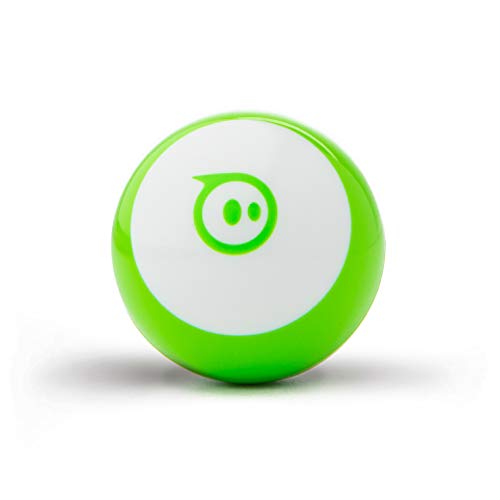
Best app controlled robot ball for coding: Sphero Mini
Best app controlled robot ball for coding: the Sphero Mini, because kids can drive it with a joystick, tilt or their own face and program it in JavaScript.
The Sphero Mini is a robotic ball about 4.0 cm across, listed for ages 8 and up. Its app modes include Joystick, Tilt, Slingshot, Face and Scream Drive; Face Drive uses facial expressions to steer. It also acts as a controller for 5 app games. JavaScript programming requires the Sphero EDU app. It holds 4.5 stars from 2,109 ratings, shared across colours.
It suits older kids who want a first taste of real code with something they can drive across the lounge room. The honest catch: it is a small robotic ball rather than a walking robot, and it depends on the app for driving and for coding.
Best for first coders, ages 5+: Learning Resources Botley 2.0
Best for first coders, ages 5+: the Learning Resources Botley 2.0, because it codes right out of the box without a tablet or phone.
The listing specifies ages 5 and up and describes 16 interactions, such as turning Botley into a train, police car or ghost. Coding activities use music, lights and movements, with screen free play. It holds 4.5 stars from 1,864 ratings.
It suits children from five who are meeting the idea of coding for the first time. The honest catch: its listed activities centre on music, lights and movements; for named programming languages, compare the Sphero Mini or mBot2.
Best for ages 8 to 12 learning Scratch and Python: Makeblock mBot2
Best for ages 8 to 12 learning Scratch and Python: the Makeblock mBot2, because kids build the aluminium robot themselves, then program it in Scratch and Python.
The listing includes the building materials, a manual and tutorials, and says children can assemble it within 30 minutes. It names an aluminium body, rechargeable battery, CyberPi main board, ultrasonic sensor, obstacle sensors and buzzer, plus line follow, obstacle avoidance and voice commands. A wifi module lets teachers connect multiple robots. It holds 4.4 stars from 1,029 ratings.
It suits builders aged 8 to 12 who want to assemble a robot and write code for it. The honest catch: it is a build and learn kit that needs software to program, so it suits project time more than quick play.
Best mechanical robot to build and code, ages 10+: Elenco Teach Tech Mech-5
Best mechanical robot to build and code, ages 10+: the Elenco Teach Tech Mech-5, because kids snap coding buttons onto a coding wheel to make it throw, lift, kick and draw.
The listing describes a mission based, entry level mechanical coding robot designed to teach mechanical engineering principles and coding basics. Its instructions are Build it. Code it. Watch it move. It specifies ages 10 and up and holds 4.4 stars from 3,291 ratings.
It suits children aged 10 and up who want to code with physical buttons on a wheel. The honest catch: building the robot is part of the project before coding its movements.
Best robot dog: fisca Remote Control Robotic Dog
Best robot dog: the fisca Remote Control Robotic Dog, because it walks, dances, reacts to a head touch and lets kids program their own sequence of moves.
The listing describes head touch interaction, moving legs and tail, and a function that repeats programmed actions. It has 4 dances with music and lights, plus remote controls for walking, looking left or right, demo, patrol, blink and head spin. It describes plastic with a smooth surface and includes a 3.7V rechargeable battery. It holds 4.3 stars from 1,834 ratings.
It suits kids who want a pet style robot. The honest catch: the remote needs two AAA batteries that are not included, and the listing does not say an age range.
Best solar powered robot kit, ages 8 to 12: Bottleboom 13 in 1 Solar Robots
Best solar powered robot kit, ages 8 to 12: the Bottleboom 13 in 1 Solar Robots, because kids follow the manual to build 13 different robots that run on sunlight.
The listing describes a manual for 13 builds that can move on land or water, with gears, plates, tyres and shafts that come apart for rebuilding. It names ABS pieces designed for small hands and a gift box. The title says age 8 to 12, while the description says 6 year olds and up. It holds 4.3 stars from 2,822 ratings.
It suits kids who like to build and rebuild. The honest catch: the listing describes solar power, so sunlight is part of the play plan; confirm the age guidance because the title and description differ.
Best value gesture control RC robot: SWTOIPIG RC Robot
Best value gesture control RC robot: the SWTOIPIG RC Robot, because it can be driven by remote control or hand gestures and kids can program up to 50 movements.
The listing words the age range as kids aged 3 4 5 6 7 8 to 12. It describes editing and replaying up to 50 actions, 8 built in songs, a cannonball rack with 3 rounds and a shield. A rechargeable lithium battery gives 1 hour of play after 1 hour of charging, with a low battery alert. It has 4.5 stars from 308 ratings.
It suits families wanting gesture control and simple programming. The honest catch: it has only 308 ratings, fewer than the other picks.
How to choose a robot toy
Start with the age range
Botley lists ages 5+, Sphero ages 8 and up, mBot2 ages 8 to 12 and Mech-5 ages 10+. SWTOIPIG lists kids aged 3 to 12. Ruko and fisca do not say an age range; Bottleboom's title and description differ. Match the gift to the listed age rather than the robot's appearance.
Ready to play or learn to code
For songs and movement, compare Ruko, fisca and SWTOIPIG. For coding, Botley uses music, lights and movements without a screen; Sphero names JavaScript in an app; mBot2 names Scratch and Python. Choose the coding method the child wants to explore.
Building a robot or opening a robot
The mBot2, Mech-5 and Bottleboom solar kit are things your child builds first. The mBot2 listing says assembly takes up to 30 minutes. Check power requirements as well: the fisca remote needs two AAA batteries, which are not included.
Batteries, charging and solar
The Ruko 1088 lists up to 100 minutes of play per charge and the SWTOIPIG lists 1 hour. The Ruko listing says to charge it with the original cable, because USB C to USB C cables will not charge it. The fisca dog and mBot2 include rechargeable batteries. Bottleboom lists solar power.
Robot toys compared by listing specs
| Robot | Age in the listing | How it is controlled or coded | Power in the listing |
|---|
| Ruko 1088 | The listing does not say (Gifts for Kids) | Remote, app, voice, gravity sensor | Rechargeable, up to 100 minutes of play |
| Sphero Mini | Ages 8 and up | App driving modes, JavaScript in the Sphero EDU app | The listing does not say |
| Botley 2.0 | Ages 5+ | Screen free coding with music, lights, movements | The listing does not say |
| mBot2 | Ages 8 to 12 | Scratch and Python, voice commands | Rechargeable battery included |
| Mech-5 | Ages 10+ | Coding buttons on a coding wheel | The listing does not say |
| fisca dog | The listing does not say | Remote, head touch, programmable moves | 3.7V rechargeable battery included, remote needs 2 AAA, not included |
| Bottleboom solar kit | Title says 8 to 12, text says 6 and up | 13 builds from a manual | Solar powered |
| SWTOIPIG RC Robot | Kids aged 3 to 12 | Gesture, remote, up to 50 actions | Rechargeable lithium, 1 hour of play |
Robots for toddlers and for gifts
No pick here lists an age under 3. For other toy ideas, our dinosaur toy guide and plush toy guide offer animal themes, while our kids art set guide covers drawing and colouring.
Frequently asked questions
What is the best robot toy for kids in Australia?
For most families the best all round robot toy is the Ruko 1088 Smart Robot: it takes remote, app or voice commands, shows 10 expressions and plays songs. If your child wants to learn to code, choose the Sphero Mini for ages 8 and up or the Botley 2.0 for ages 5 and up.
What is the best toy robot for toddlers?
No pick on this page gives an age under 3. The SWTOIPIG RC Robot is the youngest listed, worded for kids aged 3 to 12, and it takes remote or gesture control. The Botley 2.0 is listed for ages 5 and up. Check each listing's age range before you buy for a toddler.
What is the best robot dog toy?
The fisca Remote Control Robotic Dog is the pick here. The listing describes touch the head interaction, four dances with music and lights, walking, patrol and head spin, and a way to program your own sequence. The rechargeable battery is included, but the remote needs two AAA batteries that are not.
What are the best STEM robotics kits?
The Makeblock mBot2 is a build and code kit: the listing describes building it, then programming in Scratch and Python. The Elenco Teach Tech Mech-5 is a mechanical coding kit for ages 10 and up, and the Bottleboom 13 in 1 builds solar powered robots from a manual. Match the kit to the age range.
Which robot toy teaches coding without a screen?
The Learning Resources Botley 2.0 is described as screen free fun that codes without a tablet or phone, using music, lights and movements. The Elenco Teach Tech Mech-5 uses coding buttons on a coding wheel to make it throw, lift, kick and draw.
What is the difference between a remote control robot and a programmable robot?
A remote control robot does what you press in the moment. A programmable robot lets a child set up moves first and then replay them. The SWTOIPIG RC Robot does both, with remote or gesture control and up to 50 programmed actions, while the fisca dog repeats the sequence you program.
Which robot toy can be controlled by voice or hand gestures?
The Ruko 1088 Smart Robot lists voice commands, a 2.4GHz remote, a Bluetooth app and a gravity sensor mode for tilting your phone. The SWTOIPIG RC Robot is the gesture pick, with gesture sensing control or a remote. The Makeblock mBot2 listing also describes voice commands.
Is there a robot toy that does not need batteries to charge or replace?
The Bottleboom 13 in 1 Solar Robots listing specifies solar power but does not say whether batteries are used. It describes 13 builds from a manual. The fisca dog includes a rechargeable battery and needs two AAA batteries for its remote, which are not included. Check each listing's power details.
Which of these is closest to an AI robot toy?
The Ruko 1088 lists voice commands, an app and gravity sensor control. The Makeblock mBot2 listing says it can be controlled by voice, remember and speak. For an AI robot toy search, these are the stated interactive features to compare, alongside each pick's age range and coding method.