The best wireless keyboard for most people is the Logitech K400 Plus, the most rated wireless keyboard in this comparison. The other six picks cover the jobs it does not: a full size keyboard with a number pad and a plug in receiver, two backlit Logitech keyboards, a slim multi device keyboard, a tablet keyboard with a stand and a foldable travel keyboard. All seven are rated 4.4 stars or higher on Amazon Australia.
Every product fact below comes from the listing, and where a listing says little we say so. Choose the connection and the size first, then the brand. The buying guide at the end sets out how.
Best overall wireless keyboard: Logitech K400 Plus
Best overall wireless keyboard: the Logitech K400 Plus, because the listing describes an all in one keyboard and touchpad with a 10 metre wireless range and a plug in Unifying receiver, and it is the most rated wireless keyboard here by a wide margin.
The listing bullets are short, but the brand description further down the listing fills them in: an all in one TV keyboard and touchpad made to control a PC connected TV from the couch, with comfortable, quiet keys, a large touchpad about 8.9 cm across, volume and arrow keys, Windows and Android shortcuts and a second left click button. It says the tiny Unifying receiver plugs into a USB port, the wireless range is 10 metres, two AA batteries come pre installed, and it works with Windows 7, 8, 10 or later, Android 5.0 or later and Chrome OS. It holds 4.4 stars from 39,444 ratings, more than three times the count of any other keyboard on this page.
It suits a lounge room or media computer where one keyboard does the typing and the mouse work, and anyone who wants the keyboard the most buyers have rated. The honest catch: the listing is written around a TV connected computer rather than a desk, and it gives no battery life figure.
Best for tablets and phones: OMOTON Slim Bluetooth Keyboard
Best for tablets and phones: the OMOTON slim Bluetooth keyboard, because it has a built in sliding stand and the listing gives an operating distance of up to 10 metres.
The listing describes a Bluetooth connection for tablets and mobile phones, a QWERTY layout with hot keys for volume, music control and brightness, and a sliding stand that holds a phone or tablet. It runs on 2 AAA batteries, which are not included, and the listing gives 30 days of continuous use and up to half a year between battery changes. It is described as small enough to fit a suitcase or handbag and comes with a 1 year warranty. It holds 4.4 stars from 10,821 ratings.
It suits anyone who wants to type on an iPad or phone with the screen propped up on the built in stand. The honest catch: the listing is written for iPads and iPhones, and the 2 AAA batteries are not included.
Best full size with receiver: Logitech K270
Best full size with receiver: the Logitech K270, because it has a full size layout with a number pad and a plug in USB receiver, and the listing gives a 24 month battery life.
The listing describes deep profile keys, a standard full size layout with all F keys, a number pad and arrow keys, and 8 multimedia keys in the title. You plug the USB receiver into a USB port on a desktop, laptop or netbook and start typing without installing software. The listing gives a range of about 10 m, and describes a spill proof design with durable print characters. It holds 4.4 stars from 4,821 ratings.
It suits a desktop PC or a home office that does spreadsheets and wants a number pad. The honest catch: the listing says it is compatible with Windows 7, 8, 10 or later, and it connects by USB receiver, not Bluetooth, so it needs a free USB port.
Best compact backlit: Logitech MX Keys Mini
Best compact backlit: the Logitech MX Keys Mini, because the listing describes backlit keys that light up when your hands approach, USB C charging and up to 10 days a charge.
The listing describes spherically dished keys, smart illumination, programmable keys and a space saving form factor. It is a Bluetooth keyboard that charges over USB C and stays powered for up to 10 days on a full charge, or up to 5 months with the backlighting turned off. The Graphite model has 30% certified post consumer recycled plastic in its plastic parts. It holds 4.5 stars from 2,450 ratings.
It suits a small desk where you want a compact keyboard that lights up in a dim room. The honest catch: the listing describes a minimalist, space saving design and does not mention a number pad, and it costs more than the basic models here.
Best for work: Logitech MX Keys S
Best for work: the Logitech MX Keys S, because it connects by Bluetooth or the Logi Bolt receiver and switches between up to 3 devices at the push of a button.
The title describes a low profile, quiet typing keyboard with programmable keys and backlighting that charges over USB C. The listing gives Bluetooth low energy or the Logi Bolt USB Receiver, 10 metres of wireless range, up to 10 days on a full charge or up to 5 months with backlighting off, and battery indicator lights. It is compatible with Windows, macOS, Linux and Chrome OS. It holds 4.6 stars from 1,971 ratings.
It suits someone who moves between a laptop, a tablet and a phone on the same desk. The honest catch: it is the dearest wireless keyboard on this page, and the listing says the free Logi Options+ app is required for programmable keys and Smart Actions.
Best slim multi device: Logitech K580
Best slim multi device: the Logitech K580, because it is an ultra thin keyboard that works with a Unifying Receiver or Bluetooth low energy.
The listing describes an ultra thin, design forward keyboard with low profile key switches for laptop style typing. It is compatible with Windows, macOS and tablet commands, and the listing notes that wireless range may vary with environmental and computing conditions. It holds 4.6 stars from 1,728 ratings.
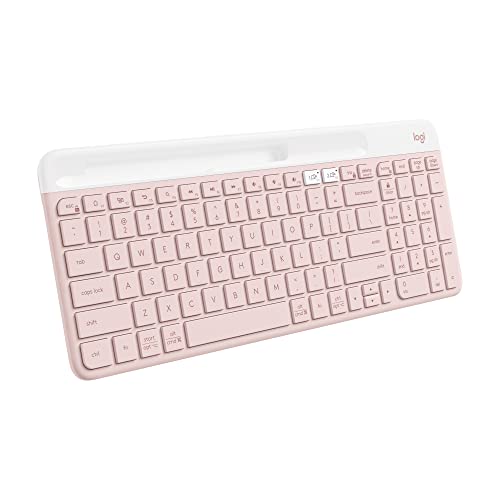
It suits anyone who likes a laptop style feel and wants to connect by receiver or Bluetooth. The honest catch: the linked listing is the Rose colour, its rating count is shared with its other colour listing, and the bullets do not give a battery life.
Best foldable for travel: iClever BK08
Best foldable for travel: the iClever BK08, because the listing gives a pocket sized tri fold design, a touchpad and a phone stand.
The listing describes a 63 key foldable keyboard with a touchpad and mouse buttons, Bluetooth 5.1 and pairing with up to 3 devices. It has a sturdy aluminium body, a built in rechargeable battery that recharges over USB C in roughly 2 hours, and a phone stand for travel. The listing includes a 1 year limited hardware warranty. It holds 4.4 stars from 4,914 ratings.
It suits a phone or tablet user who wants a keyboard that fits a bag. The honest catch: the listing says the 13 mm keycaps are smaller than laptop size, it is Bluetooth only with no USB receiver, and the keys are not backlit or spill proof.
How to choose a wireless keyboard
Choose the connection first
A USB receiver plugs into the computer and needs no pairing; the K270 works this way. Bluetooth pairs with tablets and phones, as on the OMOTON and iClever BK08. The MX Keys S and K580 listings offer both a receiver and Bluetooth, which suits anyone who changes devices. The K400 Plus plugs in its Unifying receiver the same way, per the listing description.
Full size, compact or foldable
A number pad matters if you enter figures. The K270 listing confirms one with a full size layout. The MX Keys Mini is the compact backlit choice, and the iClever BK08 is a 63 key foldable keyboard with 13 mm keycaps. Decide on the number pad before you decide on size.
Batteries or USB C charging
The K270 listing gives a 24 month battery life and the OMOTON runs on 2 AAA batteries that are not included. The MX Keys Mini and MX Keys S listings give up to 10 days a charge, or up to 5 months with backlighting off, and charge over USB C. The iClever BK08 recharges over USB C in roughly 2 hours.
Typing feel
The listings describe three feels: deep profile keys on the K270, low profile switches for laptop style typing on the K580, and spherically dished keys on the MX Keys Mini. If you type for hours, trying one in person is the real test, but the listing wording gives you a starting point.
Which devices it works with
The K270 listing names Windows and the K400 Plus lists Windows, Android and Chrome OS. The MX Keys S lists Windows, macOS, Linux and Chrome OS, the K580 lists Windows, macOS and tablet commands, and the iClever BK08 lists Apple, Samsung, Android and Windows devices. The OMOTON is written for iPads and iPhones.
Gaming, mice and sets
None of these seven is described as a gaming keyboard. If you want a different typing feel, our mechanical keyboard guide is the next stop. To buy keyboard and mouse together, see our wireless keyboard combo guide, and to choose a mouse on its own, our wireless mouse guide.
Frequently asked questions
What is the best wireless keyboard in Australia?
The Logitech K400 Plus is our best overall pick because it is the most rated wireless keyboard here, with 4.4 stars from 39,444 ratings. If you want a different job done, the Logitech K270 suits a desktop PC, the MX Keys S switches between up to 3 devices, and the iClever BK08 folds for travel.
What is the best wireless keyboard for typing?
For long typing, look at the key style. The Logitech K270 listing describes deep profile keys in a standard full size layout, while the Logitech K580 listing describes low profile key switches for laptop style typing. The MX Keys S title lists fluid, precise, quiet typing. Pick the feel you already like, not the longest spec list.
What is the best wireless keyboard for work?
For a work desk, the Logitech MX Keys S is the strongest here: the listing gives Bluetooth or a Logi Bolt receiver, up to 3 devices, backlighting and programmable keys through the free Logi Options+ app. The Logitech MX Keys Mini is the smaller backlit option, and the K270 is the plain full size option.
Which wireless keyboard has a number pad?
The Logitech K270 is the pick with a confirmed number pad: the listing describes a standard full size layout with all F keys, a number pad and arrow keys. The listings for the MX Keys Mini and the iClever BK08 describe compact designs and do not mention one.
What is the best wireless keyboard for travel?
The iClever BK08 is the travel pick: the listing describes an ultra compact tri fold design, a touchpad and a phone stand. The OMOTON slim Bluetooth keyboard is the second option, described as small enough to fit a suitcase or handbag. Both are Bluetooth, so they pair with phones and tablets.
Is a Bluetooth or USB receiver keyboard better?
It depends on the device. A USB receiver like the one on the Logitech K270 needs a free USB port but no software installation, per the listing. Bluetooth, as on the OMOTON and iClever BK08, pairs with tablets and phones. The Logitech MX Keys S and K580 listings offer both a receiver and Bluetooth.
What is the best wireless keyboard for gaming?
None of the seven picks is described as a gaming keyboard. The listings for the Logitech MX Keys S and K270 describe typing, connections and battery life, not gaming features, so we do not recommend either for it. For a gaming style keyboard, see our mechanical keyboard guide.
What is the best wireless keyboard and mouse combo?
This page compares keyboards on their own, so the combo question has its own guide: our wireless keyboard combo guide compares sets. A separate keyboard such as the Logitech K270, with its plug in receiver, or the MX Keys S, with Bluetooth or a Logi Bolt receiver, lets you pick the mouse you like.
Which wireless keyboard works with an iPad or phone?
The OMOTON slim Bluetooth keyboard is the pick for an iPad or iPhone: the listing names iPad and iPhone models, a built in sliding stand and up to 10 metres of range. The iClever BK08 lists Apple, Samsung, Android and Windows devices, and the MX Keys S lists Windows, macOS, Linux and Chrome OS.