The short version
A wireless keyboard and mouse combo is one of the cheapest, tidiest upgrades you can make to a desk. You get a matching keyboard and mouse that run off a single USB receiver, the cables disappear, and you spend less than you would buying the two separately. After weighing up the combos that are actually in stock on Amazon Australia in 2026, here is where we landed.
For most people the Logitech MK345 (about $62) is the pick - full-size with a number pad, long battery life and a track record of nearly 40,000 reviews. Share a room or live on video calls, the silent Logitech MK295 (about $47) is worth the look. On a tight budget the Rapoo X2100 (about $25) covers the basics. Want one set that jumps between a work laptop and home computer, the Bluetooth Logitech MK950 (about $119) is the splurge.
Why buy a combo instead of a separate keyboard and mouse
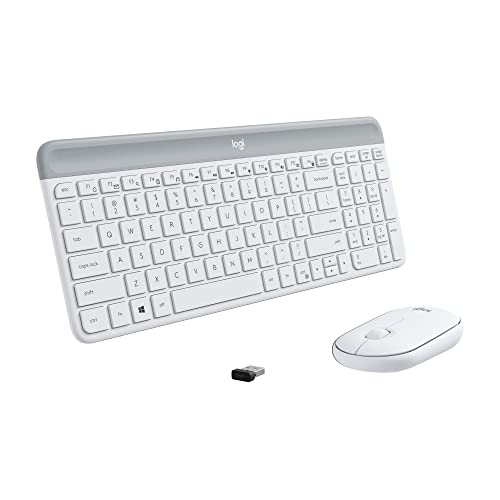
The honest answer is value and simplicity. A combo bundles a matched keyboard and mouse for less than the two cost on their own, and crucially they share one tiny USB receiver - plug a single dongle into one USB port and both devices come to life. That means one less cable, one less thing to charge or pair, and a guaranteed style match between the two.
If you have very specific needs - a gaming mouse with a high polling rate, or a mechanical keyboard - then buying separately makes sense. For everyday home and office use, a combo is simpler and cheaper, which is exactly why all six picks here are sold as sets.
Every combo on this list runs both the keyboard and the mouse from a single receiver or a single Bluetooth host, so you are never managing two connections.
2.4GHz USB dongle vs Bluetooth - which connection you want
There are two ways these combos talk to your computer, and it is worth understanding the difference before you buy.
2.4GHz USB dongle is the plug-and-go option. You put one small receiver into a USB-A port, and the keyboard and mouse just work - no pairing menus, no fuss. The downside is you give up a USB port, and you can only use the set with one computer at a time. The Rapoo X2100, MK295, MK345 and MK470 all use a 2.4GHz dongle.
Bluetooth skips the dongle entirely, which is handy if you are short on USB ports or using a tablet or thin laptop. It can also pair to more than one device. The trade-off is that pairing is slightly fiddlier and, on some machines, Bluetooth needs to be awake before the keyboard works at boot. The Logitech MK950 is Bluetooth-only and switches across three devices, while the Logitech Pebble 2 gives you both - Bluetooth or the bundled dongle - so you can choose per device.
If you mostly use one desktop, a 2.4GHz dongle is the easier life. If you bounce between a laptop and a desktop, Bluetooth multi-device pairing is the feature to chase.
Full-size with a number pad vs slim and compact
Desk space and how you work decide this one.
Full-size boards like the Logitech MK345 and Logitech MK295 keep the number pad on the right. If you do data entry, accounting or anything number-heavy, that pad saves real time. The cost is desk width and a longer reach to the mouse.
Slim and compact boards like the Logitech MK470 and the smaller Logitech Pebble 2 trade size for a tidier desk. The MK470 is low-profile but still has a number pad; the Pebble 2 drops the pad to stay genuinely compact and bag-friendly. Less keyboard means the mouse sits closer, which is easier on your shoulder over a long day.
There is no wrong answer here - pick full-size if you use the number pad, slim if you value the space and the look.
Silent keys for shared rooms and video calls
If you work in the same room as someone else, or you are on calls all day, key noise matters more than you would think. The Logitech MK295 is built for exactly this - its SilentTouch keys and mouse clicks cut around 90% of the noise compared with a standard board, without making the keys feel mushy.
The Rapoo X2100 also markets quiet keys (again about 90% less noise), so it is a budget alternative if silence is the goal. The MK950 and Pebble 2 are described as quiet too, but the MK295 is the dedicated silent pick and the cheapest way to get there at about $47.
Worth saying plainly: silent does not mean a worse typing feel. SilentTouch keys press and release like normal keys, they just do it without the clack.
Battery life - how often you will actually swap batteries
This is one of the quiet joys of a wireless combo. Because keyboards and mice draw very little power, these sets run for a long time on standard AA or AAA cells - typically one to three years on the keyboard, depending on the model and how much you use it. The Rapoo X2100 is rated for up to 12 months on the keyboard, and Logitech quotes long, multi-year figures on the MK345 and others.
In practice you will change keyboard batteries roughly once a year or less, and the mouse a little more often. None of these are rechargeable - they take replaceable batteries - which is actually a plus: you are never stuck with a dead device while it charges, you just swap a cell and keep going.
Honest note: these are membrane keyboards, not mechanical
Every combo on this list uses membrane (or scissor-switch) keys, not mechanical switches. Membrane keys are soft, quiet and cheap, which is exactly why they suit a home or office combo and why these sets are so affordable.
If you want a clicky, tactile typing feel, or you are buying for gaming where switch speed and durability matter, a membrane combo is not the right tool. For that, see our best-mechanical-keyboard-australia guide - mechanical boards cost more and are usually sold without a mouse, but they deliver the typing feel that combos cannot.
For everyday emails, browsing, spreadsheets and study, membrane keys are perfectly good and most people genuinely prefer how quiet they are.
Why this list is mostly Logitech
Five of our six picks are Logitech, and that is not laziness - it reflects the market. Logitech has genuinely owned the reliable-combo space for years, with the broadest range, the best stock on Amazon Australia, and by far the deepest review history (the MK345 alone has nearly 40,000 reviews). When a category is dominated by one brand because that brand actually makes the best, most reliable products, the honest thing is to say so.
Rapoo is the budget alternative and the reason it makes the list - the X2100 undercuts everything Logitech sells while still being full-size and quiet. Beyond those two, the combos on Amazon Australia tend to be unbranded sets with thin review histories, which is why we have not included them. We would rather point you to a proven set than pad the list.
How we chose
We started with combos that are actually in stock on Amazon Australia in 2026, then filtered for ones with enough verified reviews to trust. We weighed connection type (dongle vs Bluetooth), layout (full-size vs slim), noise, battery life and price, and we kept the picks to a tight six so the list stays useful rather than overwhelming. Prices shown are indicative and move around, so check the live price before you buy.
Where a pick has a smaller review base - the MK950 (140+) and MK470 (440+) - we have flagged it plainly rather than treating those numbers as the same as a 40,000-review product.
Frequently asked questions
Is a wireless keyboard and mouse combo cheaper than buying them separately?
Almost always, yes. A combo bundles a matched keyboard and mouse for less than the two cost on their own, and they share a single USB receiver, so you also save a USB port and a cable. The cheapest combo here, the Rapoo X2100, is about $25 for both.
Does one USB receiver really run both the keyboard and the mouse?
Yes. On the 2.4GHz combos - the Rapoo X2100, MK295, MK345 and MK470 - a single small dongle in one USB port runs both devices. The MK950 uses Bluetooth instead, so it needs no dongle at all, and the Pebble 2 can do either.
What is the difference between the 2.4GHz dongle and Bluetooth?
A 2.4GHz dongle is plug-and-go - one receiver, no pairing, but it uses a USB port and works with one computer at a time. Bluetooth needs no dongle and can pair to multiple devices, but it is slightly fiddlier to set up. The MK950 is Bluetooth and switches across three devices; the Pebble 2 offers both.
Are these keyboards quiet enough for video calls?
The Logitech MK295 (about $47) is the dedicated silent pick, cutting roughly 90% of typing and click noise, and the Rapoo X2100 (about $25) also markets quiet keys. Both are well suited to shared rooms and calls.
How long do the batteries last?
A long time. These sets run on replaceable AA or AAA cells and typically last one to three years on the keyboard - the Rapoo X2100 is rated up to 12 months, and Logitech quotes multi-year figures on models like the MK345. You will swap a battery roughly once a year, not charge a device daily.
Are these mechanical keyboards?
No. Every combo here uses membrane or scissor-switch keys - soft, quiet and affordable, which is what makes them good value. If you want a clicky, tactile or gaming-grade board, see our best-mechanical-keyboard-australia guide instead.
Which combo should I buy?
For most people the Logitech MK345 (about $62) is the best all-rounder. Buy the silent MK295 (about $47) if noise matters, the Rapoo X2100 (about $25) if budget is tight, the slim MK470 (about $64) or compact Pebble 2 (about $82) for a tidier desk, and the MK950 (about $119) if you need one set across multiple devices.
Found this helpful?
Check out more guides for new homeowners.